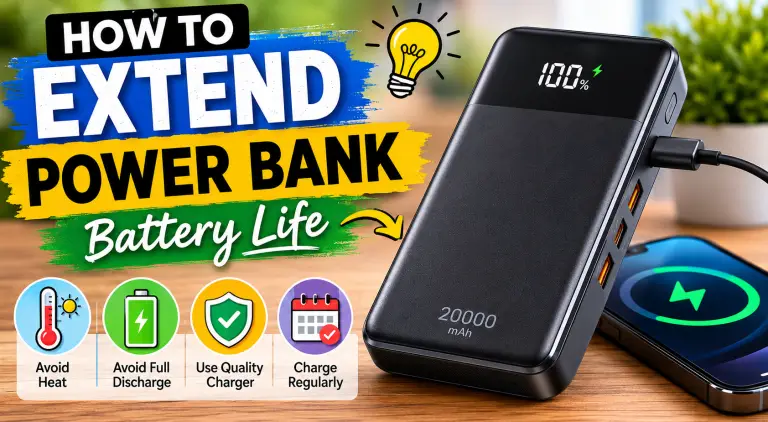
A power bank that provides fewer phone charges does not automatically need replacing. Before deciding it is worn out, check the cable, port, charging settings and connected devices. This guide helps you choose between ordinary care, troubleshooting and replacement without promising a fixed number of extra years.
Research basis: BuyZivo reviewed the official Anker and Belkin support documents linked below, plus US EPA battery-disposal guidance. This is a research-based care guide, not a physical endurance test. Instructions for your exact model take priority.
Quick answer: what should you do first?
- Working normally: use the model’s approved charging setup and storage instructions.
- Charging slowly or delivering fewer charges: investigate compatibility and connected loads before buying a replacement.
- Swollen or physically damaged: stop using it and contact the manufacturer for handling advice.
Charging and storage: follow the right instructions
Anker’s Power Bank Safety Guide advises a dry, ventilated charging location, avoiding hot cars, direct sunlight and soft charging surfaces. It recommends disconnecting after charging and before sleep, rather than making overnight charging a routine.
For long storage, that guide specifies approximately 60% charge and recharging every three months. Those are Anker’s recommendations, not universal targets for every battery pack. It also advises against deliberately running the battery empty before recharging, and against covering, crushing or disassembling the unit.
By comparison, Belkin’s BOOST CHARGE 5K/10K FAQ recommends a 50–75% storage level for the models discussed. It describes overcharge protection and an automatic sleep function. Protection features do not make a damaged unit safe, and a storage recommendation is not a requirement to stop every everyday recharge at the same percentage.
Build a care note for your own model
Find the model number on the casing and save its manual. Record the permitted charger, input port, storage charge level, maintenance interval and support contact. Set a reminder using that interval if you keep the pack in a drawer between trips. This is more useful than trying to apply one internet checklist to every power bank you own.
Is fast charging automatically bad?
Do not treat a supported charging feature as a reason to replace your charger. Belkin’s cited FAQ says its listed packs support fast charging, with speed depending on the device. Anker’s safety guide stresses compatible charger specifications. Our practical recommendation is to check the pack’s input requirements and use the supported setup; this article does not establish that switching every power bank to a slow adapter extends its life.
Separate two questions when reading specifications: how quickly the power bank recharges, and how quickly it charges your phone. A large output rating is not necessarily the input rating. If the product page is unclear, ask support about the exact model rather than assuming a higher-wattage adapter guarantees faster recharging.
Pass-through charging needs explicit model support
Pass-through means recharging the power bank while it powers another device. Anker’s 313 FAQ says that model does not support it. Belkin’s cited 5K/10K models also do not support it. These examples cannot establish the rule for every newer model.
Look for an explicit statement in your manual. If none is available, recharge the pack and charge your phone separately. When buying a replacement, confirm this feature before paying for it; the presence of multiple ports alone is not evidence of support.
Fewer phone charges: a useful troubleshooting sequence
Anker’s 737 troubleshooting FAQ discusses several causes of apparent drain: a phone left attached after charging, some Lightning cables consuming power without a phone, and a display left running. It also suggests checking another cable and device. These are model-specific examples, not a claim that every pack behaves identically.
For an undamaged pack, make a short comparison note:
- Record the phone, starting charge level, cable, port and other connected devices.
- Repeat with the same setup to see whether the difference is consistent.
- Try a known-compatible cable and the port recommended in the manual.
- Check the model’s display, standby and low-current settings.
- If the problem remains, send those observations to support.
A phone used for navigation during one recharge and left idle during another gives an unfair comparison. This simple log will not measure certified battery health, but it gives support a clearer description than “my 20,000mAh pack feels weak.” Do not perform repeated full-discharge experiments just to create a number.
Keep, troubleshoot or replace?
| Situation | Next decision |
|---|---|
| It still meets your backup needs | Keep it; follow the model’s care instructions. |
| One cable or port gives inconsistent results | Check the supported setup and contact support if needed. |
| It cannot cover your usual trip after checks | Consider replacement based on your actual use, not a generic age limit. |
| The case is swollen or damaged | Stop using it; obtain handling and disposal instructions. |
Damage and disposal
The US EPA identifies swelling as battery damage and a potential fire hazard. Do not try to restore a swollen pack by opening it, pressing the casing flat or testing another recharge.
EPA disposal guidance says lithium-ion batteries and devices containing them belong outside household rubbish and ordinary municipal recycling bins. Contact the manufacturer or local battery-waste service; explain any damage before arranging a drop-off. Disposal services differ by location.
Frequently asked questions
How many years or cycles will my power bank last?
This guide cannot give one lifespan for all models. If a manufacturer publishes a cycle rating, read its capacity-retention threshold and test conditions. Otherwise, decide using condition, reliability and whether the pack still meets your needs.
Must I keep it between 20% and 80%?
We have not established that as a universal power-bank rule. Use the specific everyday charging and long-term storage guidance supplied for your model.
Does slow charging prove the battery is worn out?
No single symptom establishes that diagnosis. Check compatibility and settings, then involve support if the issue persists. Physical damage requires stopping use rather than troubleshooting through more charging.
BuyZivo recommendation
Keep a reliable pack that still suits your routine. Troubleshoot an undamaged unit before spending money, and replace one that no longer meets your needs after those checks. For choosing the next model, use our power-bank buying guide. Care helps you use the product responsibly; it cannot guarantee a particular lifespan.