Research basis: This explanation uses the USB-IF program pages, Texas Instruments negotiation report and manufacturer charging guidance linked below. It is a research guide, not a charger performance test; confirm requirements for your exact device.
Introduction
Buying a new charger used to be simple. Today you’ll see terms like USB-C, USB PD, PPS, 65W, and 140W, making it difficult to know what actually matters.
If you’ve searched for USB Power Delivery explained, you’re probably wondering whether USB PD is just another marketing term or a genuine charging standard worth paying attention to.
USB Power Delivery (USB PD) is a charging specification maintained by USB-IF. Compatible equipment negotiates a power contract; this does not mean all power is withheld until negotiation finishes. USB-IF explains that PD Revision 3.1 introduced support for up to 240W. That is a system capability requiring suitable equipment, not the output of every PD charger.
Whether you’re charging a smartphone, tablet, laptop, handheld gaming console, or power bank, understanding USB PD helps you choose accessories that are safer, more compatible, and less likely to become obsolete.
Quick Answer
USB Power Delivery lets compatible chargers and devices agree on a supported voltage and current. Basic USB-C power can be available at 5V before a higher-voltage PD contract is established. Charging speed depends on the device, charger profiles and cable. EPR-capable systems can support up to 240W; a PD label alone does not promise that output.
Key Takeaways
- USB Power Delivery is an official charging standard developed by USB-IF.
- USB PD primarily works over USB-C connections.
- Devices and chargers negotiate a PD contract before switching to an agreed higher voltage; basic 5V power can already be present.
- PD Revision 3.1 introduced EPR support up to 240W; every component must support the required power.
- USB PD is widely supported by Apple, Google, Samsung, Dell, Lenovo, and many other manufacturers.
- A higher wattage charger will not automatically damage a compatible device because power is negotiated between the charger and the device.
- Cable quality also matters. Not every USB-C cable supports the same charging capabilities.
What Is USB Power Delivery?
USB Power Delivery, commonly called USB PD, is an official charging specification maintained by the USB Implementers Forum (USB-IF).
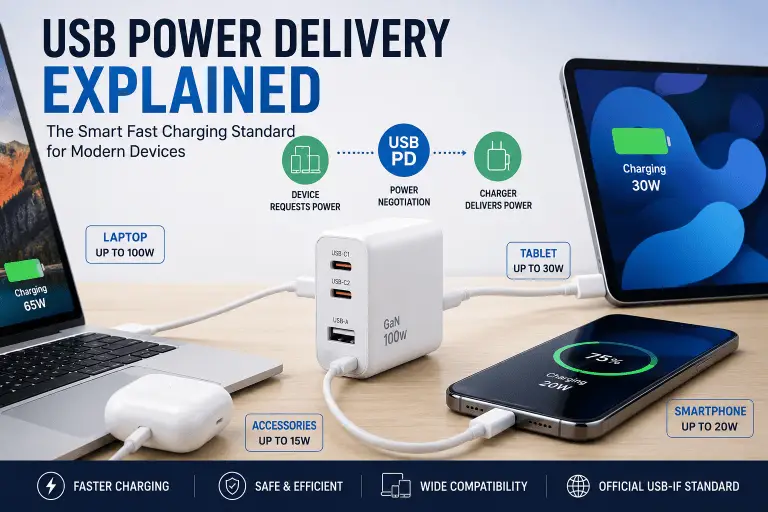
USB PD allows connected equipment to negotiate voltage and current rather than treating the adapter’s maximum wattage as the power every device receives. The device selects from the capabilities the charger offers.
Think of it as a conversation.
Instead of a charger saying:
“Here’s 10 watts. Take it.”
USB PD works more like this:
Device: “I can safely accept 20 watts.”
Charger: “I can provide that.”
Device: “Great, let’s charge at 20 watts.”
Negotiation happens automatically. The conversation above is a simplified explanation, not a timing guarantee or a literal sequence of protocol messages.
The result is:
- faster charging
- improved compatibility
- reduced risk of supplying inappropriate power
- support for many different device types using one charging standard
Why Was USB Power Delivery Developed?
Earlier USB standards were designed mainly for transferring data.
Charging was almost an afterthought.
For example:
| USB Standard | Typical Maximum Power* |
|---|---|
| USB 2.0 | 2.5W |
| USB 3.x Standard Port | 4.5W |
| USB Battery Charging 1.2 | Up to 7.5W |
*Actual charging behavior depends on the device and implementation.
As smartphones became larger and laptops began adopting USB-C, these older limits became impractical.
USB-IF introduced USB Power Delivery to solve several problems:
- Higher charging power
- One charger for many device types
- Better efficiency
- Safer power management
- Standardized communication between chargers and devices
Today, many modern smartphones, tablets, monitors, docking stations, and laptops rely on USB PD for wired charging.
How USB Power Delivery Works
The biggest difference between USB PD and older charging methods is communication.
A USB PD charger doesn’t simply send maximum power immediately.
Instead, several steps occur behind the scenes.
| Stage | What happens |
|---|---|
| USB-C attachment | Basic 5V power can be available. |
| Source capabilities | The charger advertises supported voltage/current options. |
| Device request | The device requests a supported option. |
| Accept and power ready | The charger accepts a valid request, adjusts its supply and signals readiness. |
Step 1: Connect at Basic USB-C Power
After attachment is detected, basic USB-C power can be available at 5V. A compatible device does not receive the charger’s highest voltage merely because the cable is connected.
Step 2: The Charger Advertises Its Capabilities
The source (charger) sends its supported power options. For a fixed profile, voltage and available current matter together: for example, 20V at 3A represents a 60W option. The headline wattage alone does not list every available profile.
Step 3: The Device Requests a Supported Option
The sink (device) requests an option from the source’s advertised capabilities. The source accepts a valid request, changes its supply as needed and signals when the agreed power is ready. Texas Instruments’ USB PD Power Negotiations report documents this source-capabilities → request → accept → power-ready sequence. Its older examples concern SPR negotiation; use USB-IF’s overview for EPR power limits.
Step 4: Power Use Can Change
A device can renegotiate as its needs change. Actual battery charging also depends on temperature, battery level and the device’s charging controls. The agreed adapter output is not a promise that the battery receives maximum power throughout charging.
Understanding USB Power Delivery Versions
USB Power Delivery has evolved over time.
Not every USB PD charger supports the latest features, which is why understanding the major revisions can help when comparing products.
USB PD 2.0
USB PD 2.0 introduced the modern negotiation system used by many early USB-C devices.
It supported multiple fixed voltage levels and enabled significantly faster charging than previous USB standards.
Many older USB-C laptops and smartphones still support PD 2.0.
USB PD 3.0
USB PD 3.0 refined communication between devices and added new capabilities, including support for Programmable Power Supply (PPS) in later updates.
PPS allows compatible chargers to adjust voltage in small increments instead of relying only on fixed voltage levels. This can improve charging efficiency on supported devices. Samsung, for example, uses USB PD PPS for certain Super Fast Charging modes on compatible Galaxy devices.
USB PD 3.1
Announced by USB-IF in 2021, USB PD 3.1 introduced Extended Power Range (EPR).
The USB-IF PD overview lists 28V, 36V and 48V fixed EPR voltages for maximum levels of 140W, 180W and 240W respectively. The charger, cable and receiving device must support the required EPR operation.
The higher limit makes USB PD suitable for more demanding devices, including high performance laptops, large monitors, and professional equipment.
USB PD Power Profiles Explained
One of the biggest strengths of USB Power Delivery is that it isn’t limited to a single charging speed.
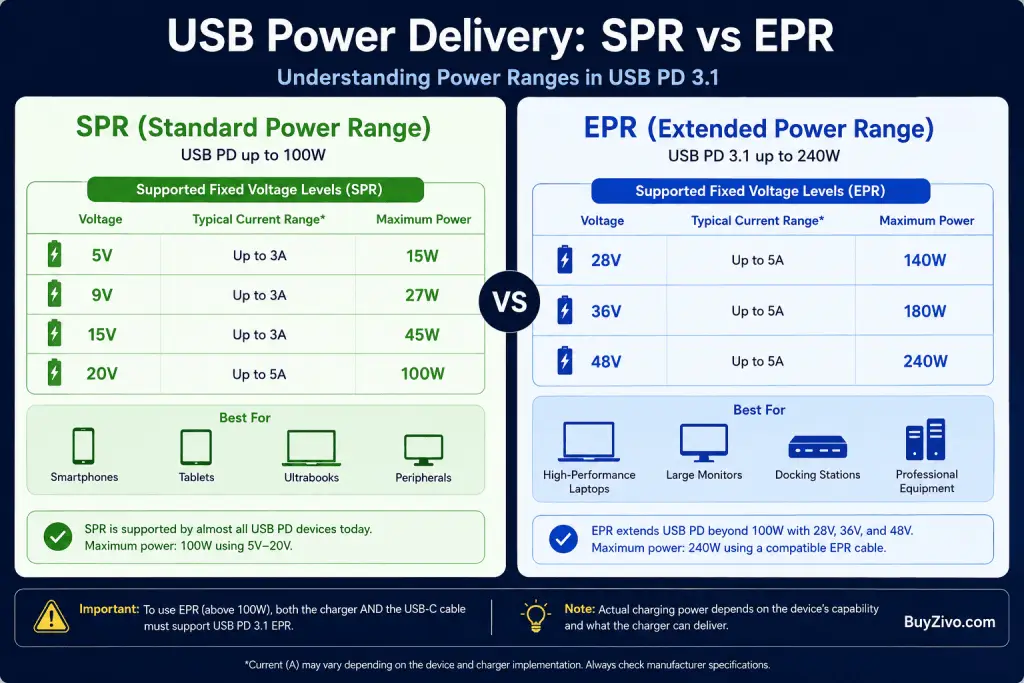
USB PD represents supported voltage and current combinations as power options. A device requests an option that the source advertises. Reading the output profile list helps you check whether a charger meets the device’s requirements.
Standard Power Range (SPR)
Standard Power Range (SPR) covers USB PD power up to 100W. Check the exact charger’s output profiles instead of assuming every SPR charger reaches that limit.
SPR supports power delivery up to 100W using the following fixed voltage levels:
| Voltage | Typical Uses |
|---|---|
| 5V | Small accessories, earbuds, older smartphones |
| 9V | Most smartphones |
| 15V | Tablets and lightweight laptops |
| 20V | Many USB-C laptops and portable monitors |
The actual current depends on what both the charger and device support.
Extended Power Range (EPR)
USB PD 3.1 introduced Extended Power Range (EPR).
EPR expands USB PD beyond 100W and supports:
| Voltage | Maximum Power* |
|---|---|
| 28V | Up to 140W |
| 36V | Up to 180W |
| 48V | Up to 240W |
*Actual delivered power depends on the charger, cable, and receiving device.
EPR requires compatible USB-C cables designed for higher power. A standard USB-C cable that isn’t rated for EPR may limit charging performance.
What Is PPS?
If you’ve looked at charger specifications, you’ve probably seen PPS listed alongside USB PD.
PPS stands for Programmable Power Supply.
Instead of switching only between fixed voltage levels like 5V or 9V, PPS allows the charger to adjust voltage in much smaller increments.
Think of it like using a dimmer switch instead of a simple on/off light switch.
Why PPS Matters
Samsung’s charging guidance says to check USB PD PPS support for Super Fast Charging, not just the charger’s maximum wattage. It also explains that cable requirements and available charging modes vary by Galaxy model and adapter.
Not every PD charger supports PPS. Match the listed PPS voltage/current range to the phone’s requirements. PPS support alone does not establish a measured temperature reduction, charging-time improvement or battery-life benefit for every device.
USB Power Delivery vs Standard USB Charging
Many people assume every USB charger works the same way.
They don’t.
| Feature | USB Power Delivery | Standard USB Charging |
|---|---|---|
| Official USB-IF standard | Yes | Depends on USB version |
| Dynamic power negotiation | Yes | No |
| Fast charging | Yes | Limited |
| Laptop charging | Yes | Usually No |
| USB-C support | Primary connector | USB-A or USB-C |
| Maximum supported power | Up to 240W (USB PD 3.1 EPR) | Much lower, depending on the USB specification |
For most modern devices, USB PD offers greater flexibility and better long-term compatibility.
USB Power Delivery vs Qualcomm Quick Charge
This is one of the most common questions readers ask.
Although both technologies enable faster charging, they are not the same.
| Feature | USB Power Delivery | Qualcomm Quick Charge |
|---|---|---|
| Developed by | USB Implementers Forum | Qualcomm |
| Open standard | Yes | Proprietary technology |
| Connector | Primarily USB-C | USB-A and USB-C (varies by version) |
| Laptop support | Common | Rare |
| Broad manufacturer adoption | Yes | Mostly devices using supported Qualcomm chipsets |
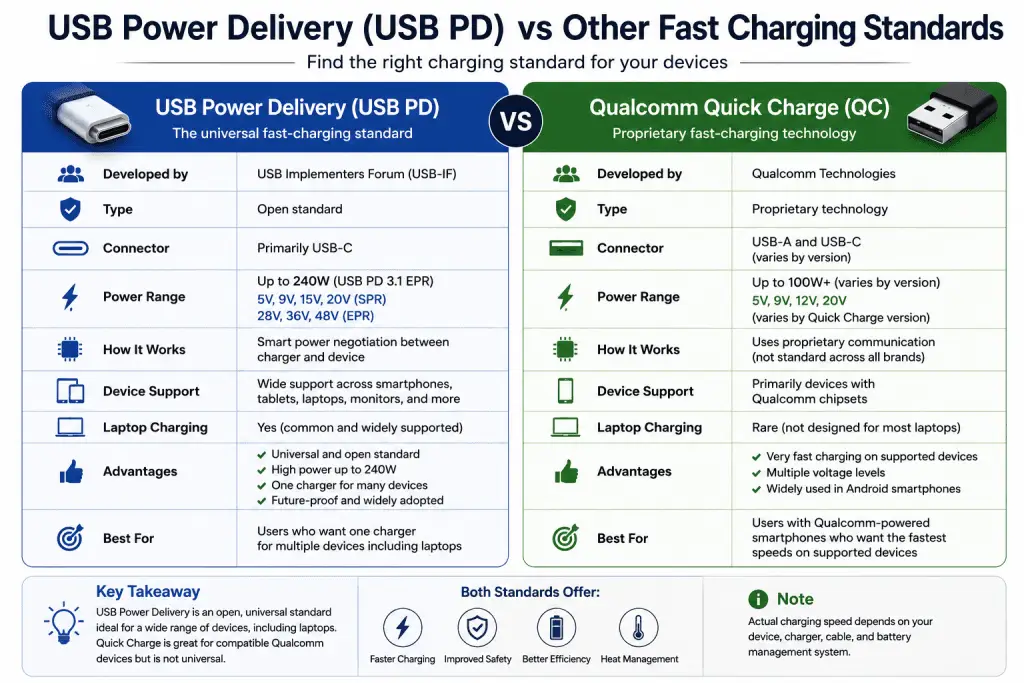
Qualcomm states that Quick Charge 4, 4+ and 5 support USB-PD devices. This is version-specific interoperability guidance. Check the exact phone and adapter rather than assuming every Quick Charge generation offers the same PD features.
Which Devices Support USB Power Delivery?
USB PD has become one of the most widely adopted charging standards.
Support continues to expand across many categories.
Smartphones
Many recent smartphones support USB PD, including models from:
- Apple
- Samsung
- Nothing
- Motorola
- Sony
Charging speeds vary by model. For examples, Apple’s iPhone fast-charging guide describes compatible USB-PD adapters and cable requirements, while Google’s Pixel charging guidance distinguishes compatible PPS and other PD adapters. These examples do not verify every model in the brand list.
Tablets
Many USB-C tablets support USB PD, including:
- Apple iPad models with USB-C
- Samsung Galaxy Tab series
- Google Pixel Tablet
USB PD allows these larger batteries to recharge much faster than older USB charging methods.
Laptops
USB PD has become increasingly common on laptops.
Examples include many models from:
- Apple MacBook
- Dell XPS
- Lenovo ThinkPad
- ASUS Zenbook
- HP Spectre
Some larger gaming laptops still require proprietary power adapters because their power requirements exceed what the laptop’s USB-C implementation supports.
Power Banks
Many modern power banks support USB PD for both:
- charging the power bank itself
- charging external devices
A USB PD power bank can often recharge much faster than older models when paired with a compatible charger.
Accessories
USB PD is also used in:
- portable monitors
- USB-C docking stations
- handheld gaming devices
- cameras
- some wireless charging stands with USB-C input
Can You Use a Higher Wattage USB PD Charger?
Yes.
This is one of the safest aspects of USB Power Delivery.
For example:
- 100W charger → 20W phone
- 140W charger → 45W laptop
- 65W charger → wireless earbuds
The device only draws the power it requests through USB PD negotiation.
A higher maximum wattage does not force extra power into a compatible device.
Check the receiving device as well as the charger and cable. Supported profiles, connector condition and applicable safety requirements still matter; power negotiation does not make a damaged or defective adapter safe.
Advantages of USB Power Delivery
USB PD has become popular because it solves several problems with older charging systems.
One Charger for Multiple Devices
Instead of carrying separate chargers for a phone, tablet, laptop, and accessories, many users can rely on a single USB PD charger with enough power and the right ports. Before buying a multiport model, check its simultaneous output: our USB-C charger power-sharing guide explains how to match a laptop and phone to the correct port combination.
Faster Charging
Compatible devices can charge much faster than with basic USB charging, although the exact speed depends on the device, charger, cable, and battery management system.
Better Compatibility
USB PD is an open standard maintained by USB-IF.
This encourages broad compatibility across manufacturers instead of locking users into one ecosystem.
Intelligent Power Management
Power is negotiated rather than forced.
This helps deliver only the amount of power a compatible device requests.
Future-Proofing
USB PD continues to evolve.
Choosing a quality USB PD charger today is more likely to keep it useful as future USB-C devices adopt newer charging capabilities.
Limitations of USB Power Delivery
Despite its advantages, USB PD isn’t perfect.
Not Every USB-C Device Supports USB PD
A USB-C connector does not automatically mean the device supports USB Power Delivery.
Some products use USB-C only for convenience while charging at standard USB power levels.
Charging Speed Depends on the Device
Buying a 140W charger won’t make a phone designed for 30W charge any faster.
The device itself determines the maximum supported charging speed.
Cable Quality Matters
Some inexpensive USB-C cables only support lower charging currents.
For higher power levels, especially above 100W, you need an appropriate cable that supports the required USB PD specification.
Marketing Can Be Misleading
Some chargers advertise:
- “Fast Charge”
- “Super Charge”
- “Turbo Charge”
These terms are often manufacturer branding rather than official standards.
Whenever possible, look for clear USB PD support in the product specifications rather than relying on marketing language alone.
Safety Considerations
USB Power Delivery includes several built-in safety features, but safe charging also depends on the quality of the charger, cable, and connected device.
When shopping for a USB PD charger:
- Buy from reputable brands with published specifications.
- Look for products that indicate USB PD support and, where applicable, USB-IF certification.
- Avoid counterfeit or unusually cheap chargers with unrealistic wattage claims.
- Use cables rated for the power level you need, especially for charging above 100W.
- Replace damaged cables immediately if you notice fraying, loose connectors, or overheating.
Protocol support and certification are different claims. USB-IF’s Compliance Program evaluates applicable USB requirements; it does not certify every aspect of an adapter’s mains electrical safety. The European Commission’s CE-marking guidance explains the manufacturer’s conformity declaration. CE marking itself does not mean the EU approved the product as safe.
Common Misconceptions About USB Power Delivery
“USB-C always means USB PD.”
False.
USB-C is a connector type.
USB Power Delivery is a charging protocol.
A device can have a USB-C port without supporting USB PD.
“A bigger charger damages smaller devices.”
False for compatible USB PD devices.
The charger only provides the power requested during USB PD negotiation.
“Every USB-C cable supports 240W.”
False.
Only compatible EPR-rated USB-C cables support charging up to 240W under USB PD 3.1.
“USB PD is only for smartphones.”
False.
USB PD supports several device categories, including phones, laptops and powered peripherals. USB-IF’s examples include a powered monitor charging a laptop. Support remains a model-level specification, not a guarantee attached to the device category.
Buying Advice: How to Choose the Right USB PD Charger
Not all USB PD chargers are equal. Before buying one, focus on the specifications that actually affect compatibility, safety, and long-term usability.
1. Buy Enough Power for Your Devices
Choose a charger that meets the needs of your most power-hungry device.
| Device Type | Typical USB PD Requirement* |
|---|---|
| Wireless earbuds | 5W–10W |
| Smartphones | 20W–45W (varies by manufacturer) |
| Tablets | 20W–45W |
| Ultrabooks | 45W–65W |
| Larger laptops | 65W–140W (depending on the model) |
*Always check your device manufacturer’s recommended charging specifications.
Buying a higher wattage USB PD charger is generally fine because compatible devices only draw the power they require.
2. Check USB PD Support
Some products advertise “Fast Charging” without stating which charging protocol they support.
Look for clear wording such as:
- USB Power Delivery
- USB PD
- USB PD 3.0
- USB PD 3.1
If USB PD isn’t mentioned anywhere in the specifications, don’t assume it’s supported.
3. Make Sure the Cable Matches
The charger is only one part of the charging system.
Your USB-C cable should support:
- the required charging wattage
- the correct USB PD specification
- reliable construction from a reputable manufacturer
For charging above 100W, use an EPR-rated cable and compatible equipment. USB-IF’s cable certification guidance requires certified USB-C-to-USB-C cables to carry 60W or 240W power-capability markings. A cable’s power rating does not establish its data speed or increase the charger’s output.
4. Consider Multiple Ports
If you regularly charge several devices, a multi-port USB PD charger can reduce clutter and eliminate the need to carry multiple adapters.
Keep in mind that some chargers redistribute power when multiple ports are used simultaneously. Check the manufacturer’s power allocation chart if you plan to charge a laptop and phone at the same time.
5. Buy From Reputable Brands
Well-known manufacturers typically provide clearer technical documentation, firmware support where applicable, and more transparent safety information.
USB-IF-certified products are listed in its Integrators List. Using certified USB logos also requires the applicable trademark licence. Verify the exact model rather than treating a printed USB logo as proof.
What Matters Most
When comparing USB PD chargers, prioritize:
- USB PD support
- Appropriate wattage
- High-quality USB-C cable
- Reliable manufacturer
- Clear technical specifications
- Safety features such as over-current, over-voltage, and temperature protection (when documented by the manufacturer)
What Doesn’t Matter Much
Some specifications sound impressive but have little practical impact for most buyers.
These include:
- flashy marketing names
- exaggerated charging claims
- oversized wattage you’ll never use
- decorative LED lighting
- premium finishes that don’t affect charging performance
Focus on compatibility and safety rather than marketing.
Decision Framework
Here’s a simple guide to help you choose.
| If You… | Consider… |
|---|---|
| Charge only a smartphone | A 20W–30W USB PD charger (or your device manufacturer’s recommended wattage) |
| Charge a phone and tablet | A 45W USB PD charger |
| Travel with multiple devices | A multi-port USB PD charger with sufficient total output |
| Charge a USB-C laptop | A 65W or higher USB PD charger if recommended by your laptop manufacturer |
| Want long-term flexibility | A reputable USB PD charger with enough capacity for future devices |
Common Mistakes to Avoid
Many charging problems come from misunderstandings rather than faulty products.
Avoid these common mistakes:
Assuming Every USB-C Charger Supports USB PD
USB-C is only the connector type. Always verify that the charger explicitly supports USB Power Delivery.
Ignoring Cable Specifications
A high-quality charger cannot overcome the limitations of an unsuitable cable.
If charging speeds seem slower than expected, the cable may be the cause.
Buying Based Only on Wattage
Higher wattage isn’t always better.
A 140W charger offers little advantage if your phone only supports 27W charging.
Believing Marketing Terms
Names like:
- Super Charge
- Turbo Charge
- Hyper Charge
are often manufacturer branding rather than universal standards.
Always check the supported charging protocols.
Purchasing Unknown Chargers
Extremely inexpensive chargers with unrealistic specifications may not meet the safety or performance claims printed on the packaging.
Whenever possible, choose products from manufacturers that publish complete specifications and safety information.
Final Recommendation
USB Power Delivery has become the leading wired charging standard for modern USB-C devices, and for good reason.
Use USB PD to match supported profiles across the charger, cable and device. Basic 5V attachment and a negotiated higher-voltage PD contract are different stages; choosing a compatible system matters more than the largest wattage printed on the box.
If you’re buying a new charger today, USB PD is generally the most versatile choice because it is widely supported across major brands. However, don’t focus only on wattage. Make sure your charger, cable, and device all support the features you need.
For most users, a quality USB PD charger from a reputable manufacturer is a smart long-term investment that can simplify charging across multiple devices.
Frequently Asked Questions
Is USB Power Delivery better than normal USB charging?
For most modern USB-C devices, yes. USB PD allows compatible chargers and devices to negotiate power, often enabling faster and more efficient charging than standard USB charging.
Does USB PD work only with USB-C?
USB Power Delivery is designed primarily for USB-C. While earlier USB PD implementations existed in limited scenarios, nearly all current USB PD products use USB-C connectors.
Can I charge my phone with a 100W USB PD charger?
Yes, if both the charger and your phone support USB Power Delivery. The phone will only draw the amount of power it is designed to accept.
Is every USB-C charger a USB PD charger?
No. Some USB-C chargers provide only basic USB charging. Check the product specifications for explicit USB PD support.
Do I need a special USB-C cable for USB PD?
Many USB-C cables support USB PD, but not all support the same power levels. For charging above 100W, you’ll need an EPR-compatible cable designed for USB PD 3.1.
Is USB PD safe for battery health?
USB PD itself is designed with power negotiation and safety mechanisms. Long-term battery health also depends on the device’s battery management system, charging temperature, and overall usage patterns.
Conclusion
Understanding USB Power Delivery explained doesn’t require an engineering background. Once you know that USB PD is an official USB-IF standard based on intelligent power negotiation, it becomes much easier to choose compatible chargers and cables.
Instead of chasing the highest advertised wattage, focus on three essentials: compatibility, quality, and verified specifications. A charger that matches your device’s requirements and uses USB Power Delivery can provide a safer, more flexible charging experience for years to come.
If you’re planning to upgrade your charging setup, compare your devices’ power requirements first, then choose a reputable USB PD charger and an appropriate USB-C cable.