Introduction
A good USB-C cable should match the charging requirements of your exact device and charger. Check the required power and current rating before choosing: some laptops need more than 60W, while compatible Samsung Galaxy 45W charging setups require a 5A cable. A higher wattage rating alone does not guarantee faster charging, high-speed data or video support.
This is a documentation-based product shortlist, not a hands-on performance test. To identify the capabilities you need before comparing these models, read our USB-C cable specifications guide covering charging watts, data speed and video.
Our top overall recommendation is the Anker Prime USB-C to USB-C Cable (240W). It provides enough charging capacity for nearly any USB-C device, uses a braided construction, and is USB-IF certified. However, it is primarily a charging cable: its USB 2.0 data speed and lack of video output make it unsuitable for high-speed storage or monitor connections.
If you need charging, fast data transfer, and video support from one cable, choose a properly certified USB4 or Thunderbolt cable instead.
The Best USB-C Cables at a Glance
| USB-C cable | Best for | Maximum charging | Data speed | Video output |
|---|---|---|---|---|
| Anker Prime USB-C to USB-C Cable | Best overall for charging | 240W | 480Mbps | No |
| Belkin BoostCharge Braided USB-C Cable | Best alternative for everyday charging | 240W | 480Mbps | No |
| Samsung 5A USB-C to USB-C Cable | Best for Samsung Galaxy devices | 100W | 480Mbps | Not specified |
| Cable Matters USB4 Cable | Best for charging, data, and video | 240W | Up to 40Gbps | Yes |
| Apple Thunderbolt 5 Pro Cable | Best premium cable for advanced setups | 240W | Up to 120Gbps* | Yes |
*Apple specifies up to 120Gbps in supported Thunderbolt 5 configurations using Bandwidth Boost. Actual performance depends on the connected hardware and workload.
1. Anker Prime USB-C to USB-C Cable (240W): Best Overall
The Anker Prime USB-C to USB-C Cable (240W, Upcycled-Braided) is the strongest all-around recommendation for buyers primarily interested in charging. Its 240W rating gives it enough headroom for phones, tablets, power banks, MacBooks, and many high-powered USB-C laptops.
Anker identifies this as a USB Power Delivery 3.1 cable supporting up to 48V/5A. It is also USB-IF certified and available in multiple lengths. The braided exterior should suit buyers who regularly carry their cable between home, work, and travel.
The main limitation is easy to miss: this is a USB 2.0 cable with data transfer limited to 480Mbps. Anker also states that it does not support screen mirroring. That is perfectly acceptable for charging and occasional file transfers, but it is not the right cable for an external SSD, USB-C monitor, or high-performance dock.
Why we recommend it
- Supports charging up to 240W
- USB-IF certified
- Braided construction
- Suitable for phones, tablets, and USB-C laptops
- Available in multiple lengths
- Provides substantial charging headroom for future devices
Limitations
- USB 2.0 data transfer is limited to 480Mbps
- Does not support video output
- A 240W rating does not make a low-power phone charge at 240W
Best for: Buyers who want one durable cable for charging almost every USB-C device.

2. Belkin BoostCharge Braided USB-C to USB-C Cable (240W): Best Everyday Alternative
The Belkin BoostCharge Braided USB-C to USB-C Cable (240W) is another sensible option for everyday charging. Belkin specifies support for USB Power Delivery 3.1 Extended Power Range up to 240W. It is backward-compatible with lower charging levels, so it can also be used with phones, tablets, and less demanding laptops.
Its braided exterior and multiple length options make it practical for a bedside table, office desk, or travel charger. A longer cable provides more flexibility, although an unnecessarily long cable is usually less convenient to pack and may create additional clutter.
Like the Anker cable, this model uses USB 2.0 for data transfer, with a maximum stated speed of 480Mbps. It is therefore better treated as a charging cable that can handle basic syncing—not as a cable for displays or high-speed external drives.
Why we recommend it
- Supports up to 240W Power Delivery
- Compatible with lower-powered USB-C devices
- Braided construction
- Offered in different lengths
- Appropriate for high-powered chargers and laptops
Limitations
- Limited to USB 2.0 data speeds
- Does not provide the capabilities of USB4 or Thunderbolt
- The exact Belkin model and length should be checked before ordering
Best for: Buyers who want a straightforward, high-capacity charging cable from an established accessory brand.

3. Samsung 5A USB-C to USB-C Cable: Best for Samsung Galaxy Devices
Owners of compatible Samsung Galaxy phones and tablets should pay particular attention to cable current.
Samsung states that its 5A USB-C to USB-C Cable (EP-DX510) supports power delivery up to 100W, USB 2.0 data transfer up to 480Mbps, and up to 45W Super Fast Charging 2.0 with compatible Samsung equipment. The 1.8-meter length also makes it convenient for use away from the wall socket.
This recommendation is less about buying the cable with the largest wattage number and more about ensuring the correct charging combination. Samsung explains that compatible 45W charging requires an appropriate 45W USB PD charger and a 5A e-marked cable. A cable alone cannot add 45W support to a phone or charger that does not provide it.
Why we recommend it
- Official Samsung accessory
- 5A cable suitable for compatible 45W Samsung charging
- Supports power delivery up to 100W
- Practical 1.8-meter length
- Appropriate for Samsung Super Fast Charging 2.0 setups
Limitations
- USB 2.0 data speed is limited to 480Mbps
- Not every Galaxy phone supports 45W charging
- Fastest charging requires a compatible USB PD PPS charger
- Offers less maximum charging headroom than newer 240W cables
Best for: Compatible Samsung Galaxy users who want the correct 5A cable for Super Fast Charging 2.0.

4. Cable Matters USB4 40Gbps Cable: Best for Charging, Data, and Video
A charging-focused USB-C cable is not automatically suitable for a monitor, dock, or external SSD. For those jobs, the Cable Matters USB4 40Gbps Cable with Power Delivery is a more complete option.
Cable Matters specifies up to 40Gbps bandwidth, video support, and charging up to 240W for the current compatible version. This combination makes it useful for connecting a laptop to a USB-C display, docking station, or high-speed storage device while retaining substantial charging capability.
The trade-off is cost and cable choice. High-speed cables are generally more expensive than basic charging cables, and specifications can vary by length and model revision. Before ordering, confirm that the exact listing states the required data speed, charging capacity, video support, and certification.
Why we recommend it
- Supports up to 40Gbps data transfer
- Supports USB-C video connections
- Provides up to 240W charging on the applicable model
- Better suited to docks, monitors, and external SSDs
- More versatile than a USB 2.0 charging cable
Limitations
- More expensive than a basic charging cable
- Real-world speed depends on both connected devices
- Some display resolutions and refresh rates depend on host and monitor support
- Exact specifications may differ between similar Cable Matters listings
Best for: Laptop users who need one cable for high-speed data, display connectivity, and charging.

5. Apple Thunderbolt 5 Pro Cable: Best Premium Option
The Apple Thunderbolt 5 (USB-C) Pro Cable is designed for demanding Mac, display, dock, and professional storage setups. Apple specifies support for Thunderbolt 5 transfers up to 120Gbps with Bandwidth Boost, USB4 transfer up to 80Gbps, DisplayPort 2.1 video output, and charging up to 240W.
It is backward-compatible with Thunderbolt 3, Thunderbolt 4, and USB-C devices, making it exceptionally capable. However, most people buying a cable only to charge a phone or laptop will not benefit from its advanced bandwidth or video features.
This is a specialized cable. Its price is easier to justify when connecting expensive Thunderbolt equipment—not when charging an iPhone beside the bed.
Why we recommend it
- Supports Thunderbolt 5
- Up to 240W charging
- Advanced data and video capabilities
- Backward-compatible with several Thunderbolt and USB standards
- Braided, tangle-resistant construction
Limitations
- Excessive for ordinary phone charging
- Premium pricing
- Maximum performance requires Thunderbolt 5-compatible hardware
- Buyers must choose the appropriate available length
Best for: Professionals using Thunderbolt displays, docks, high-speed storage, or compatible Macs.

What Should Buyers Know About the Best USB-C Cables?
The best USB-C cable is not simply the one with the highest wattage. It must match the required charging power, data speed, video capability, connector type, and length.
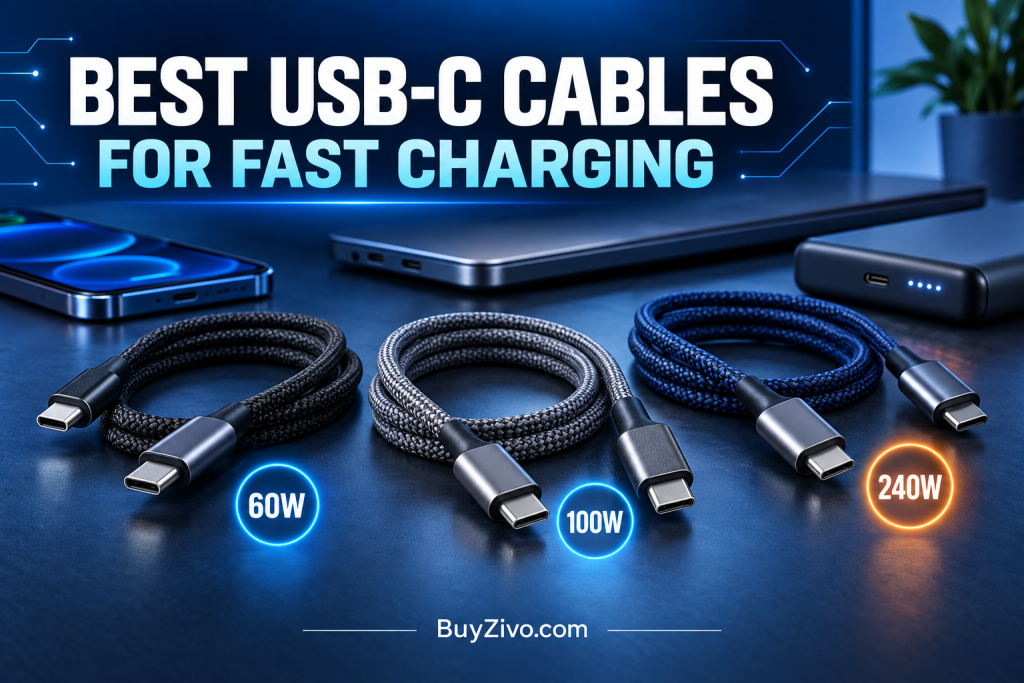
A 60W USB-C cable is sufficient for many phones, tablets, power banks, and lightweight laptops. A properly marked 100W or 240W cable is preferable for devices that draw more power or require a 5A connection. Buyers who connect monitors, docks, or external drives should choose USB4 or Thunderbolt rather than assuming every USB-C cable supports high-speed data and video.
How to Choose the Right USB-C Fast-Charging Cable
Match the cable to the device’s charging requirement
The connected device controls how much power it requests. A 240W cable does not force 240W into a phone; it only indicates the maximum power the cable is designed to carry under a compatible USB Power Delivery setup.
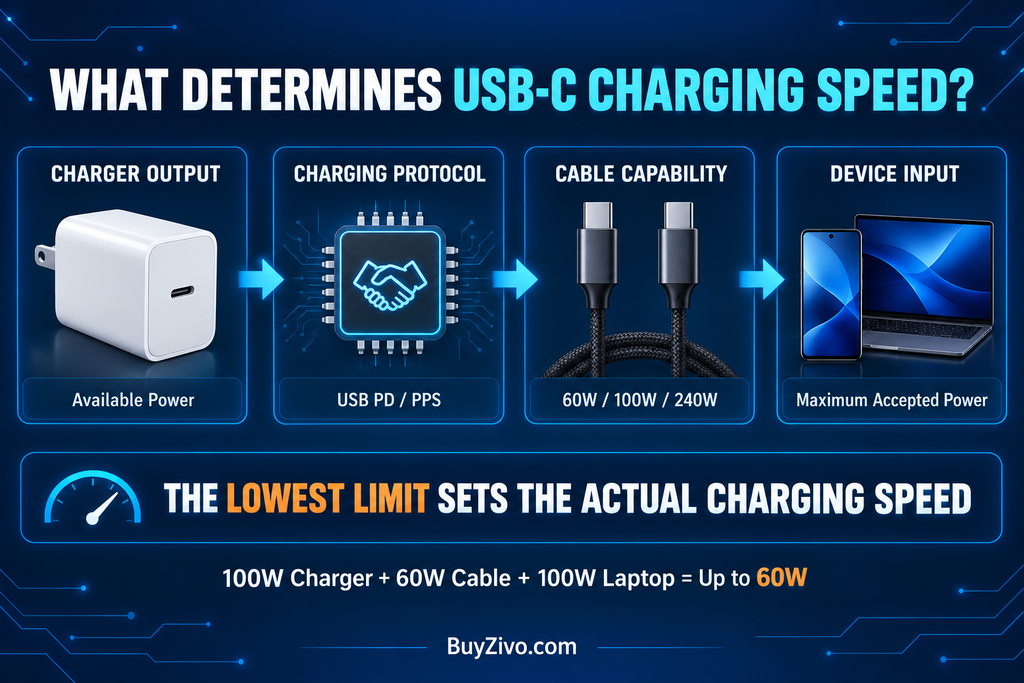
Your actual charging speed is limited by the weakest part of the chain:
Charger output → charging protocol → cable capability → device input
For example, a 100W laptop will not charge at 100W from a 30W adapter, even if the cable supports 240W.
For help choosing an appropriate adapter, see Best USB-C Chargers.
Understand 3A and 5A cables
Samsung’s documentation distinguishes between 3A and 5A USB-C cables. Its 3A cable supports up to 60W USB Power Delivery and up to 25W Samsung Super Fast Charging, while the 5A model supports higher-current charging combinations, including compatible 45W Super Fast Charging 2.0 setups.
USB-IF documentation also explains that cables carrying more than 3A require appropriate electronic identification. This is why an e-marked 5A cable matters for certain high-power charging modes.
If you are buying for a 45W Samsung device or a high-powered laptop, verify the current rating rather than relying only on the USB-C connector.
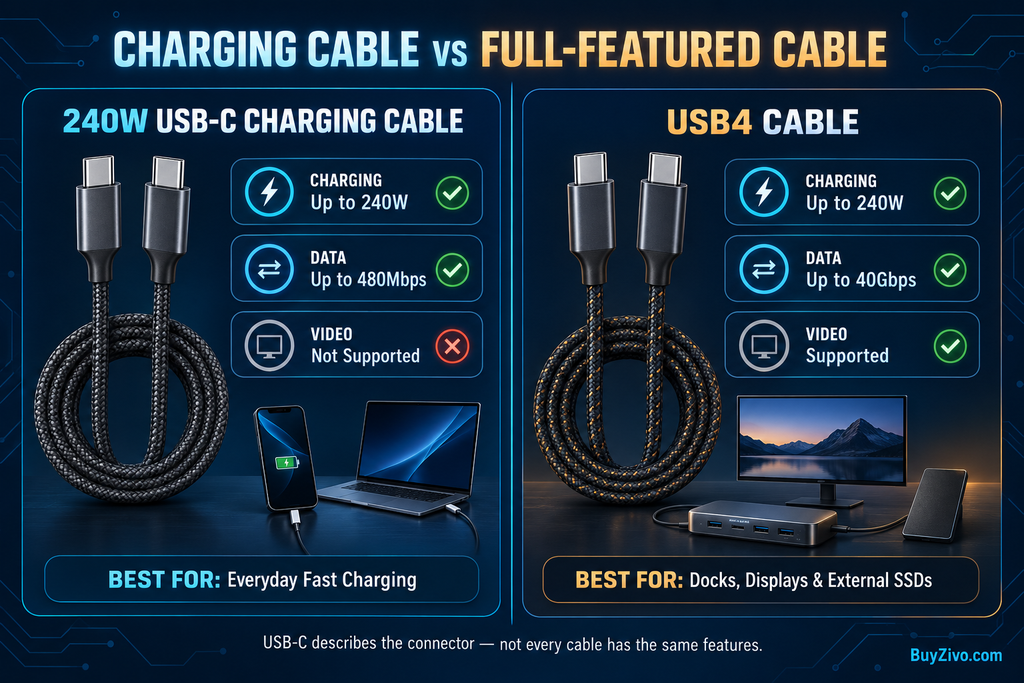
Do not confuse charging wattage with data speed
Charging power and data performance are separate specifications.
A cable advertised for 240W charging may still transfer data at only 480Mbps. That speed is adequate for syncing a phone or moving occasional documents, but it is slow compared with 10Gbps, 20Gbps, 40Gbps, or faster USB4 and Thunderbolt connections.
Choose based on the intended task:
| Primary use | Recommended cable type |
|---|---|
| Phone charging | 60W or higher USB-C charging cable |
| Samsung 45W charging | Compatible 5A e-marked USB-C cable |
| Laptop charging | 100W or 240W USB-C PD cable |
| Power-bank charging | Match the cable to the power bank’s input and output |
| External SSD | USB 3.2, USB4, or Thunderbolt cable |
| USB-C monitor | Video-capable USB-C, USB4, or Thunderbolt cable |
| Docking station | Cable matching the dock’s power, data, and display requirements |
Check for video support
USB-C describes the connector, not a guaranteed feature set. A cable may fit a USB-C monitor while failing to send a video signal.
For monitor or dock use, look for explicit support for DisplayPort Alt Mode, USB4, or Thunderbolt. Do not assume a cable supports video merely because it is rated for 100W or 240W charging.
Look for clear USB-IF markings and certification claims
USB-IF now uses power-rating labels such as 60W and 240W to make cable capability easier to identify. Certified products may also display an approved data-rate logo.
A certification logo is more meaningful than vague phrases such as “super-fast” or “universal.” However, certification applies to a specific product—not automatically to every cable produced by the same brand. Check the exact model and packaging.
You can learn more in Fast Charger Safety: Certifications and Features to Check.
Choose a practical cable length
A one-meter cable is convenient for travel and desktop charging. A longer 1.8-, 2-, or 3-meter cable provides more freedom near beds, sofas, and office desks.
Longer is not always better. A cable that is too long takes up more space, tangles more easily, and can be less convenient to carry. For high-speed data or video, the maximum supported performance may also vary by cable length and design.
Consider connector construction
A good cable should have firm USB-C connectors, strain relief near the plugs, and a jacket suitable for its intended environment. Braided cables often resist surface abrasion well, while softer silicone-style cables may be easier to coil.
Large connector housings can interfere with thick phone cases, recessed ports, or closely spaced laptop ports. Check the product images and dimensions if your device has limited clearance.
60W vs 100W vs 240W USB-C Cables
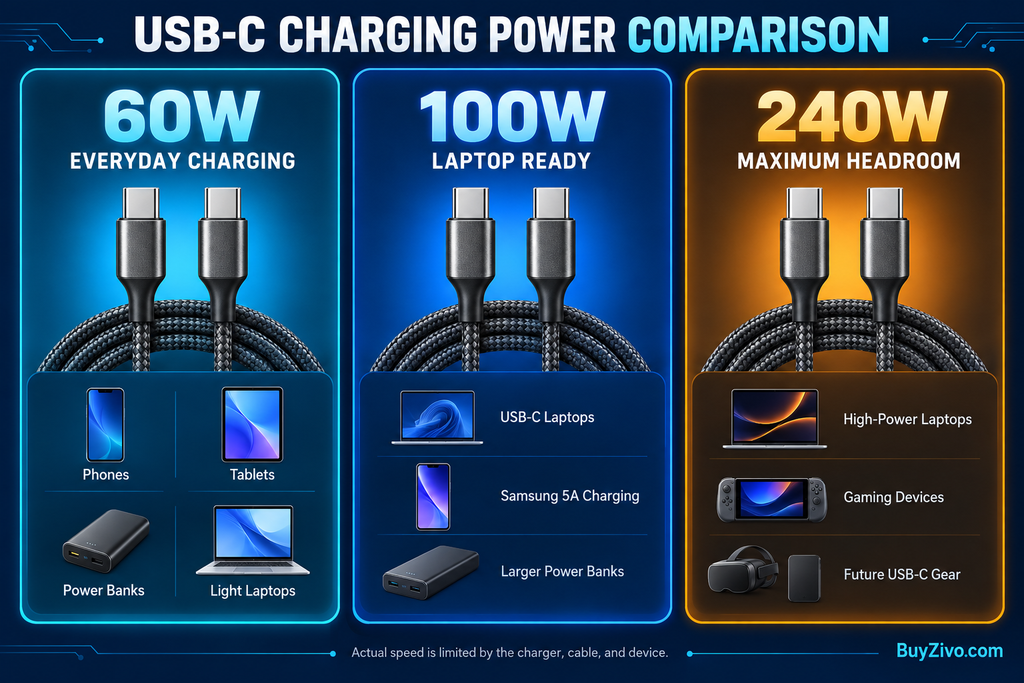
Choose a 60W cable if:
- You mainly charge phones, earbuds, tablets, or power banks
- Your laptop requires no more than 60W
- You do not need a 5A charging connection
- Lower cost is more important than future power headroom

Choose a 100W cable if:
- You charge a USB-C laptop
- You need a 5A cable for a supported Samsung charging setup
- Your charger provides more than 60W
- You want broad compatibility without requiring 240W EPR charging
Choose a 240W cable if:
- You want the highest standardized USB PD cable power rating
- You use a high-powered laptop or compatible gaming device
- You want more headroom for future USB-C equipment
- The price difference from a 100W cable is reasonable
USB Power Delivery currently supports power levels up to 240W through compatible Extended Power Range equipment. Reaching that figure requires a compatible charger, cable, and device; replacing only the cable will not increase charging beyond the limits of the other components.
Common USB-C Cable Buying Mistakes
Buying by connector shape alone
Two cables can have identical USB-C connectors while offering completely different charging, data, and video capabilities.
Assuming 240W means fast data
Many excellent 240W charging cables still use USB 2.0 and transfer data at only 480Mbps.
Expecting a cable to increase the device’s charging limit
A phone designed for lower-power charging will continue to regulate its own input even when connected through a 240W cable.
Using a 3A cable for a charging mode that requires 5A
This can prevent some Samsung devices and higher-powered USB-C products from reaching their fastest supported charging mode.
Buying an expensive Thunderbolt cable only for charging
Thunderbolt is valuable for data, displays, and docks. It generally offers little practical benefit if the cable will only connect a charger to a phone.
Ignoring the exact model number
Product families often contain 60W, 100W, and 240W versions that look similar. Confirm the wattage, length, data standard, and model identity before purchasing.
Frequently Asked Questions
Do all USB-C cables support fast charging?
No. USB-C describes the connector, but cables can have different current ratings and Power Delivery capabilities. Check the cable’s supported wattage and whether your charger and device use compatible charging standards.
Is a 100W USB-C cable enough for phone charging?
Yes. A 100W cable can safely be used with a lower-powered phone when the cable, charger, and device comply with the relevant USB standards. The phone requests only the power it supports.
Is a 240W cable better than a 100W cable?
A 240W cable provides more power headroom, but it does not automatically improve charging speed. If your charger and device never exceed 100W, both cables may provide the same charging result.
Do I need a 5A cable for Samsung 45W charging?
For compatible Samsung devices using Super Fast Charging 2.0, Samsung recommends a compatible 45W USB PD charger and a 5A e-marked USB-C cable. Device compatibility should be confirmed because not every Galaxy model supports 45W charging.
Can a charging cable connect a laptop to a monitor?
Only if it explicitly supports video. Many charging cables, including some 240W models, use USB 2.0 and do not carry a display signal. Choose a video-capable USB-C, USB4, or Thunderbolt cable.
Does cable length affect charging speed?
A properly designed and compliant cable should deliver its advertised capability. However, cable construction becomes more demanding at longer lengths, particularly for high-speed data. Always verify the stated specifications for the exact length being purchased.
What is an e-marked USB-C cable?
An e-marked cable contains an electronic marker that communicates its capabilities to connected USB-C equipment. This identification is required for cable configurations carrying more than 3A and is important for many 5A and higher-powered charging applications.
Can one USB-C cable handle charging, data, and video?
Yes, but the cable must explicitly support all three. USB4 and Thunderbolt cables are usually the most suitable options when charging, high-speed data transfer, and video output are all required.
Final Verdict
The Anker Prime USB-C to USB-C Cable (240W) is our best overall recommendation for charging. It offers broad device compatibility, high charging capacity, USB-IF certification, and a braided build. Its 480Mbps data limit and lack of video output are the main compromises.
Choose the Samsung 5A USB-C Cable when setting up compatible Galaxy 45W charging. Choose the Cable Matters USB4 Cable when high-speed data and video matter alongside charging. The Apple Thunderbolt 5 Pro Cable is the premium choice for advanced Thunderbolt equipment, but it is unnecessary for routine phone charging.
Before buying, verify the exact product model, wattage, current rating, data speed, video capability, length, and connector type. That short check is the most reliable way to avoid paying for features you do not need—or buying a cable that cannot perform the job you expect.