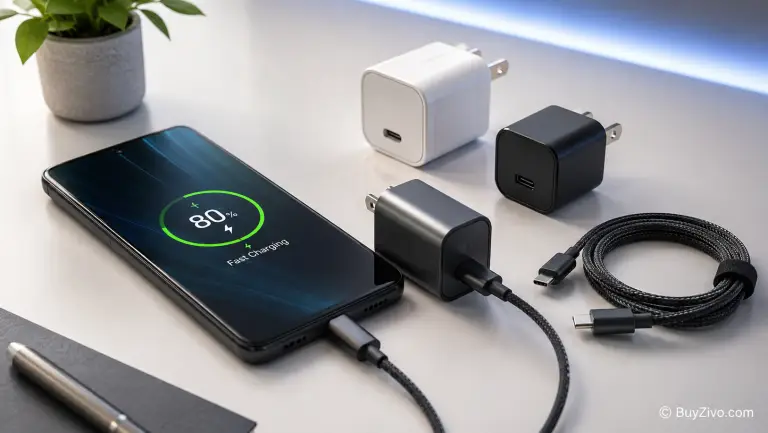
Buying a phone charger used to be simple. You picked any adapter that fit your cable and plugged it in. Now, things are different. Phones support different charging speeds, chargers come with different watt ratings, and terms like USB-C PD, PPS, and GaN can make a simple purchase feel more confusing than it should.
The good news is that choosing the best fast charger for your phone is not difficult once you know what to check. You do not need the most expensive charger. You do not always need the highest wattage either. You need a charger that matches your phone, supports the right charging standard, comes from a reliable brand, and works safely with the cable you use.
This guide explains everything in a practical way so you can buy the right fast charger with confidence.
Quick Answer: What Makes a Phone Charger “Best”?
The best fast charger for your phone is one that supports your phone’s charging standard, provides enough wattage, includes safety protections, and works with a good-quality cable.
For most modern phones, a USB-C fast charger with 20W to 45W output is enough. iPhone users usually need a USB-C Power Delivery charger. Many Samsung and Android users may get better results with a charger that supports USB-C PD with PPS.
A simple rule:
- iPhone: Look for USB-C Power Delivery, usually 20W or higher.
- Samsung Galaxy: Look for USB-C PD PPS, usually 25W or 45W depending on model.
- Google Pixel: Look for USB-C PD PPS.
- Other Android phones: Check the brand’s recommended charging standard.
- Travel or multi-device use: Consider a 45W, 65W, or higher multi-port GaN charger.
Why the Right Fast Charger Matters
A fast charger is not just about saving time. It also affects convenience, safety, and how well your phone performs during daily use.
Imagine this: you have 20 minutes before leaving home. A slow old charger may add only a small amount of battery. A compatible fast charger can give you enough power to get through your commute, meeting, or class.
The right charger helps you:
- Charge faster when you are in a hurry.
- Avoid carrying multiple adapters.
- Reduce cable and charger clutter.
- Get better performance from newer phones.
- Charge safely with proper power control.
The wrong charger may still work, but it may charge slowly, heat up more than expected, or fail to trigger your phone’s fastest supported charging mode.
Understand Charger Wattage Before You Buy
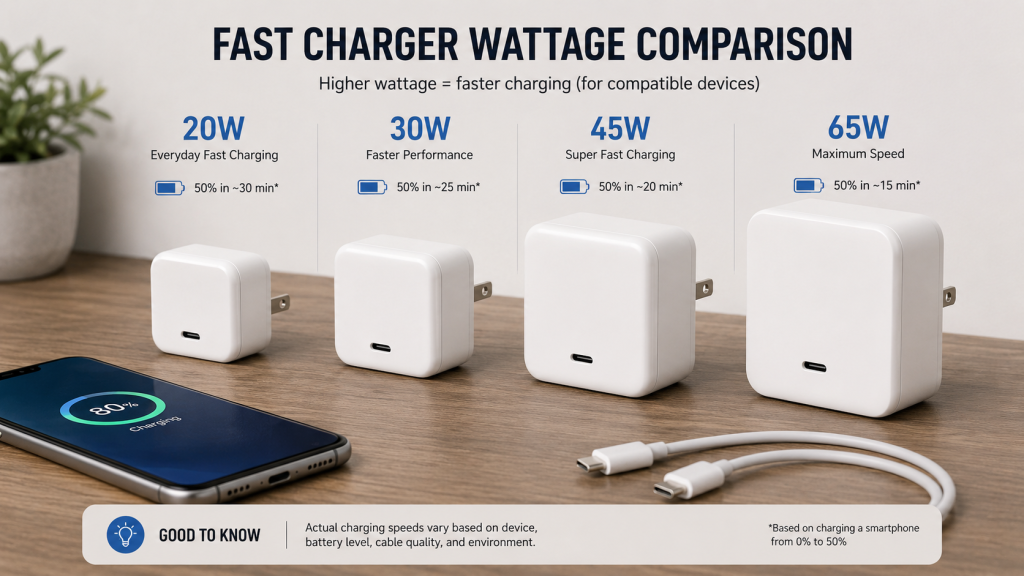
Wattage tells you how much power a charger can deliver. You will usually see it written as 20W, 25W, 30W, 45W, 65W, or higher.
A higher number does not automatically mean your phone will charge at that full speed. Your phone controls how much power it accepts. For example, if your phone supports 25W charging, using a 65W charger does not mean it will charge at 65W. It will take only what it can safely use.
Is a Higher-Watt Charger Safe?
In most cases, a quality higher-watt USB-C charger is safe because modern phones and chargers communicate with each other. The charger offers power levels, and the phone chooses what it needs.
That said, quality matters. A cheap, poorly made charger may not handle heat, voltage control, or safety protection properly. This is why it is better to buy from a trusted brand instead of choosing the cheapest option with a big wattage number printed on it.
Common Wattage Ranges for Phones
| Charger Wattage | Best For |
|---|---|
| 18W–20W | Basic fast charging, many iPhones, older phones |
| 25W–30W | Most modern phones, compact daily charging |
| 45W | Some Samsung and Android phones, tablets, faster top-ups |
| 65W | Phones plus tablets, small laptops, multi-port use |
| 100W+ | Laptop-heavy setups, not necessary for most phone-only users |
For most people, a 30W charger is a good everyday choice. It is compact, affordable, and powerful enough for many phones. If you use a Samsung Galaxy model that supports 45W charging, a 45W PPS charger may make more sense.
Check Your Phone’s Fast-Charging Standard
This is the part many buyers skip, but it matters the most. Two chargers can have the same wattage and still charge your phone at different speeds because they support different charging standards.
USB-C Power Delivery
USB-C Power Delivery, often called USB-C PD, is one of the most common fast-charging standards. It is widely used by iPhones, many Android phones, tablets, and even laptops.
If you own a newer iPhone, a USB-C PD charger is usually the safest and easiest choice. Many Android phones also support USB-C PD, although some brands use extra charging technology to reach their highest speeds.
PPS Charging
PPS stands for Programmable Power Supply. It is part of the USB Power Delivery family and allows the charger to adjust voltage and current more flexibly.
In simple terms, PPS helps the charger and phone fine-tune power delivery. This can improve efficiency and reduce unnecessary heat when supported by the phone.
Many Samsung Galaxy phones need USB-C PD PPS to activate Super Fast Charging. Some Google Pixel and other Android models also benefit from PPS support.
Brand-Specific Fast Charging
Some phone brands use their own charging systems. For example, certain OnePlus, OPPO, Xiaomi, and vivo phones may reach their fastest speeds only with the brand’s own charger and cable.
That does not mean third-party chargers are useless. A good USB-C PD charger will still charge many of these phones, but it may not reach the advertised maximum speed.
Before buying, search your phone model with terms like:
- “fast charging wattage”
- “USB-C PD support”
- “PPS support”
- “official charger specs”
This quick check can save you from buying a charger that looks powerful but does not unlock your phone’s best charging speed.
Why the Charging Cable Matters
Many people blame the charger when the real problem is the cable.
A fast charger needs a cable that can safely carry the required power. If you use an old or low-quality cable, your phone may charge slowly even with a powerful adapter.
For most phones, a good USB-C to USB-C cable rated for 60W is enough. If you plan to use the same cable for laptops or high-power devices, consider a cable rated for 100W or more.
Look for:
- USB-C to USB-C support.
- Clear wattage rating.
- Strong connectors.
- Good build quality.
- Certification or reliable brand information.
For iPhone models with Lightning ports, you need a USB-C to Lightning cable that supports fast charging. For newer USB-C iPhones, a USB-C to USB-C cable is the better choice.
A simple test: if your phone says “fast charging,” “super fast charging,” or shows a faster charging indicator, your charger and cable are likely working together properly.
Single-Port vs Multi-Port Fast Chargers
A single-port charger is simple. You plug in one phone, and the charger gives it the available power.
A multi-port charger is more flexible. It can charge your phone, earbuds, tablet, smartwatch, or even laptop from one adapter. This is useful for travel, desk setups, and people who hate carrying multiple chargers.
However, multi-port chargers split power between devices. A 65W charger may provide the full 65W when one device is connected, but less power per port when two or three devices are charging.
Before buying a multi-port charger, check:
- Total wattage.
- Power output per port.
- Output when all ports are used.
- Whether the USB-C port supports PD or PPS.
- Whether it has USB-A ports if you still use older cables.
For most users, a 65W dual-port USB-C charger is a smart balance. It can fast charge a phone and still handle another small device.
Safety Features to Look For
A good fast charger should do more than charge quickly. It should protect your phone and itself.
Look for safety features such as:
- Over-voltage protection.
- Over-current protection.
- Over-temperature protection.
- Short-circuit protection.
- Certified or tested design.
- Heat-resistant materials.
Also pay attention to physical quality. If a charger feels unusually light, gets very hot, makes noise, or has unclear labeling, avoid it.
A reliable charger may cost a little more, but it is worth it. You are plugging it into an expensive phone, and in many cases, leaving it connected near your bed, desk, or travel bag.
Wired vs Wireless Fast Charging
Wireless charging is convenient, but wired fast charging is usually faster and more efficient.
A wireless charger is great for:
- Desk charging.
- Overnight charging.
- Reducing cable wear.
- Quick placement while working.
A wired fast charger is better for:
- Fast top-ups.
- Travel.
- Charging while using mobile data or GPS.
- Getting the most reliable speed.
If speed matters, choose a wired USB-C fast charger. If convenience matters more, a wireless charger can be a nice secondary option.
One practical setup is to keep a wired fast charger in your bag and a wireless charger on your desk or bedside table.
Best Fast Charger Buying Checklist
Before you buy, run through this quick checklist:
- Check your phone’s maximum charging wattage.
Do not guess based on the charger alone. - Choose the right standard.
For most users, USB-C PD is important. For many Samsung and Pixel users, PPS is also useful. - Pick enough wattage.
20W to 30W is fine for many phones. Choose 45W if your phone supports it. - Use a proper cable.
A weak cable can limit charging speed. - Buy from a trusted brand.
Safety and power control matter more than flashy marketing. - Think about future use.
A 65W GaN charger may be useful if you also charge a tablet or laptop. - Check the plug type.
Make sure it fits your country or travel needs. - Avoid fake or unclear listings.
If the product page does not clearly mention PD, PPS, wattage, and safety features, be careful.
Common Fast-Charger Mistakes to Avoid
Buying Only by Wattage
A 100W charger is not automatically better for your phone. If your phone only accepts 25W, the extra wattage will not make it charge faster.
Using the Wrong Cable
A low-quality cable can stop fast charging from working. Always match the cable with the charger and device.
Ignoring PPS for Samsung Phones
Many Samsung phones need PPS support for Super Fast Charging. A regular PD charger may charge the phone, but not at the best speed.
Buying Very Cheap Unknown Chargers
Cheap chargers can be tempting, especially online. But poor build quality can lead to heat, unstable charging, or short life.
Expecting Full Speed All the Time
Fast charging is not constant from 0% to 100%. Phones usually charge fastest at lower battery levels, then slow down as the battery fills. This is normal and helps manage heat and battery health.
Final Thoughts
Choosing the best fast charger for your phone is mostly about compatibility. Start with your phone’s charging limit, then match it with the right charger standard and cable.
For most people, a good USB-C PD charger between 20W and 45W is enough. If you use a Samsung Galaxy or certain Android phones, look for PPS support. If you charge multiple devices, a compact 65W GaN multi-port charger can be a smart upgrade.
Do not chase the biggest watt number. Choose the charger that fits your real use.
Frequently Asked Questions
What watt charger do I need for my phone?
Most modern phones work well with a 20W to 30W charger. Some Android phones, especially certain Samsung models, may support 45W or more. Check your phone’s official charging specs before buying.
Is a 65W charger safe for my phone?
A quality 65W USB-C charger is usually safe because your phone only pulls the power it can handle. However, buy from a reliable brand and use a good cable.
Why is my fast charger charging slowly?
The most common reasons are a weak cable, the wrong charging standard, low-quality adapter, dirty charging port, high phone temperature, or background apps using power while charging.
Do iPhones need a special fast charger?
Newer iPhones fast charge with a USB-C Power Delivery charger. Many users choose a 20W or higher USB-C adapter with the correct cable.
What is PPS charging?
PPS means Programmable Power Supply. It helps the charger adjust power more precisely. Many Samsung phones need PPS to activate Super Fast Charging.
Is wireless fast charging better than wired fast charging?
Wireless charging is convenient, but wired charging is usually faster and more efficient. Use wired charging when speed matters.
Does fast charging damage phone battery health?
Modern phones manage fast charging with software and safety controls. Heat is the bigger concern. Use quality chargers, avoid very hot environments, and unplug when convenient.