Introduction
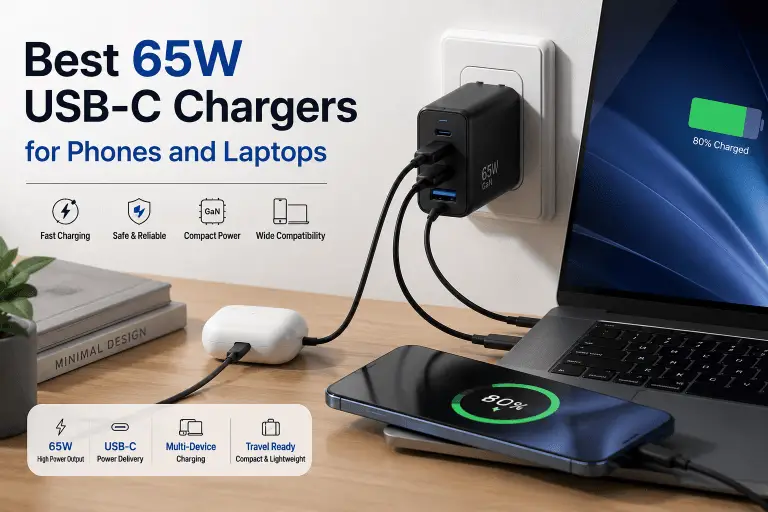
Finding the best 65W USB-C charger isn’t simply about choosing the highest wattage or the cheapest option. Many chargers advertise impressive specifications, but not all deliver reliable power, support the right charging standards, or include the safety features needed to protect expensive devices.
What should readers know about the best 65W USB-C charger?
A good 65W USB-C charger should support USB Power Delivery (USB PD), provide stable power output, include comprehensive protection against overheating and overcurrent, and come from a reputable manufacturer with transparent specifications. For most people, a quality 65W charger can safely power smartphones, tablets, ultrabooks, and many USB-C laptops, making it one of the most versatile charging options available. According to USB Power Delivery specifications and manufacturer guidance from companies such as Apple and Samsung, connected devices negotiate how much power they receive, so using a higher-wattage USB-C charger does not force excess power into a compatible device.
This guide explains what actually matters when shopping for a 65W charger, which features deserve your attention, and which marketing claims are better ignored.
Affiliate Disclosure

This article may contain affiliate links. If you purchase through them, BuyZivo may earn a commission at no extra cost to you. Our recommendations are based on research, official documentation, and practical buying considerations rather than sponsored placements.
Quick Answer
If you regularly charge both a phone and a USB-C laptop, a quality 65W GaN USB-C PD charger is one of the smartest long-term purchases.
Look for:
- USB Power Delivery (USB PD) support
- PPS support if you use compatible Samsung or Google devices
- GaN technology for a smaller charger
- Built-in safety protections
- Reliable manufacturer documentation
- Appropriate USB-C cables rated for your required power output
Avoid choosing a charger solely because it advertises “65W.” The charging protocol, port capabilities, and safety design matter just as much as the maximum wattage.
Key Takeaways
- A 65W USB-C charger can power most smartphones, tablets, handheld gaming devices, and many USB-C laptops.
- USB Power Delivery (USB PD) is more important than the wattage printed on the box.
- GaN chargers are usually smaller and more efficient than traditional silicon chargers.
- Your device only draws the amount of power it is designed to accept.
- Multi-port chargers often reduce available power when multiple devices are connected.
- High-quality USB-C cables are just as important as the charger itself.
- Buying from reputable brands reduces the risk of poor build quality and misleading specifications. Recent reporting has highlighted increased risks from low-quality USB-C charging accessories.
What Is a 65W USB-C Charger?
A 65W USB-C charger is a power adapter capable of delivering up to 65 watts through a USB-C connection when paired with a compatible device.
The important word is up to.
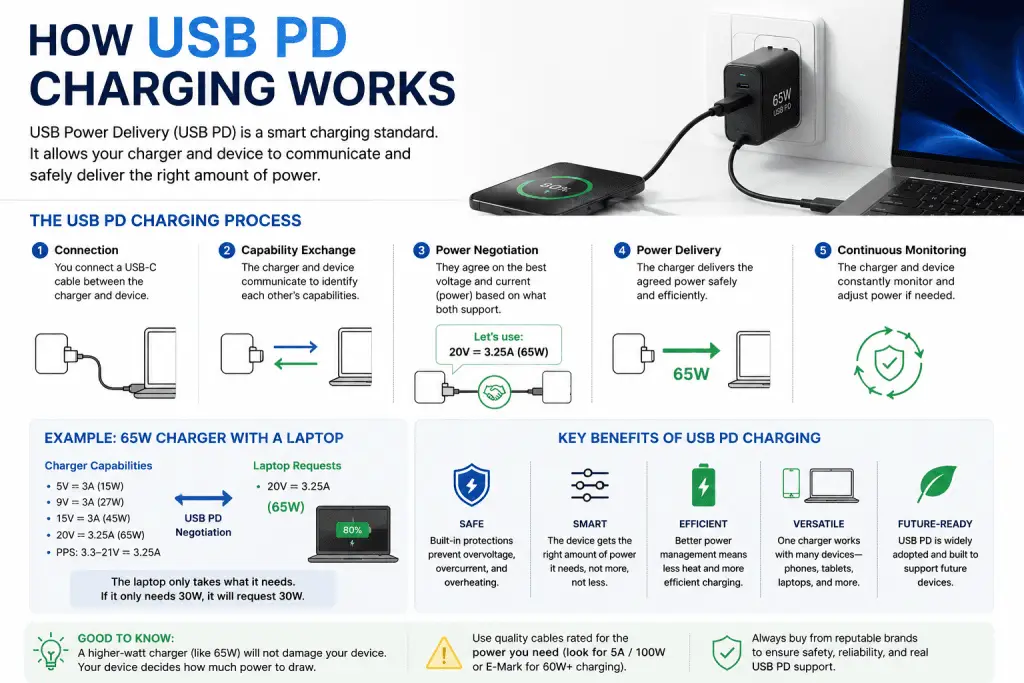
Modern USB-C chargers don’t constantly output 65 watts. Instead, they communicate with your device using USB Power Delivery (USB PD). The charger and device negotiate an appropriate voltage and current before charging begins.
For example:
| Device | Typical Maximum Charging Need |
|---|---|
| Wireless earbuds | 5W–10W |
| Smartphones | 18W–45W (varies by model) |
| Tablets | 20W–45W |
| Steam Deck and similar handhelds | Around 45W |
| Many ultrabooks | 45W–65W |
If your phone only supports 25W charging, connecting it to a 65W charger will not suddenly force 65W into the battery. The device requests only the power it supports through USB PD negotiation.
Why Choose a 65W Charger?
A 65W charger sits in a practical middle ground.
Lower-power chargers, such as 20W or 30W models, are excellent for smartphones but may struggle with larger tablets or laptops.
Higher-power adapters, including 100W or 140W models, offer additional flexibility but are usually larger, heavier, and more expensive.
For many users, 65W provides an excellent balance between portability and versatility.
Advantages
One charger for multiple devices
Instead of carrying separate adapters for your phone, tablet, and laptop, a single 65W charger can often handle all three.
Travel-friendly
Many modern 65W chargers use Gallium Nitride (GaN) components, making them much smaller than older silicon chargers without sacrificing power output.
Better future compatibility
As more laptops, tablets, and accessories adopt USB-C charging, investing in a quality 65W USB PD charger can reduce the number of chargers you need to own.
Suitable for many USB-C laptops
Many lightweight laptops from manufacturers such as Apple, Dell, Lenovo, ASUS, Acer, HP, Microsoft, and Framework support charging from 65W USB-C adapters. However, some performance laptops and gaming laptops require significantly more power. Always check your laptop manufacturer’s specifications before purchasing.
Understanding USB PD, PPS, and GaN
These terms appear on nearly every charger listing, but they don’t all mean the same thing.
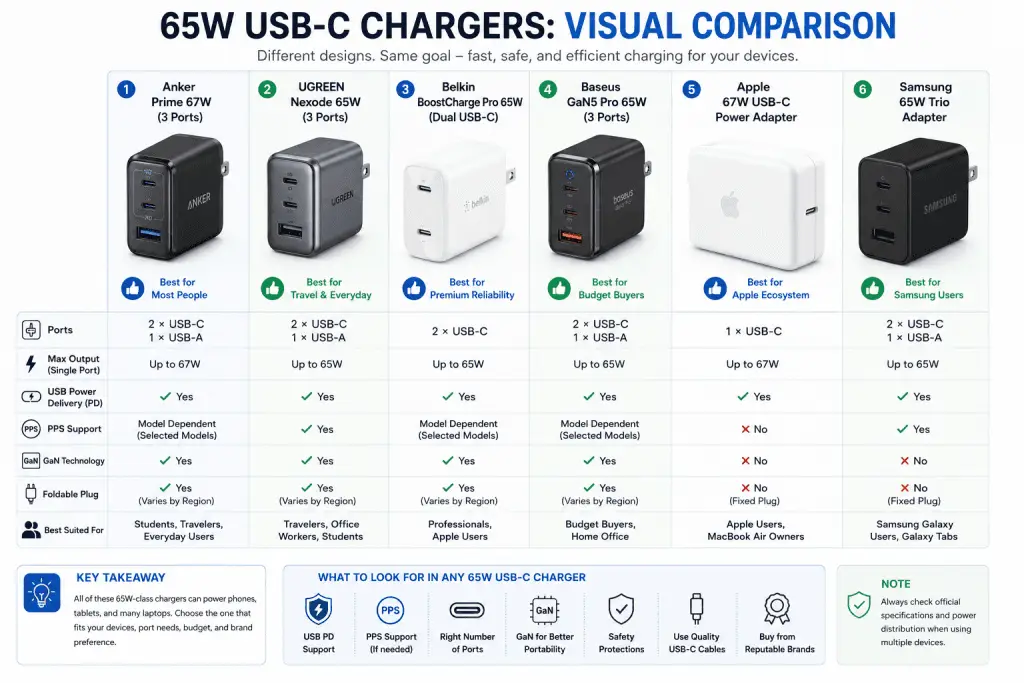
USB Power Delivery (USB PD)
USB Power Delivery is the primary fast-charging standard for USB-C devices.
It allows chargers and devices to negotiate safe charging levels rather than delivering a fixed output.
Many phones, tablets, and laptops now rely on USB PD for fast charging.
According to Samsung, many recent Galaxy devices support USB Power Delivery, while Apple also recommends USB-C Power Delivery adapters for fast charging compatible iPhone and iPad models.
PPS (Programmable Power Supply)
PPS is an optional extension of USB Power Delivery.
Rather than using fixed voltage steps, PPS allows supported devices to request smaller voltage adjustments.
This can improve charging efficiency and heat management on compatible devices.
Samsung’s Super Fast Charging relies on PPS support for the highest supported charging speeds on compatible phones. Simply buying a 65W charger without PPS may not deliver the fastest charging available for those devices.
GaN (Gallium Nitride)
GaN refers to the semiconductor material used inside many modern chargers.
Compared with traditional silicon designs, GaN chargers are often:
- Smaller
- Lighter
- More efficient
- Better at managing heat
GaN itself is not a charging protocol.
A charger can use GaN technology and still provide poor charging performance if its internal design is weak. Likewise, a traditional silicon charger can still be reliable if it meets appropriate safety and performance standards.
Think of GaN as an engineering improvement rather than a guarantee of quality.
Who Should Buy a 65W Charger?
A 65W charger is an excellent choice for many users, but not everyone has the same needs.
Ideal for
Students
Charge a laptop, smartphone, earbuds, and other accessories with fewer adapters in your backpack.
Frequent travelers
A compact GaN charger saves space while reducing cable clutter in hotels and airports.
Hybrid workers
If you move between home and the office, carrying one charger instead of several makes daily commuting easier.
Families
A multi-port 65W charger can recharge several small devices, though the available power may be shared between ports depending on the charger’s design.
You may not need 65W if…
- You only charge a smartphone.
- You never charge tablets or laptops.
- You already own a reliable USB PD charger that meets your needs.
You may need more than 65W if…
Consider a 100W or higher charger if you regularly use:
- High-performance creator laptops
- Gaming laptops
- Multiple laptops simultaneously
- Several power-hungry USB-C devices at the same time
Many multi-port chargers reduce the maximum output available to each port when more than one device is connected, so always review the manufacturer’s power distribution chart before buying.
Best 65W USB-C Chargers (Research-Based Recommendations)
There is no single best 65W USB-C charger for everyone. The right choice depends on the devices you own, how many ports you need, whether you travel frequently, and how much importance you place on size versus charging flexibility.
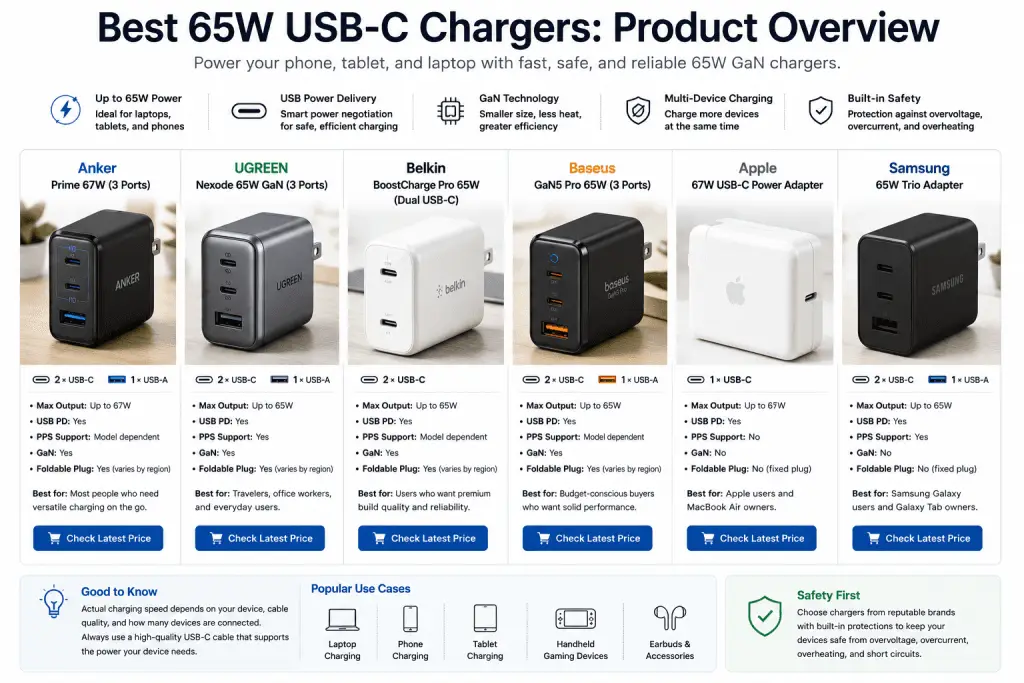
The recommendations below are based on official manufacturer specifications, USB PD support, safety features disclosed by manufacturers, and overall reputation. They are research-based recommendations, not hands-on reviews by BuyZivo.
1. Anker Prime 67W USB-C Charger (3 Ports)
Best for: Most people
Why it stands out
Although rated at 67W rather than exactly 65W, this charger falls into the same class and offers excellent versatility. It combines two USB-C ports with one USB-A port, making it suitable for charging a laptop and phone simultaneously.
According to Anker, it supports USB Power Delivery and intelligent power distribution across its ports.
Pros
- Compact GaN design
- Three charging ports
- USB PD support
- Foldable plug (region dependent)
- Good travel companion
Cons
- Output changes when multiple devices are connected
- Premium pricing compared with basic chargers
Ideal for
- MacBook Air users
- Windows ultrabooks
- iPhone and Android owners
- Frequent travelers
2. UGREEN Nexode 65W GaN Charger
Best for: Travel and everyday use
UGREEN’s Nexode series has become one of the most popular GaN charger families thanks to its compact design and broad compatibility.
Based on official specifications, the charger supports USB Power Delivery and PPS, making it suitable for many Samsung Galaxy devices, Google Pixel phones, iPhones, iPads, Nintendo Switch, and numerous USB-C laptops.
Pros
- Small GaN design
- USB PD support
- PPS support
- Three charging ports
- Wide compatibility
Cons
- Shared power when multiple devices are connected
- Some laptops may charge more slowly under heavy workloads
Ideal for
- Travelers
- Office workers
- Students
3. Belkin BoostCharge Pro 65W Dual USB-C GaN Charger
Best for: Premium reliability
Belkin has long worked with Apple and other major manufacturers on charging accessories.
Its 65W BoostCharge Pro charger focuses on dependable USB PD charging with two USB-C ports rather than offering multiple connector types.
Pros
- Trusted manufacturer
- USB PD support
- Compact GaN design
- High-quality construction
Cons
- Fewer ports than some competitors
- Premium price
Ideal for
- Apple users
- Professionals
- Daily office use
4. Baseus GaN5 Pro 65W Charger
Best for: Budget-conscious buyers
Baseus offers several 65W GaN chargers with multiple USB-C and USB-A ports.
According to the manufacturer’s documentation, these models support USB Power Delivery and various fast-charging protocols. However, supported protocols can vary by model, so buyers should always confirm specifications before purchasing.
Pros
- Competitive pricing
- Compact design
- Multiple ports
- Good feature set
Cons
- Product naming can be confusing
- Specifications differ between regional versions
Ideal for
- Budget buyers
- Home office users
5. Apple 67W USB-C Power Adapter
Best for: Apple ecosystem users
Apple sells a 67W USB-C Power Adapter that supports USB Power Delivery and is recommended for compatible MacBook Air models and various USB-C devices.
Although it provides slightly more than 65W, it competes directly with other chargers in this category.
Apple also notes that compatible iPhones and iPads can fast charge when paired with an appropriate USB-C cable.
Pros
- Excellent build quality
- Official Apple accessory
- USB PD support
- Reliable compatibility with Apple devices
Cons
- Single USB-C port
- Larger than many GaN alternatives
- More expensive than many third-party options
Ideal for
- MacBook Air owners
- iPhone users
- Apple ecosystem

6. Samsung 65W Trio Adapter
Best for: Samsung Galaxy users
Samsung’s 65W Trio Adapter combines multiple charging ports with USB Power Delivery support. Compatible Galaxy devices can also benefit from PPS support for Samsung Super Fast Charging where applicable.
Pros
- Official Samsung charger
- PPS support
- Multiple ports
- Reliable compatibility
Cons
- Larger than some GaN chargers
- Primarily optimized for Samsung devices
Ideal for
- Galaxy phone owners
- Galaxy Tab users
- Samsung laptops

Quick Comparison Table
| Charger | USB-C Ports | USB-A Ports | GaN | USB PD | PPS | Best For |
|---|---|---|---|---|---|---|
| Anker Prime 67W | 2 | 1 | ✓ | ✓ | Model dependent | Most users |
| UGREEN Nexode 65W | 2 | 1 | ✓ | ✓ | ✓ | Travel |
| Belkin BoostCharge Pro 65W | 2 | 0 | ✓ | ✓ | Model dependent | Premium quality |
| Baseus GaN5 Pro 65W | 2 | 1 | ✓ | ✓ | Model dependent | Budget |
| Apple 67W Adapter | 1 | 0 | No (official specifications do not market it as GaN) | ✓ | No | Apple |
| Samsung 65W Trio | 2 | 1 | No (official specifications do not market it as GaN) | ✓ | ✓ | Samsung |
Note: Features such as PPS support and port power distribution may vary between product revisions and regional models. Always verify the official specifications before purchasing.
Compatibility Guide
One of the biggest advantages of a 65W USB-C charger is its ability to work with many different devices.
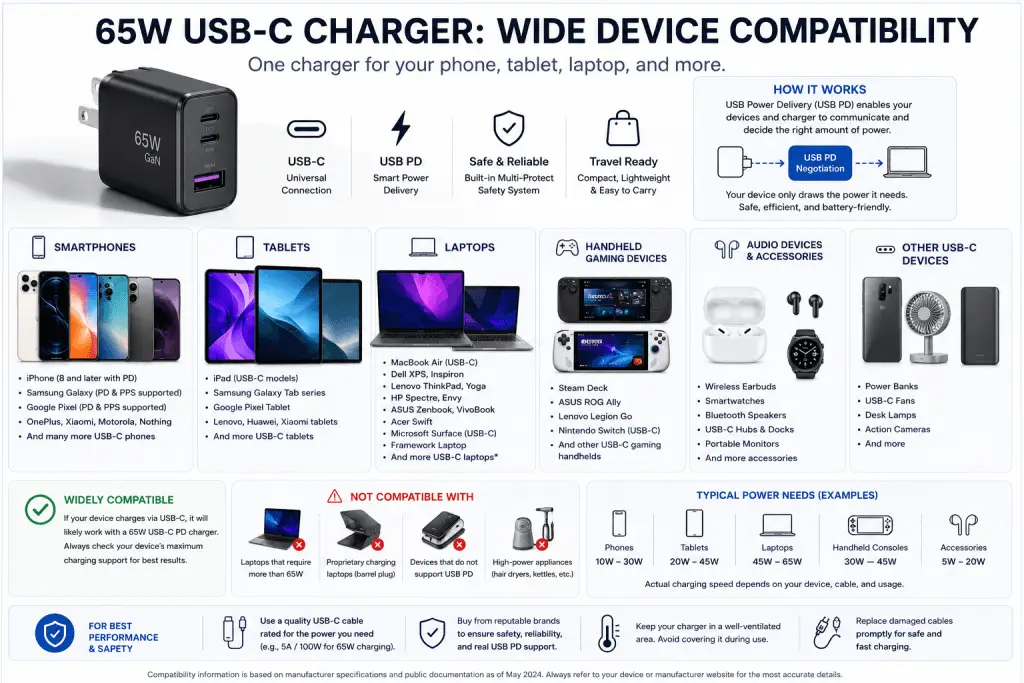
Smartphones
A quality USB PD charger is suitable for many devices including:
- Apple iPhone (USB-C and Lightning models that support USB PD with the appropriate cable)
- Samsung Galaxy phones
- Google Pixel phones
- Motorola smartphones
- Nothing Phone
- Many Xiaomi devices that support USB PD
Keep in mind that some manufacturers also use proprietary charging systems. A USB PD charger may not deliver the brand’s absolute maximum charging speed if the device relies on a proprietary protocol.
Tablets
Most modern USB-C tablets charge comfortably from a 65W charger, including many:
- iPad models with USB-C
- Samsung Galaxy Tab devices
- Google Pixel Tablet
- Lenovo tablets
USB-C Laptops
A 65W charger is commonly suitable for many lightweight laptops, including compatible models from:
- Apple MacBook Air
- Dell XPS
- Lenovo ThinkPad
- HP Spectre
- ASUS Zenbook
- Acer Swift
- Microsoft Surface (USB-C charging models)
- Framework Laptop
However, always check the original charger rating. If your laptop ships with a 90W, 100W, or 140W adapter, a 65W charger may charge more slowly or may not keep up under heavy workloads.
Handheld Gaming Devices
Many USB-C gaming devices also work well with quality 65W chargers.
Examples include:
- Steam Deck
- ASUS ROG Ally
- Lenovo Legion Go
- Nintendo Switch (when used with compatible USB PD chargers)
Always use chargers that meet the manufacturer’s charging requirements.
Understanding Real Charging Performance
Many buyers expect a 65W charger to deliver 65W at all times. In practice, charging behavior depends on three factors.
Device Limitations
Every compatible device determines how much power it requests.
For example:
- A phone that supports 25W will usually request around 25W.
- A tablet supporting 45W may draw up to 45W.
- A laptop may request the full 65W if needed.
The charger does not force maximum power into the device.
Cable Quality Matters
Even the best charger cannot compensate for a poor-quality cable.
For reliable charging:
- Use USB-C cables from reputable manufacturers.
- Check that the cable supports the required charging wattage.
- Replace damaged or worn cables promptly.
- For higher-power charging, use cables that are rated appropriately, especially above 60W where USB-C e-marker requirements may apply according to USB-IF specifications.
Multi-Port Charging
A common misunderstanding is that a 65W charger provides 65W from every port simultaneously.
In reality, many chargers distribute power dynamically.
For example:
- Laptop only → up to 65W
- Laptop + phone → 45W + 20W (example only)
- Three devices → power shared according to the manufacturer’s allocation
Because power distribution differs by model, review the official port allocation chart before buying.
Safety and Certification Considerations
Charging safety should never be an afterthought.
A trustworthy charger should provide multiple protective features, including safeguards against:
- Overcurrent
- Overvoltage
- Overheating
- Short circuits
When evaluating products, distinguish between different types of claims:
| Term | What It Means |
|---|---|
| USB-IF Compliance | Indicates alignment with USB specifications. Manufacturers may state compliance or certification where applicable. |
| UL Listing/Certification | A safety certification issued by UL Solutions for applicable products and markets. |
| CE Marking | A manufacturer’s declaration that the product meets applicable European Union requirements. It is not an independent third-party certification. |
| FCC Marking | Indicates compliance with relevant U.S. electromagnetic interference regulations where applicable. |
Also remember:
- Extremely low-priced chargers with vague specifications may cut corners on internal components.
- Well-known brands generally provide clearer documentation, firmware support (where applicable), and customer service.
- Buying from authorized retailers reduces the risk of counterfeit products.
Choosing a charger with transparent specifications and documented safety features is often worth paying a little more for, especially when you’re charging devices that cost hundreds or even thousands of dollars.
Buying Advice: How to Choose the Best 65W USB-C Charger
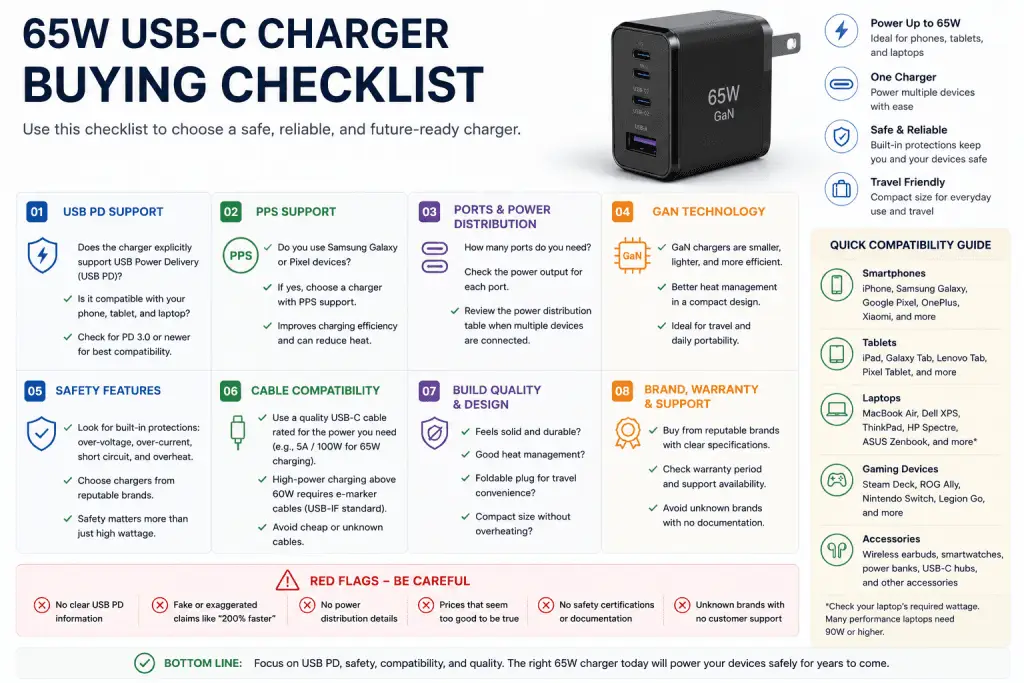
A 65W charger may look like a simple accessory, but small differences in design and features can significantly affect everyday use. Here’s what deserves your attention before you buy.
What Matters Most
1. USB Power Delivery (USB PD) Support
USB PD is the most important feature to look for.
It enables safe communication between the charger and your device so that the correct voltage and current are negotiated automatically. Most modern phones, tablets, handheld gaming devices, and USB-C laptops rely on USB PD for fast charging.
If a charger does not clearly state USB PD support, consider looking elsewhere.
2. PPS Support (If You Own Compatible Devices)
Programmable Power Supply (PPS) is particularly useful for many Samsung Galaxy devices and some Google Pixel phones.
PPS allows finer voltage adjustments, which can improve charging efficiency and reduce heat during fast charging.
If you mainly use Apple devices, PPS is less critical, though it doesn’t hurt to have it for broader compatibility.
3. Number and Type of Ports
Think about how you actually charge your devices.
| Your Needs | Recommended Configuration |
|---|---|
| Laptop only | Single USB-C port |
| Laptop + phone | Dual USB-C ports |
| Laptop + phone + earbuds | Two USB-C + one USB-A |
| Family charging station | Three or four ports with clear power allocation |
More ports are convenient, but remember that maximum output is usually shared when multiple devices are connected.
4. Size and Portability
If you travel frequently, a GaN charger is usually worth the extra cost.
Compared with many traditional silicon chargers, GaN models are often:
- Smaller
- Lighter
- Easier to pack
- Better at handling higher power in a compact design
5. Build Quality
Pay attention to:
- Plug stability
- Housing quality
- Heat management
- Cable fit
- Manufacturer warranty
- Official documentation
A well-built charger should feel solid rather than lightweight and flimsy.
6. Cable Compatibility
A charger is only part of the charging system.
For higher-power charging, use a USB-C cable that supports the required wattage. According to the USB-IF, some higher-power USB-C cables require an electronic marker (e-marker) chip to safely support increased power levels.
If your cable isn’t rated appropriately, charging speed may be limited even if the charger supports 65W.
What Doesn’t Matter as Much
Many online listings emphasize features that have little impact on everyday charging.
These include:
- RGB lighting
- Fancy display screens
- Overly aggressive “turbo” branding
- Marketing claims such as “200% faster”
- Unverified charging speed comparisons
Instead, focus on official specifications and compatibility information.
How to Compare Two 65W Chargers
Before purchasing, compare the following checklist.
| Feature | Why It Matters |
|---|---|
| USB PD support | Essential for broad compatibility |
| PPS support | Important for many Samsung and Pixel devices |
| Number of USB-C ports | Determines charging flexibility |
| Power distribution chart | Shows output when multiple devices are connected |
| GaN technology | Improves portability and efficiency |
| Safety protections | Helps protect connected devices |
| Manufacturer documentation | Indicates transparency and support |
| Warranty | May reflect manufacturer confidence |
How to Avoid Marketing Tricks
Not every charger advertising “65W” delivers the same experience.
Be cautious if you notice any of the following:
- No official specification sheet
- Missing USB PD information
- No mention of supported charging protocols
- Unrealistically low prices
- Generic product images with inconsistent branding
- Claims that cannot be verified
Also remember that CE marking is not an independent certification. It is a manufacturer’s declaration of conformity with applicable European Union requirements.
Whenever possible, buy from reputable retailers to reduce the risk of counterfeit products.
Which 65W Charger Is Right for You?
For Students
Look for:
- Compact GaN design
- Dual USB-C ports
- Foldable plug
- USB PD support
For Frequent Travelers
Prioritize:
- Small size
- Lightweight construction
- Wide input voltage (100–240V) if you travel internationally
- Reliable manufacturer
For Apple Users
A USB PD charger from Apple or a reputable third-party manufacturer such as Belkin, Anker, or UGREEN can work well with compatible iPhones, iPads, and MacBook Air models.
For Samsung Users
Choose a charger that supports:
- USB PD
- PPS
This helps compatible Galaxy devices achieve their supported fast-charging capabilities.
For Home Office Users
Consider:
- Three charging ports
- Stable desk placement
- Good heat management
- Reliable warranty support
Common Buying Mistakes
Many buyers unknowingly purchase chargers that don’t meet their needs.
Here are some common mistakes to avoid.
Buying Based Only on Wattage
A 65W label tells you the maximum output, not the charging quality.
USB PD support, compatibility, and safety are equally important.
Ignoring the Cable
Even an excellent charger can perform poorly if paired with a low-quality cable.
Always use a cable that matches your charging requirements.
Assuming Every USB-C Charger Supports Fast Charging
USB-C is only the connector type.
Not every USB-C charger supports USB Power Delivery or PPS.
Always check the specifications.
Buying Unknown Brands With No Documentation
If the manufacturer doesn’t publish detailed specifications or safety information, think twice before purchasing.
Forgetting Multi-Port Power Sharing
Many buyers expect every port to deliver the full 65W simultaneously.
In reality, available power is usually divided between connected devices according to the manufacturer’s design.
Final Recommendation
For most people, a 65W USB-C GaN charger with USB Power Delivery support offers the best balance of portability, versatility, and future compatibility.
If you regularly charge a laptop and a smartphone, choose a model with at least two USB-C ports. If you also use Samsung Galaxy devices, PPS support is worth having.
Rather than focusing on flashy marketing, prioritize transparent specifications, documented safety features, and a reputable manufacturer. A dependable charger may cost a little more upfront, but it can provide years of reliable service and help protect the devices you use every day.
Frequently Asked Questions
Is a 65W charger too powerful for a phone?
No. Compatible phones negotiate the amount of power they need through USB Power Delivery. A phone that supports 25W or 30W will only draw that amount, even when connected to a 65W charger.
Can a 65W charger power a laptop?
Yes, many USB-C laptops are designed to charge with a 65W USB PD adapter. However, some larger creator and gaming laptops require 90W, 100W, 140W, or more. Always check the laptop manufacturer’s recommended charger.
Are GaN chargers safer than traditional chargers?
GaN technology itself does not automatically make a charger safer. Safety depends on the overall design, protective circuitry, manufacturing quality, and compliance with relevant standards.
Can I charge multiple devices at once?
Yes, if the charger includes multiple ports. Keep in mind that total power is usually shared between connected devices, and the exact allocation varies by model.
Does every USB-C charger support USB Power Delivery?
No. USB-C refers to the connector shape, not the charging protocol. Always verify that the charger explicitly supports USB Power Delivery (USB PD).
Do I need a special cable for a 65W charger?
In most cases, you’ll need a quality USB-C cable that supports the required power level. For charging above 60W, USB-IF specifications require compatible USB-C cables with an e-marker chip.
Will a 65W charger charge my laptop at full speed while charging my phone?
It depends on the charger’s power distribution. Many multi-port chargers reduce the available output to each port when multiple devices are connected. Check the manufacturer’s power allocation chart for details.
Conclusion
A good 65W USB-C charger is more than just a convenient accessory. It can simplify your setup by replacing multiple chargers, reduce travel clutter, and provide reliable charging for everything from smartphones to lightweight laptops.
When comparing options, focus on features that genuinely matter: USB Power Delivery support, PPS compatibility if needed, transparent specifications, dependable safety protections, and a trusted manufacturer. Pair your charger with a high-quality USB-C cable, and you’ll have a charging solution that’s built to last.
Before making a purchase, check the latest price and availability, compare the official specifications, and confirm compatibility with your devices. A few extra minutes of research can help you avoid misleading marketing claims and choose a charger that delivers dependable performance for years to come.