Introduction
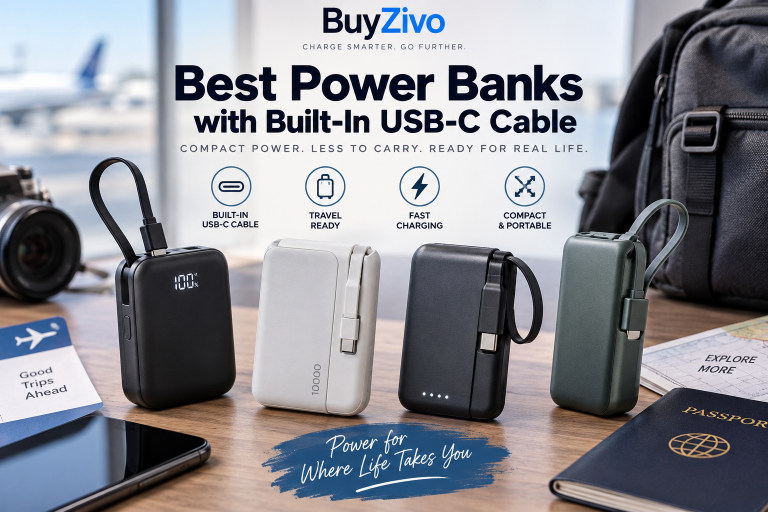
Carrying a power bank but forgetting the cable defeats much of the point of having portable power. A power bank with a built-in USB-C cable solves that problem—but the cable alone does not make it a good charger.
The best power bank with built-in USB-C cable should combine a durable integrated cable with enough USB-C output for your devices, sensible capacity, practical size, and a charging protocol that actually matches what your phone, tablet, or laptop uses.
For most people, the Anker Nano Power Bank (30W, Built-In USB-C Cable) is the most balanced choice in this group. It combines 10,000mAh capacity, up to 30W USB-C output, USB PD and PPS support, a separate USB-C port, USB-A, and a compact 215g body.
But it is not the right choice for everyone. A laptop user may need 65W or 100W USB-C output, while someone carrying only a phone may be better served by a smaller 10,000mAh model.
Best Power Banks with Built-In USB-C Cable at a Glance
Power Bank Capacity Built-In Cable Output Best For Anker Nano A1259 10,000mAh 30W max Best overall UGREEN Nexode Pro 10,000mAh Up to 45W PD-class charging Compact higher-power use Belkin BoostCharge 10K 10,000mAh 20W Basic phone charging Baseus PicoGo AC22 20,000mAh 45W High-capacity travel Anker Power Bank A1383 20,000mAh 65W max single USB-C Laptop + travel Anker Laptop Power Bank A1695 25,000mAh / 90Wh 100W max USB-C Laptop power users Maximum output does not mean every device will charge at that wattage. Actual charging power depends on the device, protocol, battery level, temperature, and how many outputs are being used.
1. Anker Nano Power Bank (30W, Built-In USB-C Cable) — Best Overall
Capacity: 10,000mAh
Maximum single-port/cable output: 30W
Built-in cable: USB-C
Other connections: USB-C + USB-A
Weight: 215g
Best for: Phones, tablets, commuting and everyday travel
The Anker Nano A1259 hits the useful middle ground for this category.
Its integrated USB-C cable supports up to 30W input and output. The separate USB-C port can also provide up to 30W, while the USB-A port reaches up to 22.5W according to Anker’s specifications. The USB-C output specifications also include PPS support up to 30W.
That combination makes it much more versatile than a basic 20W cable power bank. You can use the integrated cable most of the time while retaining standard ports when you need to connect another cable.
The body measures approximately 104 × 52.3 × 26 mm and weighs 215g, which is reasonable for a 10,000mAh battery.
Pros
- 10,000mAh is a practical everyday capacity
- 30W bidirectional USB-C cable
- USB PD and PPS support
- Separate USB-C and USB-A connections
- Display provides more information than basic LED indicators
- Compact enough for regular bag or travel use
Cons
- 30W is not ideal for higher-power USB-C laptops
- Connecting multiple devices reduces available total power
- Integrated cable remains a permanent wear point
Who should buy it?
Choose the Anker Nano if you primarily charge smartphones, earbuds, tablets, and other moderate-power USB-C devices and want one portable battery that is easy to carry every day.

2. UGREEN Nexode Pro 10,000mAh 45W — Best Compact Higher-Power Option
Capacity: 10,000mAh
USB-C charging: Up to 45W PD-class output
Built-in cable: Braided USB-C
Additional connections: USB-C + USB-A
Best for: Users wanting more output without moving to a 20,000mAh battery
The UGREEN Nexode Pro occupies an interesting position between ordinary phone power banks and larger laptop batteries.
UGREEN lists a 10,000mAh battery, 45W fast charging, an integrated braided USB-C cable, and the ability to charge three devices through the cable, USB-C port, and USB-A port.
The company also says the built-in cable has been tested for more than 10,000 bends and plug cycles. That is manufacturer testing rather than independent BuyZivo testing, so it should be treated as a durability claim rather than proof that the cable cannot fail.
Its 45W class output gives it more headroom than typical 20W–30W models, especially for tablets and some lower-power USB-C computers.
Pros
- 45W-class USB-C charging
- Compact 10,000mAh format
- Braided integrated USB-C cable
- USB-C and USB-A ports in addition to the cable
- Can power several small devices
Cons
- 10,000mAh limits endurance for laptop use
- Multi-device charging can reduce per-device power
- Higher output is unnecessary if you only charge a low-power phone
Who should buy it?
This is a strong fit if 30W feels restrictive but you still want something substantially smaller than a 20,000mAh laptop power bank.
3. Belkin BoostCharge Power Bank 10K with Integrated Cable — Best for Simple Phone Charging
Capacity: 10,000mAh
Maximum output: 20W
Built-in cable: USB-C
Additional connection: USB-C
Best for: Straightforward smartphone charging
Not everyone needs 45W, 65W, or 100W.
Belkin’s BoostCharge 10K with Integrated Cable is built around a simpler formula: 10,000mAh capacity, an integrated USB-C cable, up to 20W output, a second USB-C connection, simultaneous two-device charging, and pass-through charging. Belkin also lists a two-year warranty.
The limitation is equally clear: 20W gives you less charging headroom than the Anker Nano or UGREEN Nexode Pro.
For a phone-focused buyer who values simplicity over maximum wattage, however, that may not matter.
Pros
- Integrated USB-C cable
- Practical 10,000mAh capacity
- Second USB-C connection
- Pass-through charging
- Two-year manufacturer warranty
Cons
- 20W maximum output
- Not a good match for laptop charging
- Less performance headroom than 30W and 45W alternatives
Who should buy it?
Consider it if you mostly need reliable USB-C phone charging and do not want to pay for laptop-level output you will never use.
4. Baseus PicoGo AC22 20,000mAh 45W — Best High-Capacity Travel Option
Capacity: 20,000mAh
Maximum USB-C charging: 45W
Built-in cable: 0.66-foot braided USB-C
Best for: Longer trips and users prioritizing capacity
Moving from 10,000mAh to 20,000mAh changes the purpose of a power bank.
The Baseus PicoGo AC22 combines a 20,000mAh battery with a built-in braided USB-C cable supporting up to 45W bidirectional charging. Baseus also lists PD and QC support, Samsung fast-charging compatibility, a digital display, and a low-current mode for smaller accessories.
This makes more sense for longer travel days than a compact 10K battery, but there is an unavoidable trade-off: doubling nominal battery capacity means carrying more battery.
Also remember that 20,000mAh printed on a power bank does not mean 20,000mAh will arrive at your phone’s battery. Conversion losses occur between the internal battery cells and the output delivered to your device.
Pros
- 20,000mAh capacity
- 45W bidirectional built-in USB-C cable
- Digital display
- Low-current mode
- Suitable for phones, tablets and some USB-C laptops
Cons
- Heavier than 10,000mAh models
- 45W may still be insufficient for demanding laptops under heavy use
- Integrated cable is not user-replaceable like a detachable cable
Who should buy it?
Choose this type of power bank when runtime matters more than pocketability.
5. Anker Power Bank (20K, 87W, Built-In USB-C Cable) — Best for Laptop + Phone Travel
Capacity: 20,000mAh
Maximum USB-C cable/port output: 65W
Maximum combined output: 87W
Built-in cable: USB-C
Weight: approximately 431g
Best for: Laptop users who still want a manageable travel battery
The Anker A1383 is substantially more capable than a standard phone power bank.
Anker specifies 20,000mAh capacity, up to 65W from the built-in USB-C cable or USB-C port, USB-A output, and up to 87W total output under supported combinations. Its listed dimensions are approximately 157.5 × 73.5 × 26 mm, with a weight around 431g.
That 65W ceiling is the key difference.
Many USB-C laptops can operate or charge from a 65W USB PD source, although the laptop’s own power requirements still determine whether 65W is sufficient—especially while the computer is under heavy load.
Pros
- 20,000mAh capacity
- Up to 65W USB-C output
- Built-in USB-C cable
- Higher total output for multiple devices
- Better laptop suitability than 20W–45W models
Cons
- Around 431g is noticeably heavier than a 10K power bank
- Not enough to deliver maximum charging speed to every high-performance laptop
- Less pocket-friendly
Who should buy it?
This is the more appropriate class of power bank if you regularly travel with both a USB-C laptop and phone and want the built-in cable to handle either one.
6. Anker Laptop Power Bank (25K, 165W) — Best for High-Power Laptop Users
Capacity: 25,000mAh / 90Wh
Maximum USB-C output: 100W per supported USB-C connection
Maximum total output: 165W
Built-in cables: Two USB-C cables, including a retractable cable
Weight: 595g
Best for: Laptop-heavy travel and multi-device charging
This is less of a pocket charger and more of a portable USB-C power station for a backpack.
Anker specifies 25,000mAh capacity, equivalent to 90Wh, with three USB-C connections when its two integrated cables are counted alongside the USB-C port. Supported USB-C connections can provide up to 100W individually, while total output reaches 165W under supported combinations.
One integrated USB-C cable retracts into the body and extends to about 70cm; the other fixed cable is approximately 30cm long.
The advantage is obvious for laptop users: 100W USB-C gives considerably more charging headroom than 30W or 45W portable batteries.
The cost is portability. At approximately 595g, this is not something most people will want in a trouser pocket.
Pros
- 25,000mAh / 90Wh capacity
- Up to 100W from supported USB-C connections
- 165W maximum combined output
- Two integrated USB-C cables
- Retractable cable reduces loose-cable clutter
- Suitable for significantly more demanding USB-C devices
Cons
- Heavy at approximately 595g
- Considerably larger than 10K alternatives
- Excessive for users who only need to charge a phone
- More complex and expensive than a basic travel portable charger
Who should buy it?
Choose this class if your laptop is one of your primary travel devices and the purpose of your power bank is to replace part of your charging kit—not merely rescue your phone at the end of the day.
What Should Buyers Know About the Best Power Bank with Built-In USB-C Cable?
The best power bank with built-in USB-C cable should match the charging requirements of your devices, not simply have the largest mAh or wattage number. Check the built-in cable’s maximum output, USB PD/PPS support where relevant, battery capacity, total multi-device output, weight, additional ports, cable durability, and watt-hour rating for travel. A 10,000mAh 30W model is usually more practical for phones, while laptops may justify 45W–100W output and 20,000mAh or more.
Built-In Cable vs Separate USB-C Cable
An integrated cable eliminates one of the easiest pieces of a charging kit to forget.
There is a trade-off.
With a normal USB-C port, a damaged cable can be replaced in seconds. If an integrated cable fails, you may lose one of the power bank’s main advantages.
That is why we prefer models that retain a separate USB-C port in addition to the fixed cable. It gives you a fallback charging path and makes the battery more flexible.
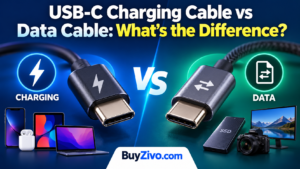
USB-IF also distinguishes USB-C cables by their supported power capabilities; compliant USB-C-to-USB-C cable categories are marked for 60W or 240W capability under the current certification framework.
For a power bank, however, the manufacturer’s specified output of the integrated charging system is what matters to the buyer. A physically USB-C-shaped cable does not automatically mean 60W, 100W, or 240W charging from the battery.
>> USB-C Cable Specifications Guide
How Much Capacity Do You Need?
10,000mAh: the everyday sweet spot
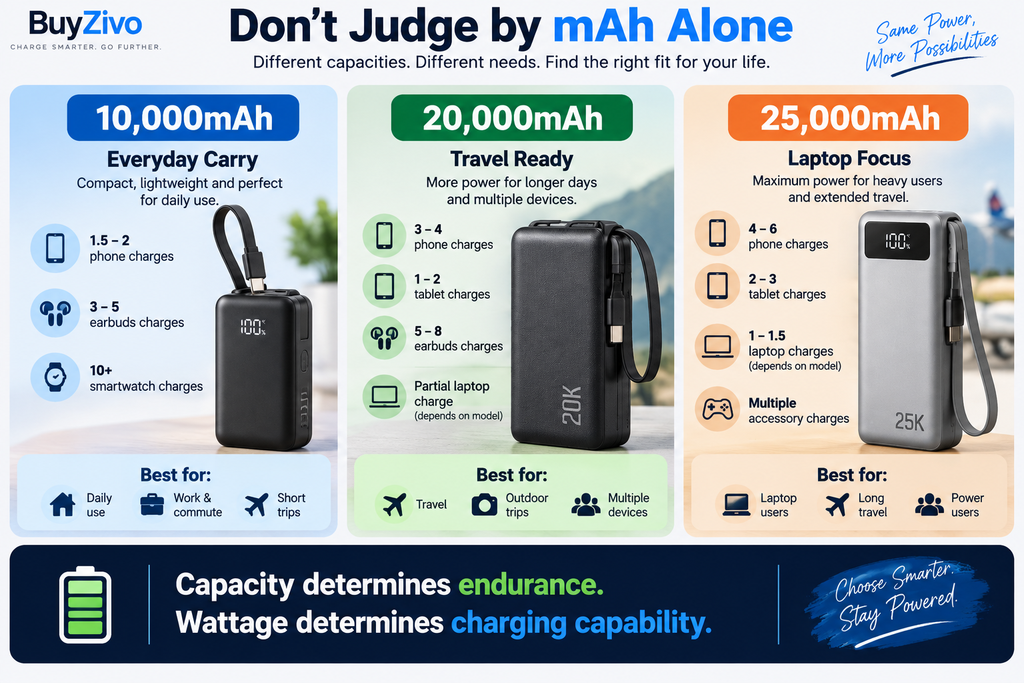
For phones and small accessories, 10,000mAh generally offers the best compromise between portability and useful reserve energy.
It is the capacity we would start with for:
- daily commuting;
- a day trip;
- phone + earbuds;
- emergency charging;
- lightweight travel.
20,000mAh: better for long travel days
Move to 20,000mAh if you regularly charge several devices, spend long periods away from outlets, or want meaningful backup energy for a tablet or laptop.
The trade-off is straightforward: more battery means more size and weight.
25,000mAh: laptop territory
A 25,000mAh battery makes more sense when laptop charging is one of the main requirements.
The Anker A1695, for example, is rated at 90Wh. That remains below the FAA’s 100Wh threshold for ordinary spare lithium-ion batteries on passenger aircraft, though airline-specific restrictions still need to be checked.
20W vs 30W vs 45W vs 65W vs 100W
Do not automatically buy the largest number.
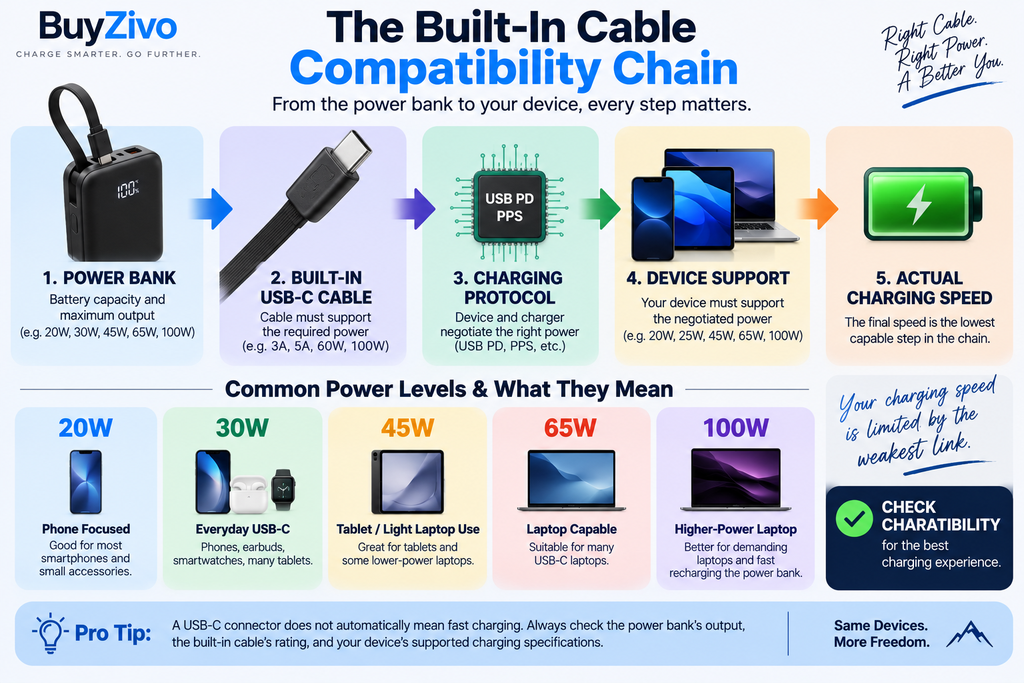
20W
Useful for basic smartphone charging.
30W
A strong general-purpose level for phones, accessories, many tablets, and some low-power USB-C devices.
45W
Provides additional headroom for tablets, some laptops, and phones that can use higher supported charging profiles.
65W
A more sensible starting point when laptop charging is a priority.
100W
Useful for more demanding USB-C laptops and faster power-bank recharging when the battery supports equivalent input.
Your device still controls what it accepts.
Connecting a 30W phone to a 100W USB-C PD power bank does not force 100W into the phone. Compatible USB Power Delivery devices negotiate supported power profiles.
Check PPS If You Use Compatible Samsung Devices
USB PD wattage alone does not tell the whole story.
Some phones rely on USB Power Delivery Programmable Power Supply, or PPS, to reach their intended fast-charging behavior.
For example, the Anker Nano A1259 explicitly lists PPS output in its USB-C specifications.
If fast charging on a particular Samsung Galaxy device is important, check both the phone’s charging requirements and the exact PPS capabilities of the power bank rather than relying on a generic “fast charging” label.
Do Not Confuse Single-Port Output with Total Output
This is one of the easiest specifications to misunderstand.
A power bank may advertise “30W” because one USB-C connection can reach 30W, but its total output can fall when several devices are attached.
The Anker Nano A1259, for example, specifies up to 30W from a single USB-C connection but 24W maximum total output in its multi-output specification.
That distinction matters if you expect to fast-charge a phone and tablet simultaneously.
When comparing products, check:
- maximum built-in cable output;
- maximum separate USB-C output;
- total combined output.
Are Power Banks with Built-In Cables Safe for Air Travel?
For U.S. aviation rules, the FAA treats power banks as spare lithium batteries.
Power banks must be carried in carry-on baggage, not checked baggage. Rechargeable lithium-ion batteries rated from 0–100Wh are generally permitted for passenger use; batteries from 101–160Wh require airline approval, and batteries above 160Wh are prohibited on passenger aircraft under the FAA guidance. Airlines may impose additional restrictions.
That is why watt-hours are more useful than mAh alone when evaluating a travel power bank.
The FAA gives the basic calculation:
Wh = volts × amp-hours
If capacity is stated in mAh, divide it by 1,000 to convert it to Ah before calculating watt-hours.
Always check the rating printed on the actual power bank and confirm your airline’s current rules before flying.
Safety: Look Beyond Marketing Phrases
Terms such as “multi-protection,” “smart safety,” and “temperature control” can describe useful features, but they are not substitutes for a recognized safety certification.
UL Solutions’ UL 2056 standard specifically covers power banks and addresses areas including overcharge/discharge protection, short-circuit and overload testing, mechanical impacts, and thermal safety.
That does not mean every power bank in this guide is UL 2056 certified. Unless a specific certification is verified for the exact model, it should not be implied.
When shopping, distinguish among:
- a manufacturer’s built-in protection features;
- regulatory declarations;
- independent safety testing;
- and formal third-party certification.
They are not interchangeable.
What About the Cable’s Durability?
This is the biggest long-term question with integrated-cable designs.
Manufacturers increasingly publish bend-cycle claims. UGREEN, for example, states that the Nexode Pro’s integrated braided cable has been tested for more than 10,000 bends and plug cycles.
Such numbers are useful context, but they are manufacturer test claims. Real-world lifespan depends on how the cable is bent, pulled, stored, exposed to heat, and used as a carrying strap.
A sensible design therefore has two advantages:
- the cable stores securely against the body; and
- the power bank still has a normal USB-C port if the integrated cable becomes unusable.
How We Selected These Power Banks
BuyZivo did not claim physical hands-on testing for this guide.
Selections were based on verified manufacturer documentation and practical buying criteria, including:
- current product availability;
- built-in USB-C cable design;
- battery capacity;
- USB-C input/output specifications;
- USB PD and PPS information where available;
- additional charging ports;
- total versus single-port output;
- size and weight;
- travel practicality;
- manufacturer warranty information where documented;
- and whether each product serves a meaningfully different buyer.
Prices were deliberately left out of the ranking because retail pricing and promotions can change quickly.
Use the purchase links to check current pricing and availability before ordering.
FAQ
Is a power bank with a built-in USB-C cable worth it?
Yes, particularly for commuting and travel. It removes the need to remember a separate USB-C cable. The trade-off is repairability: a detachable cable is easy to replace, while an integrated cable usually is not. A model that also includes a standard USB-C port offers the best fallback.
Is 10,000mAh enough for a power bank?
For most phone users, 10,000mAh is a practical balance of capacity and portability. A 20,000mAh model is more appropriate for extended travel, several devices, or laptop charging.
Can a built-in USB-C power bank charge a laptop?
Some can. The connector alone does not determine compatibility. Check whether the laptop accepts USB-C charging and compare its power requirements with the power bank’s USB-C output. Models offering around 65W–100W are generally much more appropriate for laptop use than 20W–30W phone-focused batteries.
Does a 100W power bank damage a 30W phone?
With properly implemented compatible USB-C Power Delivery charging, the device and power source negotiate supported power rather than the power bank simply forcing its maximum rated wattage into the phone.
Should I choose 20,000mAh instead of 10,000mAh?
Choose 20,000mAh when extra runtime matters more than weight. For daily phone charging, 10,000mAh is usually easier to carry. For laptops, multiple devices, or long travel days, 20,000mAh provides more useful reserve energy.
Can I put a power bank in checked luggage?
Under current FAA guidance, spare lithium batteries including power banks must be carried in carry-on baggage and cannot be placed in checked baggage. Check your airline as well because carrier-specific restrictions can be stricter.
Does built-in USB-C mean fast charging?
No. USB-C describes the connector. Charging speed depends on the power bank’s supported output, charging protocol, cable capability, and the receiving device.
Final Verdict
For most buyers, a 10,000mAh power bank with roughly 30W–45W USB-C output is the most practical version of this category. It gives you useful phone and tablet charging without turning the power bank into another heavy item in your bag.
The Anker Nano Power Bank A1259 is our main recommendation because its 10,000mAh capacity, 30W bidirectional built-in USB-C cable, PD/PPS support, separate USB-C port, USB-A port, and 215g weight make it a balanced everyday option.
Choose the UGREEN Nexode Pro if you want more charging headroom in a 10K design.
Move to the Baseus PicoGo AC22 when 20,000mAh capacity matters more than pocketability.
For laptop charging, the Anker A1383 20K/87W provides up to 65W from USB-C, while the much larger Anker A1695 25K/165W is the better fit when 100W USB-C output and multi-device laptop travel are the priority.
The important part is not simply buying a power bank with a cable attached.
Match the built-in cable’s actual output, charging protocol, capacity, and total power to the devices you intend to carry.
Sources and Verification
For the first two options, consult the official Anker Nano A1259 specifications and UGREEN Nexode Pro 10,000mAh product page. Before ordering any model in this guide, match the model number, regional version, cable output and multi-device limits to the manufacturer’s current documentation. Manufacturer specifications and durability claims are not independent BuyZivo test results.