Buying a USB-C charger should be simple, but the market is filled with confusing wattage claims, unfamiliar charging standards, and products that promise more than they deliver. Some chargers advertise extremely high power that your phone cannot even use, while others lack the safety features expected from reputable manufacturers.
If you’re wondering what you should know about the best USB-C charger, the short answer is this: choose a charger that supports USB Power Delivery (USB PD) from a trusted manufacturer, provides enough power for your device, includes appropriate safety protections, and ideally carries USB-IF certification or complies with recognized safety standards. More wattage does not automatically mean faster charging.
This guide explains what actually matters when choosing a USB-C charger, how USB PD and PPS affect charging performance, which features are worth paying for, and which marketing claims you can safely ignore. The recommendations are based on publicly available documentation from manufacturers and guidance from organizations such as the USB Implementers Forum (USB-IF), Apple, Samsung, Google, and UL Solutions.
Whether you use an iPhone, Samsung Galaxy, Google Pixel, OnePlus, Motorola, or another USB-C smartphone, this guide will help you make a smarter purchase.
Quick Answer
The best USB-C charger is one that matches your phone’s charging capabilities rather than simply offering the highest wattage.
For most modern smartphones, look for:
- USB Power Delivery (USB PD) support
- PPS support if your phone benefits from it
- 25W–45W output for most users
- A reputable manufacturer
- Proper safety protections
- USB-C port instead of older USB-A
- Genuine compliance with applicable safety standards
Compact GaN chargers are often the best choice because they deliver high power while remaining smaller and cooler than many traditional silicon chargers.
Key Takeaways
- USB Power Delivery is the most widely supported fast-charging standard for modern smartphones.
- A higher wattage charger is generally safe if your device supports USB PD because the phone determines how much power it draws.
- PPS (Programmable Power Supply) can improve charging efficiency on compatible Android devices, including many Samsung Galaxy phones.
- GaN chargers are smaller and often more efficient but are not automatically faster than traditional chargers.
- USB-IF certification is voluntary and indicates interoperability with USB standards. Not every quality charger carries USB-IF certification.
- Regulatory markings such as CE indicate compliance with applicable regulations but should not be confused with independent product certification.
- Buying from established manufacturers helps reduce the risk of counterfeit or poorly designed chargers.
What Is a USB-C Charger?
A USB-C charger is a power adapter that uses the USB Type-C connector to deliver electricity to compatible devices. Unlike older USB-A chargers, USB-C supports significantly higher power levels, faster data transfer, and modern charging protocols such as USB Power Delivery.
Today, USB-C is used by:
- Android smartphones
- iPhone 15 series and newer
- Tablets
- Laptops
- Wireless earbuds
- Portable gaming devices
- Many accessories
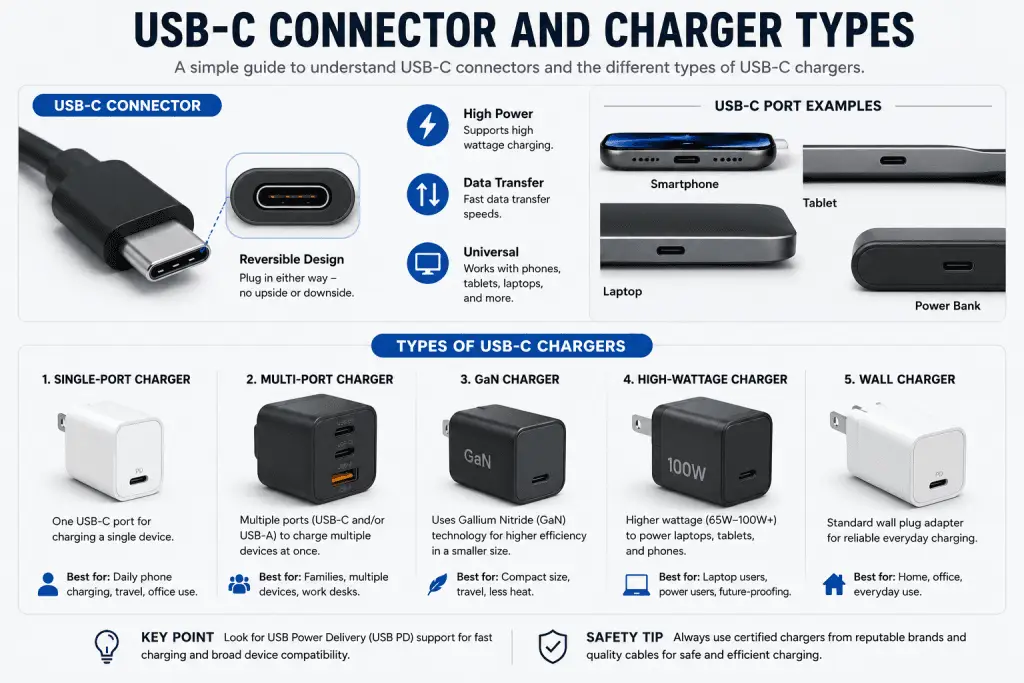
One of the biggest advantages of USB-C is versatility. A single charger can often power multiple types of devices, reducing cable clutter and making travel more convenient.
However, not every USB-C charger performs the same. Some only provide basic charging, while others support advanced protocols that allow compatible devices to charge much faster.
Why USB-C Has Become the Standard
The transition from older USB connectors to USB-C has simplified charging across many device categories.
Compared with previous USB connectors, USB-C offers several practical benefits:
| Feature | USB-C | Older USB-A |
|---|---|---|
| Reversible connector | Yes | No |
| USB Power Delivery support | Yes | Limited |
| Higher power capability | Yes | Limited |
| Modern smartphone compatibility | Excellent | Decreasing |
| Laptop charging support | Yes | Rare |
Manufacturers including Apple, Samsung, Google, Lenovo, Dell, ASUS, and many others now rely heavily on USB-C across their product lines.
For smartphone owners, this means one charger may be able to charge a phone, tablet, headphones, Nintendo Switch, and even some laptops, depending on the charger’s power output.
Understanding USB Power Delivery (USB PD)
USB Power Delivery, commonly called USB PD, is the industry’s standardized fast-charging protocol developed by the USB Implementers Forum (USB-IF).
Unlike proprietary charging systems that may only work with specific brands, USB PD is designed to improve compatibility across devices from different manufacturers.
When you connect a USB PD charger, the charger and the device communicate before charging begins. They negotiate a suitable voltage and current based on what both devices support. This helps deliver appropriate power without forcing the charger to operate at its maximum output.
For example:
- A 45W USB PD charger can safely charge a phone that only requires 20W.
- A tablet may draw more power from the same charger.
- A compatible laptop may use an even higher power profile if supported.
This intelligent negotiation is one of the reasons USB PD has become the preferred charging standard for many smartphones, tablets, and laptops.
According to USB-IF documentation, USB Power Delivery supports multiple power profiles and allows compatible devices to negotiate power dynamically instead of relying on fixed charging behavior.
What About PPS?
Some Android manufacturers, particularly Samsung, also support Programmable Power Supply (PPS), an optional feature within the USB PD specification.
Instead of using only fixed voltage levels, PPS allows supported chargers to adjust voltage more precisely during charging. This can improve charging efficiency and help reduce excess heat on compatible devices.
Apple does not currently advertise PPS support for iPhones, while many recent Samsung Galaxy devices benefit from PPS-compatible chargers. Google Pixel devices primarily rely on USB PD, with support varying by model according to Google’s official documentation.
What Makes a Great USB-C Charger?
The best USB-C charger is not necessarily the one with the highest wattage or the most ports. Instead, it balances safety, compatibility, reliability, and practical performance.
When evaluating a charger, prioritize these factors:
USB Power Delivery Support
USB PD compatibility should be your starting point. It provides the broadest compatibility across smartphones, tablets, and many laptops.
Appropriate Wattage
For most smartphones, a charger between 25W and 45W provides an excellent balance of speed and future compatibility. Buying a 100W charger solely for a phone usually offers little real-world benefit unless you also charge larger devices.
Trusted Manufacturer
Established brands generally publish clearer specifications, provide firmware and compatibility updates where applicable, and are more transparent about safety testing. Always verify specifications on the manufacturer’s official website rather than relying solely on marketplace listings.
Safety Protections
Look for documented protections such as:
- Overcurrent protection
- Overvoltage protection
- Overtemperature protection
- Short-circuit protection
Manufacturers often list these protections in their official product documentation. Their presence alone does not guarantee certification, but reputable brands typically explain the safety mechanisms built into their products.
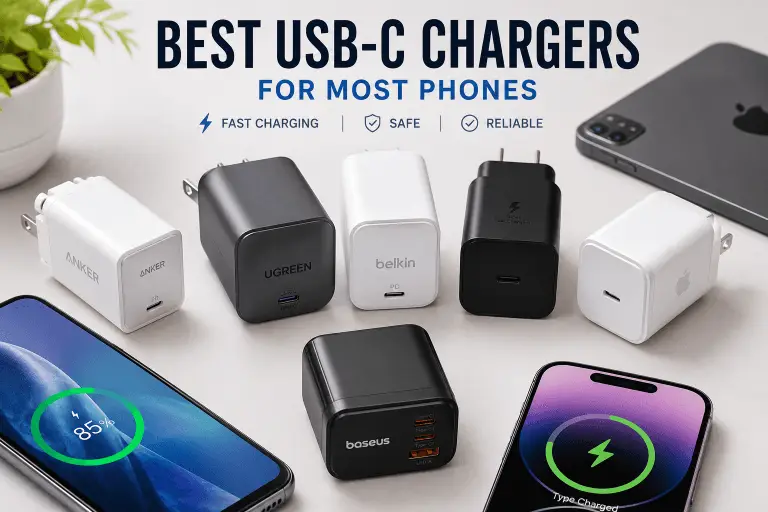
Best USB-C Chargers for Most Phones
There is no single “best” USB-C charger for everyone. The right choice depends on your phone, how many devices you charge, whether you travel frequently, and whether you also need to charge tablets or laptops.
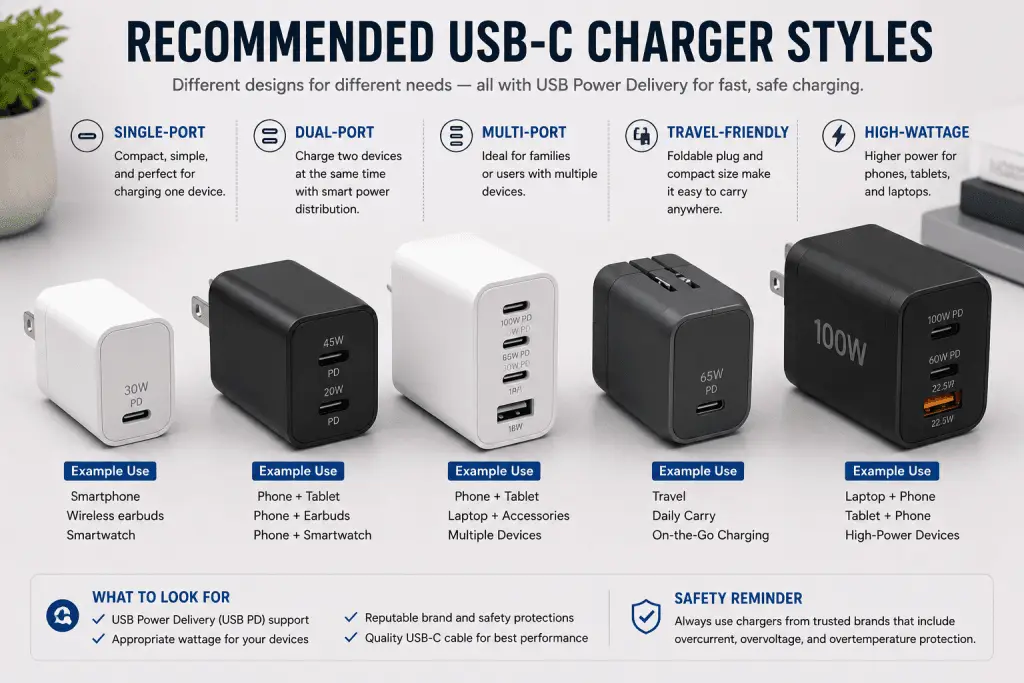
The recommendations below are based on official manufacturer specifications, supported charging standards, published safety information, and overall reputation. They are research-based recommendations, not hands-on test results by BuyZivo.
1. Anker Anker 313 Charger (Ace, 45W)
Best for
Most Android phones and iPhone users looking for an affordable single-port USB-C charger.
Why it’s recommended
According to Anker’s official specifications, the 313 Charger supports USB Power Delivery and provides up to 45W output from a single USB-C port. That is more than enough for virtually every modern smartphone and many tablets.
Its compact design also makes it suitable for travel.
Pros
- USB PD support
- Compact design
- Reliable brand reputation
- Suitable for phones and tablets
- Can charge some USB-C laptops
Cons
- Single charging port
- No extra USB-A port for older accessories
2. UGREEN Nexode 45W GaN Charger
Best for
Travelers who want a small charger without sacrificing charging capability.
Why it’s recommended
UGREEN’s Nexode series uses gallium nitride (GaN) technology, allowing a smaller charger body than many traditional silicon chargers with similar output.
According to UGREEN’s documentation, this model supports USB Power Delivery and PPS for compatible devices.
Pros
- Compact GaN design
- USB PD support
- PPS support
- Good travel option
Cons
- Usually costs more than basic chargers
- Single USB-C port on some versions
3. Belkin BoostCharge USB-C PD Charger
Best for
Users who prioritize brand reputation and broad device compatibility.
Why it’s recommended
Belkin has long produced Apple-certified accessories while also supporting Android devices through USB Power Delivery.
Many BoostCharge models include USB PD support and are designed for iPhone, Samsung Galaxy, Google Pixel, and other USB-C devices.
Pros
- Excellent compatibility
- Strong manufacturer reputation
- Available in several wattage options
- Good build quality
Cons
- Often more expensive than competing brands
4. Apple 20W USB-C Power Adapter
Best for
iPhone users.
Why it’s recommended
Apple recommends its own USB-C Power Adapter for fast charging compatible iPhone models when paired with an appropriate USB-C cable.
Although limited to 20W output, that is sufficient for Apple’s advertised fast charging on supported iPhones.
Pros
- Official Apple accessory
- Excellent compatibility
- Compact
- Reliable
Cons
- Lower wattage than many third-party chargers
- Single port only
5. Samsung 45W Super Fast Charging Power Adapter
Best for
Samsung Galaxy users.
Why it’s recommended
Samsung states that certain Galaxy smartphones achieve their highest supported wired charging speeds only when paired with compatible Super Fast Charging adapters supporting USB PD with PPS.
This charger is designed specifically for that purpose.
Pros
- Supports PPS
- Official Samsung accessory
- Excellent Galaxy compatibility
Cons
- Best performance mainly benefits Samsung devices
- Costs more than many generic chargers
6. Baseus GaN5 Fast Charger
Best for
Users needing multiple ports.
Why it’s recommended
Baseus offers several GaN chargers with combinations of USB-C and USB-A ports. Many support USB PD while allowing multiple devices to charge simultaneously.
Always verify the exact model specifications because charging capabilities vary between versions.
Pros
- Multiple ports
- Compact GaN design
- USB PD support on many models
Cons
- Performance differs by model
- Power is shared when multiple devices are connected
Quick Comparison
| Charger | Best For | USB PD | PPS | GaN | Multi-Port |
|---|---|---|---|---|---|
| Anker 313 45W | Most users | ✅ | Some versions | No | No |
| UGREEN Nexode 45W | Travel | ✅ | ✅ | Yes | No |
| Belkin BoostCharge | Reliability | ✅ | Model dependent | Some models | Some models |
| Apple 20W | iPhone | ✅ | No | No | No |
| Samsung 45W | Galaxy phones | ✅ | ✅ | No | No |
| Baseus GaN5 | Multiple devices | ✅ | Model dependent | Yes | Yes |
Note: Specifications vary by model and region. Always confirm the official product page before purchasing.
Single-Port vs Multi-Port Chargers
Many buyers assume more ports automatically make a charger better. In reality, the best choice depends on how you use it.
Single-Port Chargers
Ideal if you mostly charge one phone at a time.
Advantages include:
- Maximum available power goes to one device
- Smaller size
- Lower cost
- Less complex power management
Recommended for:
- Daily phone charging
- Office desks
- Bedside charging
- Most smartphone users
Multi-Port Chargers
These are useful when you regularly charge multiple devices.
For example:
- Smartphone
- Smartwatch
- Wireless earbuds
- Tablet
- Laptop
However, many multi-port chargers redistribute power between connected devices. A USB-C port capable of 65W alone may provide much less when another device is plugged in.
Manufacturers usually publish power distribution charts showing how output changes with multiple connections.
GaN vs Traditional Chargers
One of the biggest marketing terms you’ll encounter is GaN.
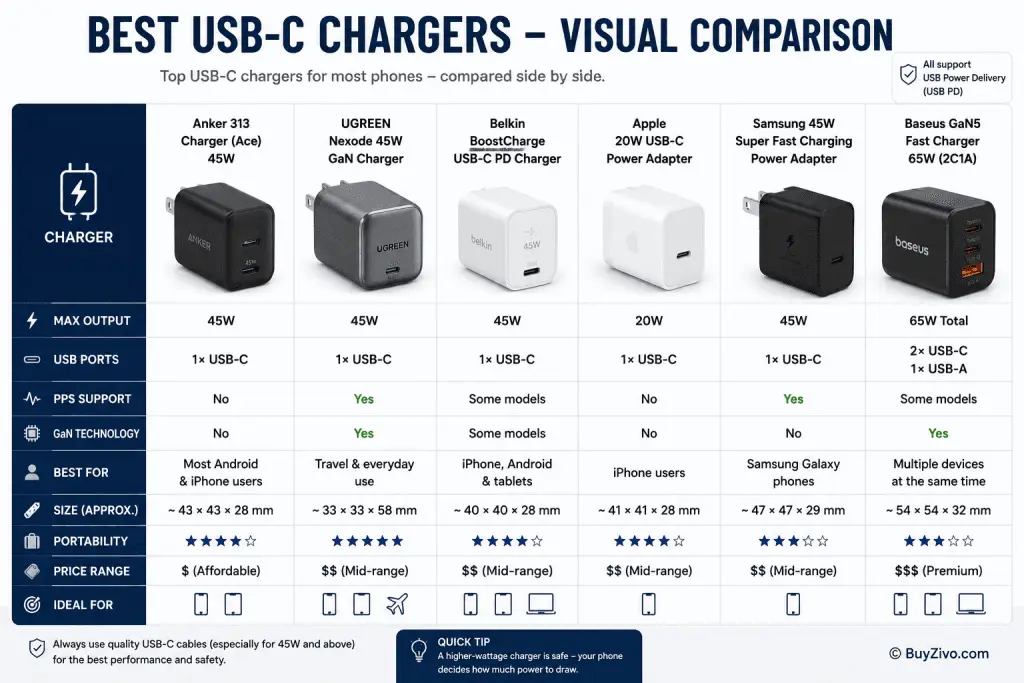
But what exactly is it?
GaN stands for Gallium Nitride, a semiconductor material that can replace traditional silicon in certain power electronics.
For consumers, the biggest advantages are physical rather than charging speed.
Advantages of GaN
- Smaller charger size
- Better efficiency
- Less wasted heat
- Easier to carry while traveling
- Higher power in a compact body
What GaN Does NOT Do
Many advertisements imply GaN chargers charge your phone dramatically faster.
That is not necessarily true.
Charging speed depends primarily on:
- Your phone
- Supported charging protocol
- Battery temperature
- USB PD negotiation
- Cable quality
A 30W GaN charger and a 30W traditional charger can deliver essentially the same charging speed if both fully support the required charging protocol.
The main difference is that the GaN charger is usually smaller and often runs more efficiently.
How Much Wattage Do You Actually Need?
Buying the highest wattage available is rarely necessary.
Here’s a practical guide.
| Device | Recommended Charger |
|---|---|
| iPhone | 20W–30W USB PD |
| Samsung Galaxy | 25W–45W USB PD with PPS (depending on model) |
| Google Pixel | 30W USB PD |
| Most Android phones | 25W–45W USB PD |
| Tablet | 30W–45W |
| USB-C Laptop | 65W–100W or manufacturer recommendation |
Remember:
A higher-wattage USB PD charger is generally safe because compatible devices negotiate the amount of power they need. For example, using a 65W USB PD charger with a phone that only draws around 25W does not force the phone to charge at 65W.
Safety Features That Matter
Marketing often focuses on charging speed, but safety deserves equal attention.
Look for chargers that clearly document protections such as:
- Overcurrent Protection (OCP)
- Overvoltage Protection (OVP)
- Overtemperature Protection (OTP)
- Short Circuit Protection (SCP)
- Overpower Protection (OPP)
These protections are commonly listed in official specifications from reputable manufacturers.
USB-IF Support
USB-IF certification is voluntary and demonstrates that a product has been tested for compliance with applicable USB standards. While many high-quality chargers are USB-IF certified, not all reputable products carry this certification. If a charger claims USB-IF certification, you can verify certified products through the USB Implementers Forum’s official Integrators List.
UL and Other Safety Certifications
Some manufacturers also obtain independent safety certifications from organizations such as UL Solutions for certain products or markets.
Keep in mind that:
- UL Listing or UL Certification is an independent third-party evaluation where applicable.
- CE marking is a manufacturer’s declaration that a product complies with relevant European Union requirements. It is not an independent certification.
Understanding this distinction can help you avoid misleading marketing claims.
Compatibility Guide
One of the biggest advantages of a quality USB-C charger is that it can work with a wide range of devices. However, compatibility depends on the charging protocol supported by both the charger and the device.
iPhone Compatibility
Apple recommends USB-C Power Delivery (USB PD) chargers for fast charging compatible iPhone models. According to Apple Support, a USB-C power adapter rated at 20W or higher can fast charge supported iPhones when paired with an appropriate USB-C cable.
Recommended charger:
- 20W–30W USB PD for most users
- 30W–45W if you also charge an iPad or MacBook Air
Samsung Galaxy Compatibility
Many recent Samsung Galaxy smartphones support Super Fast Charging, which relies on USB PD with PPS (Programmable Power Supply).
If you use a charger that supports USB PD but not PPS, your phone may still fast charge, but it may not reach Samsung’s highest advertised charging speed on supported models.
Recommended charger:
- 25W USB PD with PPS
- 45W USB PD with PPS for supported Galaxy Ultra models
Always check your specific Galaxy model’s charging specifications on Samsung’s official support page.
Google Pixel Compatibility
Google recommends USB Power Delivery chargers for Pixel devices. Many Pixel phones support charging speeds up to approximately 30W depending on the model, battery level, and charging conditions.
Recommended charger:
- 30W USB PD charger
Other Android Phones
Manufacturers such as Motorola, Nothing, Sony, ASUS, Nokia, and many others increasingly support USB PD, although some brands continue to use proprietary fast-charging technologies.
If your phone uses a proprietary system (for example, some OnePlus, OPPO, vivo, or Xiaomi models), a USB PD charger will usually still charge the device safely but may not achieve the manufacturer’s maximum advertised charging speed unless the required proprietary protocol is also supported.
When in doubt, consult the phone manufacturer’s documentation.
How to Avoid Marketing Tricks
USB-C chargers often come with impressive-sounding claims that don’t always translate into better real-world performance. Here are some common marketing tactics to watch for.
“100W Is Better for Every Phone”
Not necessarily.
A phone only draws the power it is designed to accept. Buying a 100W charger solely for a smartphone usually won’t make it charge faster than a good 30W or 45W USB PD charger.
A higher-wattage charger only makes sense if you also charge tablets, laptops, or multiple devices.
“GaN Means Faster Charging”
GaN primarily improves the charger’s size and efficiency. It does not automatically increase charging speed.
If two chargers provide the same USB PD output and your phone supports the same protocol, charging performance is likely to be very similar.
“More Ports Mean Better Value”
Additional ports are convenient, but they often share the available power.
For example:
- One device connected: 65W available
- Two devices connected: Power may be split into 45W + 20W
- Three devices connected: Even lower output per port
Always review the manufacturer’s power distribution chart before buying.
“Fast Charging Works with Every Cable”
This is another common misconception.
Even the best USB-C charger cannot deliver optimal performance if paired with a poor-quality cable.
For USB PD charging:
- Use a reputable USB-C cable.
- Higher-power chargers may require a cable rated for the appropriate current.
- Some high-power USB-C cables include an E-Marker chip, which helps devices negotiate safe power levels for higher-wattage charging.
For more guidance, see BuyZivo’s USB-C Cable Buying Guide.
Buying Advice
Choosing the best USB-C charger doesn’t have to be complicated. Focus on the features that genuinely affect safety, compatibility, and everyday convenience.
What Matters Most
USB Power Delivery Support
USB PD remains the most important feature because it provides broad compatibility across modern smartphones, tablets, and many laptops.
Appropriate Wattage
Choose a charger that matches your current and future needs.
- 20W–30W: Most iPhones
- 25W–45W: Most Android phones
- 65W or higher: Phones plus laptops
Manufacturer Reputation
Buy from companies that publish clear technical specifications, maintain official support pages, and have a history of producing reliable charging accessories.
Safety Documentation
Look for documented protection features and avoid products that make vague claims without technical details.
Features That Matter Less
Many shoppers spend too much time comparing features that have little impact on daily use.
Examples include:
- Extremely high wattage for phone-only charging
- Fancy LED lighting
- Aggressive marketing phrases without technical explanations
- Claims of “universal fastest charging” without protocol details
Instead, prioritize compatibility and safety over flashy advertising.
Which Charger Fits Your Needs?
| User Type | Recommended Charger |
|---|---|
| iPhone owner | 20W–30W USB PD |
| Samsung Galaxy user | 25W–45W USB PD with PPS |
| Google Pixel owner | 30W USB PD |
| Frequent traveler | Compact 30W–45W GaN charger |
| Family with multiple devices | 65W+ multi-port GaN charger |
| Laptop and phone user | 65W–100W USB PD charger |
Common Mistakes When Buying a USB-C Charger
Avoiding these mistakes can save money and reduce frustration.
Buying Based Only on Wattage
Higher wattage doesn’t guarantee faster charging.
Ignoring Charging Protocols
USB PD and PPS compatibility often matter more than the advertised wattage.
Using Poor-Quality Cables
A charger is only one part of the charging system. Low-quality cables can reduce charging performance or fail to support higher power levels.
Choosing Unknown Brands Solely Because They’re Cheap
A very inexpensive charger may omit important safety features or provide inaccurate specifications.
Whenever possible, buy from manufacturers that publish detailed technical documentation and offer customer support.
Assuming Every USB-C Charger Is Identical
USB-C refers to the connector type, not the charging capability.
Two chargers with USB-C ports can support completely different power levels and charging standards.
Frequently Asked Questions
What is the best USB-C charger for most phones?
For most users, a u003cstrongu003e25W to 45W USB PD chargeru003c/strongu003e from a reputable manufacturer provides the best balance of compatibility, charging speed, and long-term value.
Is a 65W charger safe for a phone?
Yes. A compatible USB Power Delivery charger negotiates the appropriate power level with the phone. Using a higher-capacity USB PD charger does not force the phone to draw more power than it supports.
Is USB PD better than proprietary fast charging?
USB PD offers excellent compatibility across many brands. Some manufacturers also use proprietary charging systems that may achieve higher charging speeds on their own devices, but USB PD remains the most widely supported open standard.
Do I need a GaN charger?
Not necessarily.u003cbru003eGaN chargers are ideal if you want a smaller, more travel-friendly charger or need higher power in a compact size. Traditional chargers can still provide excellent charging performance.
Does every USB-C charger support fast charging?
No.u003cbru003eSome USB-C chargers only provide basic power output. Look for explicit support for u003cstrongu003eUSB Power Delivery (USB PD)u003c/strongu003e and, if needed for your device, u003cstrongu003ePPSu003c/strongu003e.
Can one USB-C charger charge my phone, tablet, and laptop?
Yes, provided the charger supplies enough power and each device supports compatible charging standards. A u003cstrongu003e65W or higher USB PD chargeru003c/strongu003e is often a practical choice for users who charge multiple types of devices.
Final Recommendation
The best USB-C charger is one that matches your device’s charging capabilities, supports USB Power Delivery, and comes from a manufacturer with a strong reputation for safety and reliability.
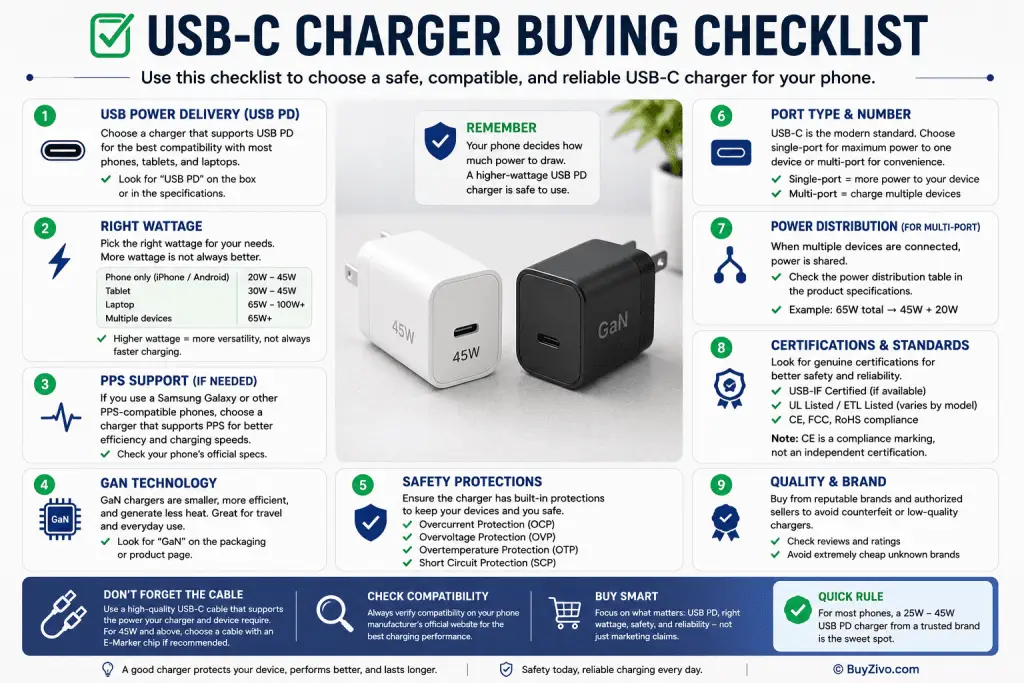
For most smartphone users, a 25W to 45W USB PD charger is the sweet spot. It delivers fast charging for modern phones while offering enough flexibility for tablets and future devices. If you frequently travel or charge several devices, a compact GaN charger with multiple USB-C ports can be an excellent investment.
Don’t be distracted by oversized wattage claims or flashy marketing. Instead, focus on charging standards, documented safety features, and verified compatibility. A well-chosen USB-C charger will serve you reliably for years across multiple devices.
Conclusion
Finding the right USB-C charger isn’t about buying the most expensive or highest-wattage model. It’s about choosing a charger that supports the right charging standards, matches your devices, and comes from a trusted manufacturer.
By understanding USB Power Delivery, PPS, GaN technology, and essential safety features, you can confidently avoid misleading marketing and invest in a charger that delivers dependable everyday performance.
Before purchasing, compare the official specifications, confirm compatibility with your phone, and always use a quality USB-C cable to get the best results.