Affiliate Disclosure: This article may contain affiliate links. If you purchase through these links, BuyZivo may earn a commission at no extra cost to you. Our recommendations are based on manufacturer specifications, published standards, and independent research rather than paid promotions.
⚡ Quick Summary
Best for: Buyers deciding whether a 65W charger is sufficient for their phone, tablet, and USB-C laptop—or whether a 100W charger offers worthwhile extra capacity.
Main recommendation: Choose a 65W USB-C charger for most phones, tablets, and thin-and-light laptops, especially when charging one main device at a time. Choose a 100W charger if your laptop recommends more than 65W, supports faster charging at higher wattage, or will be charged alongside a phone or tablet.
Important: Wattage alone does not determine charging performance. Verify USB Power Delivery support, PPS compatibility where required, each port’s maximum output, multi-port power allocation, and your laptop’s recommended charging wattage. For full output above 60W, use an appropriately rated 5A e-marked USB-C cable.
Buying advice: A GaN charger can provide higher power in a relatively compact design, but “GaN” does not guarantee better compatibility or safety. Choose a reputable manufacturer that publishes complete output specifications, power-sharing details, warranty information, and verifiable safety or compliance claims.
Research basis: This comparison uses official technical guidance from USB-IF, Apple Support, Samsung Support, Google Support, UL Solutions, and current manufacturer documentation. No physical hands-on testing is claimed.
Table of Contents
Introduction
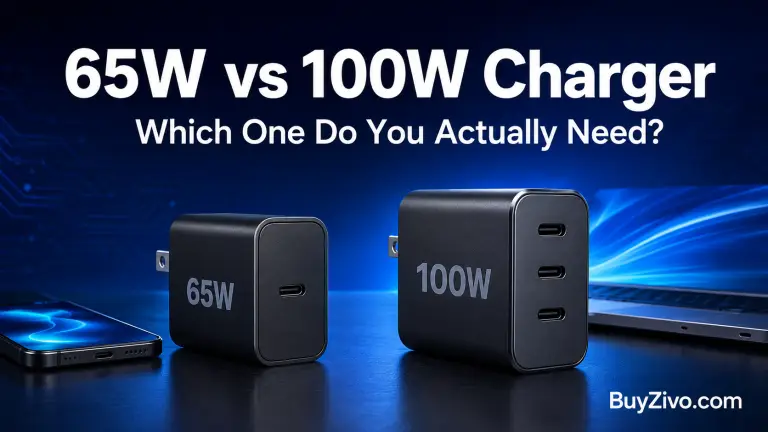
A 65W charger is enough for most people. It can fast-charge phones, tablets, handheld devices, and many thin-and-light USB-C laptops. It is usually smaller and less expensive than a comparable 100W model.
Choose a 100W charger if your laptop recommends more than 65W, you want faster charging on a compatible performance laptop, or you regularly charge a laptop and other devices from one adapter.
The number printed on the charger is only its maximum output. Your device controls how much power it accepts, while the charger’s protocols, individual port limits, cable, and multi-port power allocation determine what you actually receive.
65W vs 100W Charger: Quick Verdict
Choose a 65W charger if…
Choose a 100W charger if…
You have a phone, tablet, or ultraportable laptop
Your laptop recommends more than 65W
You normally charge one main device at a time
You charge a laptop and phone simultaneously
Portability and lower cost matter most
You want more power headroom
Your laptop’s original adapter is 45W–65W
Your compatible laptop can use 90W–100W
You do not need maximum charging speed under load
A 65W supply struggles while the laptop is working
BuyZivo’s recommendation: Start with the wattage specified by your laptop manufacturer. If that requirement is 65W or less and you normally connect one device, buy the 65W charger. Move to 100W when your device or multi-device routine can make use of the additional capacity.
What Does the Wattage Rating Actually Mean?
Watts measure electrical power. A “100W charger” can provide up to 100W under a supported voltage-and-current combination, but it does not continuously push 100W into everything connected to it.
USB Power Delivery allows a charger and device to negotiate a compatible power level. A phone that needs 20W does not receive 100W simply because it is connected to a 100W adapter. It requests a supported level, subject to its own charging design, temperature, battery state, charger protocol, and cable capability.
USB-IF says USB Power Delivery originally supported up to 100W at 20V using 5A-rated USB-C cables. USB PD 3.1 subsequently expanded the standard to as much as 240W through Extended Power Range. That broader standard does not mean every charger, cable, or laptop supports every available level. (USB-IF)
The practical difference in this comparison is therefore available capacity, not a guaranteed 35W increase at the device.
The Differences That Matter
1. Laptop charging
A 65W charger is a natural match for laptops originally supplied with a 45W, 60W, 61W, or 65W USB-C adapter. This includes many ultraportable and business laptops, although the exact requirement must be checked for each model.
A 100W charger becomes useful when:
The original adapter is rated around 90W, 96W, or 100W.
The laptop supports faster charging above 65W.
The computer loses battery charge during demanding work when powered by 65W.
You want enough total capacity for the laptop and another device.
Apple illustrates why model-specific checking matters. Its current support guidance lists 67W, 70W, 96W, and 140W combinations for fast-charging different MacBook Air and MacBook Pro models. Apple identifies 96W as a fast-charge option for compatible 14-inch MacBook Pro models, while compatible 16-inch MacBook Pro models use a 140W adapter for fast charging. (Apple Support)
A 100W charger can therefore be a meaningful step up for a compatible 14-inch MacBook Pro, but it is still not equivalent to the 140W solution specified for maximum fast charging on certain 16-inch models.
Apple also advises using an adapter with equal or greater wattage than the one supplied with a Mac. A lower-wattage adapter may still charge it, but charging can be slower. (Apple Support)
The same principle applies beyond MacBooks: consult the laptop’s official specifications or original adapter before buying.
2. Phone and tablet charging
For phones, the jump from 65W to 100W usually provides no direct speed advantage. Most phones accept far less than 65W over standard USB PD, and some require a particular protocol to reach their advertised maximum.
For example, Google states that the Pixel 9 and Pixel 9 Pro can reach up to 27W wired, while the Pixel 9 Pro XL can reach up to 37W under Google’s stated test conditions using its 45W USB-C charger. A 100W label alone cannot make those models accept 100W. (Google Support)
Samsung’s 45W charging is another useful warning against shopping by wattage alone. Samsung identifies USB PD 3.0, Programmable Power Supply support, and an appropriate 5A cable as relevant to its 45W Super Fast Charging 2.0 implementation. A generic 65W or 100W charger without the required PPS output may charge a compatible Galaxy device more slowly than expected. (Samsung)
For a phone-only purchase, protocol compatibility is usually more important than choosing 100W instead of 65W.
3. Charging several devices
Multi-device use is the strongest general reason to buy 100W.
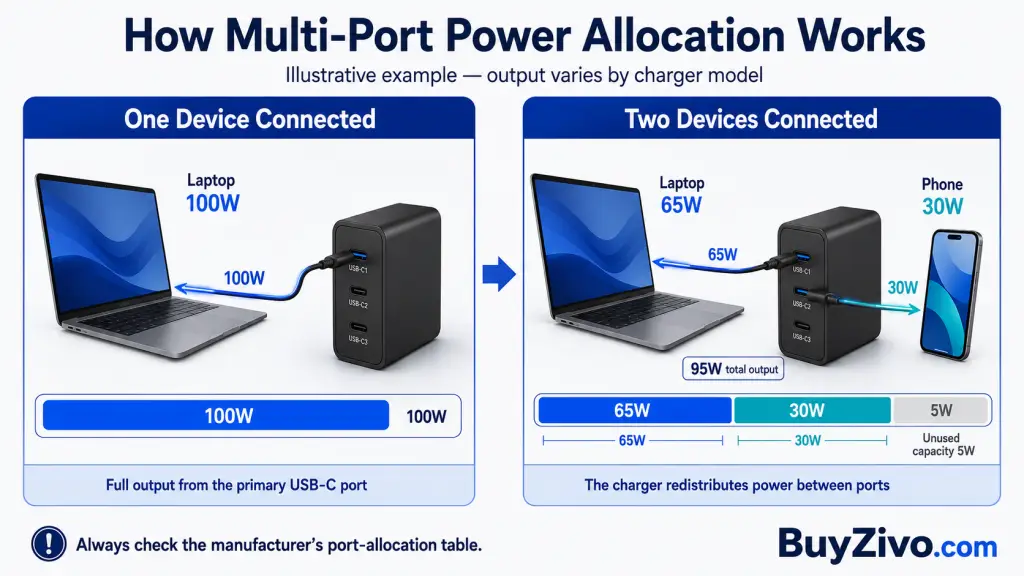
Imagine connecting a laptop that can use 65W and a phone that can use 20W. A properly designed 100W multi-port charger may have enough total capacity to serve both at useful speeds. A 65W model must divide a smaller total budget, so the laptop may drop below 65W as soon as the phone is connected.
However, do not assume that a four-port 100W charger supplies 100W from every port simultaneously. “100W” usually describes either:
The charger’s total output;
The maximum output from one particular USB-C port; or
Both, but only under defined connection conditions.
Manufacturers commonly redistribute power when a second or third device is connected. One port might fall from 100W to 65W, for example, while the remaining capacity is assigned to other ports. The exact split varies by model.
Before buying a multi-device charger, find its output table and check:
Which USB-C port provides the highest single-port output;
How power is divided with two devices connected;
How it changes with three or more devices;
Whether disconnecting a device temporarily interrupts charging while power is renegotiated.
This information is much more useful than the total wattage printed on the front.
Does a 100W Charger Charge Every Laptop Faster?
No. It only provides a benefit when the laptop can negotiate and use more than the 65W charger supplies.
Charging speed can be limited by:
The laptop’s maximum supported input;
Battery temperature;
Current battery level;
The laptop’s workload;
The selected USB-C port;
The cable’s power rating;
The charger’s USB PD profiles;
Power sharing with other connected devices.
A laptop designed for 65W will not suddenly charge at 100W. In that situation, the larger charger mainly provides reserve capacity for other devices.
Conversely, a laptop designed around a higher-wattage adapter may accept 65W but charge slowly or draw some energy from its battery under a heavy CPU or GPU workload. That does not automatically make the charger defective; it may simply be undersized for that workload.
The Cable Can Limit Both Chargers
Do not treat the cable as an interchangeable accessory.
A standard 3A USB-C cable can support up to 60W at 20V. To get the full 65W or 100W from conventional USB PD output profiles, you generally need a suitable 5A electronically marked cable. For newer Extended Power Range charging above 100W, use a cable explicitly rated for the required power, commonly identified by a 240W marking.
That means an old 60W cable can prevent a 65W or 100W charger from delivering its advertised maximum, even when the charger and laptop are otherwise compatible.
Look for a clearly stated power rating such as 100W or 240W and buy from a traceable manufacturer or retailer. USB-IF’s current certified product search is limited to products that have passed its compliance program and are authorized to bear the applicable USB-IF logo. (USB-IF Certified Product Search)
A compliant, properly functioning USB-C charger does not force its full rated wattage into a lower-power device. The charger and device negotiate a supported level.
The important qualifier is product quality. A printed logo or an online listing is not proof that a charger has been properly evaluated. UL Solutions has published warnings about USB chargers carrying counterfeit UL marks, noting that the identified products had not been evaluated to the appropriate safety standards. (UL Solutions)
When comparing chargers, look beyond broad phrases such as “safe charging.” Check for:
A recognizable manufacturer and exact model number;
Verifiable safety certification appropriate to your market;
USB-IF certification where claimed;
Published input and output specifications;
Overcurrent, overvoltage, short-circuit, and temperature protections;
A clear warranty and reachable support channel;
Purchase through the manufacturer or an authorized retailer.
Certification, regulatory declarations, and manufacturer protection claims are not interchangeable. Do not assume that a marketplace badge proves independent safety testing.
Does GaN Make 100W Better Than 65W?
Gallium nitride, or GaN, can help manufacturers build compact, efficient high-power chargers. It does not determine whether a charger supports the protocols, port allocation, or safety controls your devices need.
A well-designed 65W GaN charger may be much easier to carry than a multi-port 100W model. A good 100W GaN charger may replace several adapters, but it will normally remain heavier and may protrude farther from the wall.
Treat “GaN” as a design characteristic—not a substitute for checking:
Choose 65W when your setup consists of a phone, tablet, accessories, and a USB-C laptop whose recommended adapter is no more than 65W.
Its main advantages are practical:
Usually smaller and lighter;
Commonly less expensive;
Enough power for many ultraportable laptops;
Considerable excess capacity for most phones;
Less unused wattage when you charge one device at a time.
A 65W multi-port model can still be useful, but check its split output carefully. If connecting a phone reduces the laptop port to 45W, decide whether that compromise fits your routine.
When a 100W Charger Is Worth It
Choose 100W when you have confirmed that your laptop benefits from the higher output or when one charger must run several devices.
It is particularly appropriate for:
Laptops recommending approximately 90W–100W;
Compatible laptops with faster charging above 65W;
A laptop-plus-phone travel setup;
Docked work where the computer remains under sustained load;
Buyers who expect their next laptop to require more power.
The trade-offs are a potentially higher price, larger size, greater weight, and more complicated port-allocation behavior. A 100W charger is not automatically the premium choice if none of your devices can use the additional power.
How to Choose in Five Steps
Read the original adapter. Note its output wattage and confirm that the laptop supports USB-C charging.
Check official charging guidance. Look for the wattage and protocol required for normal charging and fast charging.
Decide how many devices will be connected. Use the charger’s multi-port allocation table—not just its total output.
Match the protocols. USB PD is fundamental for modern USB-C laptop charging; PPS matters for maximum speed on certain phones.
Match the cable. Use a properly rated 5A cable for more than 60W and verify any claimed certification.
Frequently Asked Questions
What should buyers know about a 65W vs 100W charger?
A 65W charger is sufficient for most phones, tablets, and thin-and-light laptops. A 100W charger is better for laptops that accept more than 65W and for charging several devices together. Check the device’s required wattage, USB PD/PPS compatibility, each port’s output, power-sharing table, and cable rating before buying.
Can I use a 100W charger with a 65W laptop?
Yes, provided the charger, laptop, and cable use compatible USB-C Power Delivery specifications. The laptop negotiates the power it accepts rather than being forced to consume 100W.
Will a 100W charger damage my phone battery?
Higher charger capacity alone does not mean the phone receives 100W. A compliant USB-C system negotiates a supported power level. Product quality, protocol compatibility, temperature, and the phone’s charging controls remain important.
Can a 65W charger power a laptop and phone together?
It can, but the 65W total may be divided between them. The laptop could receive less than 65W once the phone is connected. Check the exact charger’s two-port output table.
Do I need a 100W cable for a 65W charger?
To receive the charger’s full 65W through conventional USB PD profiles, use a suitable 5A electronically marked cable. A 60W/3A cable can become the limiting component. A reputable 100W- or 240W-rated cable is an appropriate choice.
Final Verdict
For most buyers, 65W is the sensible default. It covers phones, tablets, accessories, and a large class of USB-C laptops without the extra size or cost of power that may never be used.
Buy 100W when your laptop’s official requirements justify it or when you need one adapter to charge a laptop and other devices at the same time. Verify the multi-port distribution before purchasing; a poorly matched 100W charger can be less useful than a well-chosen 65W model.
The correct decision is not “more watts are better.” It is enough wattage, the right charging protocols, a capable cable, and an output arrangement that matches how you charge.
About the Author
Arif Hossen
Hi, I'm Arif Hossen, founder of BuyZivo. I research and write about mobile accessories, including chargers, power banks, earbuds, cables, and other everyday tech essentials. My goal is to help readers make informed buying decisions with honest reviews, comparisons, and practical guides.