Introduction
Should you charge your phone wirelessly or stick with a cable?
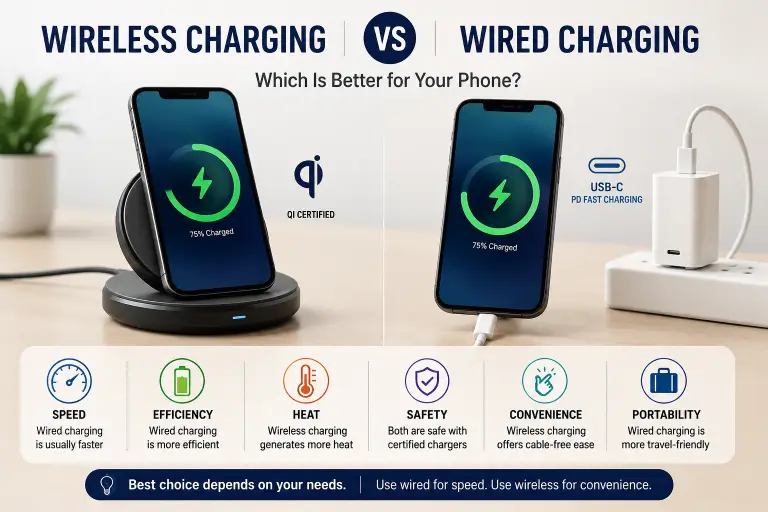
The answer depends on what matters most to you. If your priority is charging speed and maximum efficiency, a wired charger is usually the better choice. If convenience and reducing cable wear are more important, wireless charging can be an excellent option for everyday use.
When comparing wireless vs wired charging, there isn’t a universal winner. Each method has strengths and weaknesses in areas like charging speed, battery heat, energy efficiency, portability, compatibility, and long-term usability.
According to the Wireless Power Consortium (WPC), Qi has become the global standard for wireless charging, while the USB Implementers Forum (USB-IF) maintains standards for USB Power Delivery and USB-C charging. Meanwhile, companies such as Apple, Samsung, and Google support both charging methods across many of their recent devices, although supported charging speeds vary by model.
This guide explains the real differences without marketing hype, helping you choose the charging method that best matches your daily routine.
Quick Answer
Wireless charging is best for convenience, while wired charging remains the better choice for speed, energy efficiency, and consistent fast charging.
If you frequently need to recharge quickly before leaving home, a quality wired USB-C charger is generally the smarter option. If you often charge your phone overnight or while working at a desk, a certified wireless charger provides a cleaner, cable-free experience.
Key Takeaways
- Wired charging is generally faster than wireless charging.
- Wireless charging generates more energy loss because power transfers through electromagnetic induction.
- Properly certified chargers from reputable manufacturers are safe when used correctly.
- Heat has a greater impact on battery aging than the charging method itself.
- Fast charging performance depends on both the charger and the phone’s supported charging standard.
- Qi-certified wireless chargers help ensure compatibility and safety.
- USB-IF compliant USB-C chargers and cables improve charging reliability.
- The best choice depends on your usage habits rather than marketing claims.
What Is Wired Charging?
Wired charging transfers electrical power directly from a charger to your device through a cable. Today’s smartphones typically use USB-C, although some older devices still rely on Lightning or Micro-USB.
Modern wired charging often supports technologies such as:
- USB Power Delivery (USB PD)
- Programmable Power Supply (PPS)
- Manufacturer-specific fast charging systems
According to the USB Implementers Forum (USB-IF), USB Power Delivery enables devices and chargers to negotiate the appropriate voltage and current, allowing compatible devices to charge efficiently while helping protect hardware.
Because electricity travels through physical conductors rather than an air gap, wired charging experiences relatively little energy loss.
Advantages of Wired Charging
- Faster charging on most devices
- Higher charging efficiency
- Lower energy waste
- Works while using the phone comfortably
- Lower cost for many chargers and cables
- Compatible with power banks and vehicle chargers
Limitations
- Cables wear out over time.
- Charging ports collect dust and debris.
- Frequent plugging and unplugging can eventually wear connectors.
What Is Wireless Charging?
Wireless charging transfers power using electromagnetic induction instead of a physical cable.
Most smartphones today use the Qi wireless charging standard, developed by the Wireless Power Consortium (WPC). Some newer devices also support Qi2, which introduces magnetic alignment to improve charging consistency and efficiency on compatible hardware.
Wireless charging requires:
- A compatible smartphone
- A compatible charging pad or stand
- Correct alignment between the charging coils
Once properly aligned, electrical energy transfers across a small gap from the charger to the phone.
Advantages of Wireless Charging
- No cable plugging
- Reduced wear on charging ports
- Cleaner desk setup
- Convenient for overnight charging
- Easy to place and remove the phone
Limitations
- Usually slower than wired charging
- More sensitive to alignment
- Higher energy loss
- Often generates more heat
- Thick or metal cases may interfere with charging
How Each Charging Method Works
Although both methods ultimately recharge the same battery, they deliver power differently.
Wired Charging
Electricity travels directly through metal conductors inside the charging cable.
The charger and phone communicate electronically to determine:
- Supported voltage
- Current
- Charging protocol
- Battery status
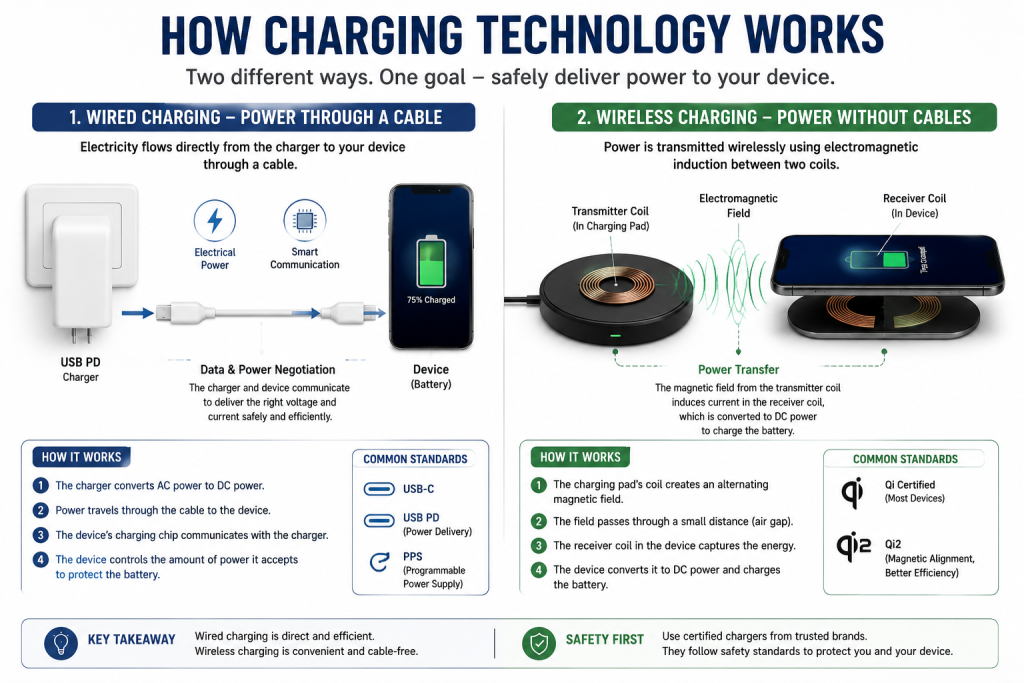
The phone continuously adjusts charging speed to protect battery health.
Wireless Charging
Wireless charging relies on electromagnetic induction.
Inside the charging pad is a transmitting coil.
Inside the phone is a receiving coil.
When these coils align, an alternating magnetic field transfers energy from the charger to the device.
Because power crosses an air gap instead of a physical conductor, some energy is inevitably lost during transfer. This is one reason wireless charging is generally less efficient than wired charging.
Wireless vs Wired Charging Comparison
| Feature | Wired Charging | Wireless Charging |
|---|---|---|
| Speed | Usually faster | Usually slower |
| Convenience | Requires cable | Simply place phone on charger |
| Energy Efficiency | Higher | Lower |
| Heat Generation | Usually lower | Often higher |
| Port Wear | Charging port used every time | Charging port rarely used |
| Cable Required | Yes | No |
| Travel Friendliness | Excellent | Good, but requires charging pad |
| Cost | Often lower | Usually higher |
| Charging While Using Phone | Easy | Less practical |
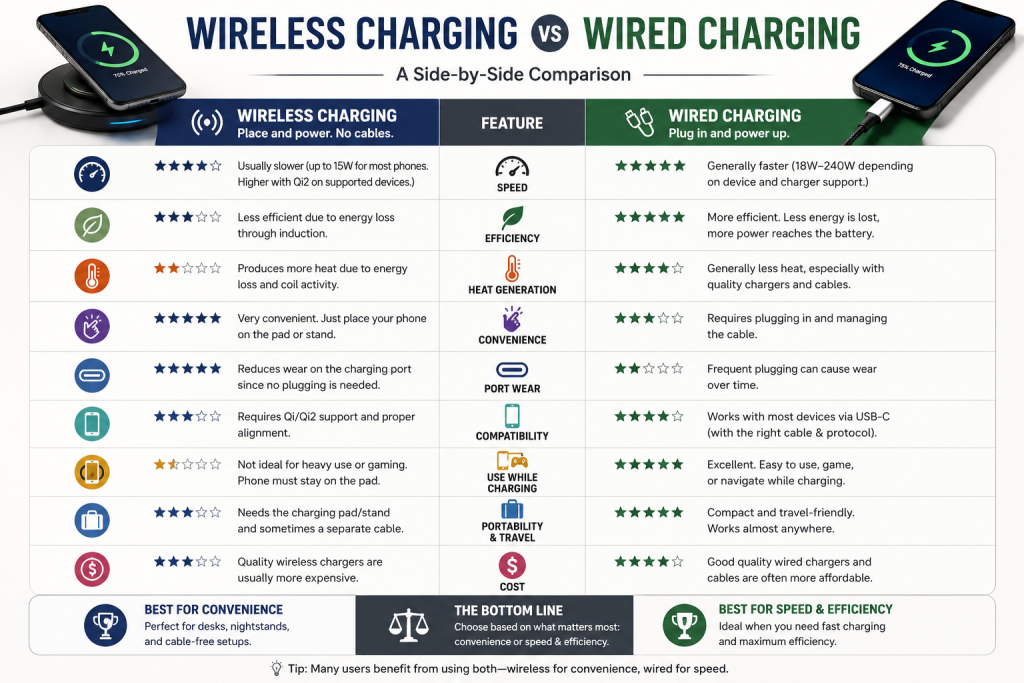
Neither option is objectively better in every situation. The right choice depends on how you use your device throughout the day.
Charging Speed Comparison
One of the biggest differences between the two charging methods is speed.
In most situations, wired charging remains the faster option.
USB Power Delivery chargers commonly deliver substantially more power than standard wireless chargers, provided both the charger and phone support the same charging standard. Some manufacturers also offer higher wireless charging speeds on specific phone models when paired with their own compatible chargers.
For example:
- Apple supports both USB-C wired charging and MagSafe wireless charging on recent iPhone models, but wired charging generally reaches higher peak charging rates under comparable conditions, according to Apple Support.
- Samsung supports fast wired charging through compatible USB-C chargers and also offers Fast Wireless Charging on supported Galaxy devices when used with compatible accessories.
- Google similarly supports wired USB-C charging and Qi wireless charging on Pixel phones, with charging performance depending on the specific device model and charger used.
It is important to note that advertised charging speeds are manufacturer claims measured under controlled conditions. Actual performance depends on several real-world factors, including:
- Battery percentage
- Device temperature
- Ambient room temperature
- Screen usage during charging
- Charger quality
- Cable quality (for wired charging)
- Charger alignment (for wireless charging)
For this reason, two users with the same phone may experience noticeably different charging times.
Efficiency and Power Loss
Charging speed is only part of the story. Efficiency determines how much electricity actually reaches your phone’s battery.
Wired charging is generally more efficient than wireless charging.
A wired connection transfers electricity directly through the cable, so relatively little energy is lost during transmission. Wireless charging, by contrast, relies on electromagnetic induction. During that process, some energy is naturally converted into heat instead of charging the battery.
The Wireless Power Consortium (WPC) acknowledges that wireless charging is inherently less efficient than a direct wired connection, although improvements such as better coil alignment and the Qi2 standard help reduce these losses on compatible devices.
Why Efficiency Matters
Higher charging efficiency can provide several benefits:
- Less wasted electricity
- Lower heat generation
- More consistent charging performance
- Better charging when using portable power stations or power banks
For most home users, the difference in electricity cost is relatively small. However, if you charge multiple devices every day, wired charging may consume less energy over time.
Battery Heat and Battery Health
One of the most common questions is whether wireless charging damages batteries faster.
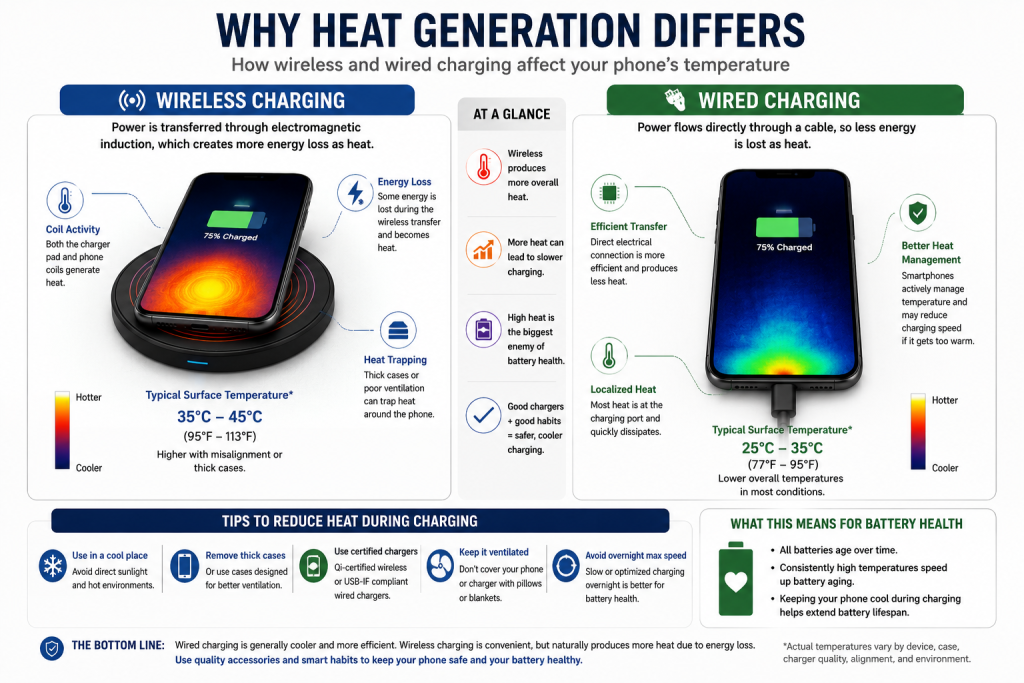
The evidence is more nuanced than many online claims suggest.
Heat Is the Bigger Concern
Lithium-ion batteries naturally degrade over time through normal use. According to Apple, Samsung, and Google, high temperatures accelerate battery aging more than the charging method itself.
Wireless charging often generates more heat because:
- Energy transfer is less efficient.
- Charging coils produce heat.
- Poor alignment increases energy loss.
- Thick phone cases can trap additional heat.
That does not mean wireless charging is unsafe.
Modern smartphones include battery management systems that monitor:
- Battery temperature
- Charging current
- Voltage
- Charging speed
If temperatures become too high, the device typically reduces charging speed or temporarily pauses charging to help protect the battery.
Tips to Reduce Battery Heat
- Use a Qi-certified wireless charger.
- Remove very thick or metal phone cases if recommended by the manufacturer.
- Keep the charger on a hard, well-ventilated surface.
- Avoid leaving the phone in direct sunlight while charging.
- Do not cover the charger with blankets or pillows.
- Update your phone’s software, as manufacturers may improve charging management through firmware updates.
Safety Considerations
Both charging methods are safe when you use certified, compatible accessories from reputable manufacturers.
Problems usually arise from poor-quality or counterfeit chargers rather than the charging technology itself.
Wired Charging Safety
Choose chargers that support recognized standards such as:
- USB Power Delivery (USB PD)
- USB-IF compliant USB-C accessories
A damaged cable can cause:
- Intermittent charging
- Overheating
- Connector damage
- Reduced charging speed
Inspect cables regularly and replace them if you notice fraying, bent connectors, or exposed wiring.
Wireless Charging Safety
For wireless charging, look for chargers certified under the Qi standard from the Wireless Power Consortium.
A certified charger helps ensure:
- Proper communication with compatible devices
- Foreign object detection (FOD) on supported models
- Safe power management
- Better interoperability across brands
Avoid placing metal objects such as coins, keys, or credit card holders between the charger and the phone. According to the WPC, foreign objects can reduce efficiency and may generate unwanted heat.
Compatibility Differences
Compatibility is another area where wired and wireless charging differ.
Wired Charging Compatibility
Most modern Android phones, tablets, laptops, and many accessories now use USB-C.
However, compatibility depends on more than the connector shape.
Charging performance may vary based on:
- USB Power Delivery support
- PPS support
- Maximum charging wattage
- Cable capabilities
For example, two USB-C chargers may look identical but support different charging protocols and power outputs.
Wireless Charging Compatibility
Wireless charging requires support on both the charger and the device.
Questions to check include:
- Does the phone support Qi charging?
- Does it support Qi2?
- Does it support magnetic alignment?
- What is the maximum wireless charging speed?
Some manufacturers also reserve their highest wireless charging speeds for their own chargers.
For example:
- Apple enables optimized MagSafe charging with compatible MagSafe accessories.
- Samsung supports Fast Wireless Charging with compatible Galaxy accessories.
- Google Pixel devices support Qi charging, with performance depending on the model and compatible charger.
Always verify compatibility using the manufacturer’s official documentation before purchasing a charger.
Convenience and Everyday Use
Convenience is where wireless charging shines.
Instead of plugging in a cable every time, you simply place the phone on the charging pad.
This makes wireless charging especially useful in places where you frequently pick up and set down your phone.
Ideal Places for Wireless Charging
- Office desks
- Bedside tables
- Living rooms
- Hotel rooms
- Coffee tables
If you often receive notifications throughout the day, lifting your phone off a charging stand is usually quicker than unplugging and reconnecting a cable each time.
When Wired Charging Is More Convenient
Wired charging still has several practical advantages.
It is usually the better option when:
- Traveling
- Using a power bank
- Gaming while charging
- Watching videos during charging
- Using navigation in a vehicle
- Charging multiple devices quickly
A cable also allows you to continue using the phone comfortably without worrying about keeping it perfectly aligned on a charging pad.
Common Misconceptions
Many myths surround wireless and wired charging. Here are some of the most common ones.
Myth 1: Wireless Charging Always Damages Batteries
Reality: There is no evidence that properly designed wireless charging alone significantly damages modern smartphone batteries. Excessive heat is the more important factor, and modern devices include safeguards to manage charging temperatures.
Myth 2: Faster Charging Always Ruins Batteries
Reality: Fast charging is designed to work within limits set by the device manufacturer. USB Power Delivery and other official charging protocols continuously adjust voltage and current based on battery conditions.
Battery aging is influenced by many factors, including temperature, charging cycles, and overall usage patterns.
Myth 3: All Wireless Chargers Are the Same
Reality: Charging speed, safety features, build quality, and compatibility vary widely between models. A Qi-certified charger from a reputable brand is generally a safer choice than an uncertified alternative.
Myth 4: A Higher-Wattage Charger Will Always Charge Faster
Reality: The phone determines how much power it accepts. Using a 100 W charger with a phone that supports only 30 W will not make it charge at 100 W. The device will draw only the power it is designed to handle, assuming the charger supports a compatible charging protocol.
Real-World Scenarios
Choose Wired Charging If You:
- Frequently need a quick battery top-up before leaving home.
- Travel often.
- Use your phone heavily while charging.
- Want the highest charging efficiency.
- Use high-capacity power banks.
Choose Wireless Charging If You:
- Charge overnight.
- Prefer a clutter-free workspace.
- Want to reduce wear on the charging port.
- Frequently place your phone on and off the charger throughout the day.
- Value convenience over maximum charging speed.
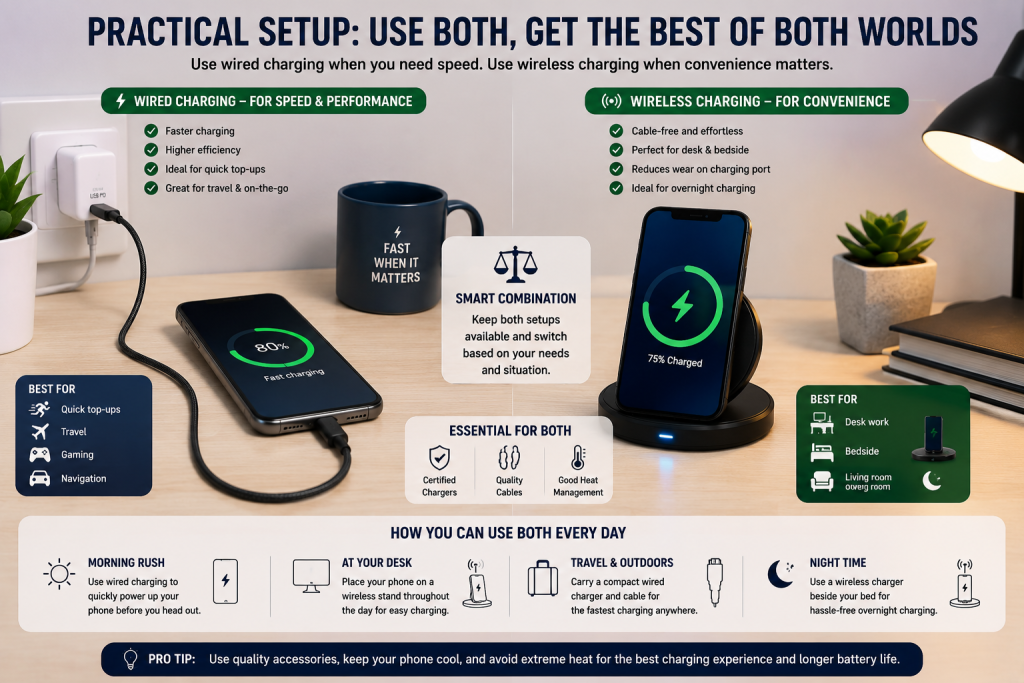
Consider Using Both
Many people benefit from using both charging methods.
For example:
- Use a wired charger in the morning when you need the fastest recharge.
- Use a wireless charging pad at your desk throughout the workday.
- Keep a USB-C charger in your travel bag.
- Place a wireless charger beside your bed for overnight charging.
This combination lets you enjoy the strengths of each method without relying exclusively on one.
Buying Advice
Choosing between wireless and wired charging is easier when you focus on your actual needs rather than marketing claims.
What Matters Most
Device Compatibility
Before buying any charger, confirm that it supports your phone’s charging standard.
Check:
- Maximum wired charging wattage
- Maximum wireless charging wattage
- USB Power Delivery (USB PD) support
- PPS support (if applicable)
- Qi or Qi2 compatibility
The charger’s advertised power output alone does not guarantee faster charging.
Certification
For the safest and most reliable experience, choose products that follow recognized industry standards.
Look for:
- Qi certification for wireless chargers (Wireless Power Consortium)
- USB-IF compliant USB-C chargers and cables where applicable
- Safety certifications appropriate for your region (such as UL Listed products in applicable markets)
Avoid assuming that a CE mark is an independent certification. CE is a manufacturer’s declaration of conformity for applicable European regulations, not a third-party certification.
Build Quality
A well-built charger typically offers:
- Better heat management
- More durable cables or charging surfaces
- Reliable connectors
- Stable charging performance
Buying from established manufacturers can also improve firmware support and warranty service.
Charger Placement
Wireless charging performance depends on proper alignment.
If you frequently use your phone while charging, a charging stand may be more practical than a flat charging pad.
Heat Management
Regardless of charging method:
- Charge in a cool environment.
- Remove unusually thick cases if charging becomes excessively warm.
- Keep ventilation openings clear.
- Replace damaged accessories promptly.
What Doesn’t Matter as Much
Many marketing claims have little practical impact for everyday users.
Examples include:
- Extremely high advertised charging speeds that your phone cannot support
- RGB lighting on chargers
- Premium materials that do not improve charging performance
- Oversized wattage ratings without compatible charging protocols
Always verify compatibility before paying extra for premium features.
How to Compare Products
Before purchasing, compare:
| Buying Factor | Why It Matters |
|---|---|
| Device compatibility | Ensures proper charging speed |
| Official charging standards | Improves reliability |
| Safety certifications | Helps reduce safety risks |
| Warranty | Indicates manufacturer confidence |
| Brand reputation | Better long-term support |
| Charging protocol support | Determines actual performance |
| Build quality | Improves durability |
| Price | Compare features, not marketing claims |
How to Avoid Marketing Tricks
Watch out for claims such as:
- “World’s fastest charger”
- “Charges any phone at maximum speed”
- “Universal fast charging for every device”
Charging speed depends on both the charger and the device.
Manufacturer claims should also be interpreted carefully because testing conditions vary.
Which Option Suits Different Users?
| User Type | Better Choice | Why |
|---|---|---|
| Frequent traveler | Wired | Faster and easier to pack |
| Office worker | Wireless | Convenient throughout the day |
| Student | Wired | Lower cost and higher efficiency |
| Overnight charger | Wireless | Convenient bedside charging |
| Mobile gamer | Wired | Easier to use while charging |
| Power user | Wired | Faster top-ups during busy days |
| Minimalist desk setup | Wireless | Cleaner appearance with fewer cables |
There is no single winner for everyone. The best choice depends on how and where you charge your devices.
Common Mistakes
Avoid these common charging mistakes:
- Buying a charger without checking your phone’s supported charging standard.
- Using low-quality or counterfeit chargers and cables.
- Believing higher wattage automatically means faster charging.
- Ignoring heat buildup during charging.
- Using damaged cables with exposed wires or bent connectors.
- Placing metal objects between a wireless charger and the phone.
- Assuming every USB-C cable supports the same charging performance.
- Covering chargers with blankets or pillows while charging.
Final Recommendation / Verdict
When comparing wireless vs wired charging, neither technology is universally better.
If your priorities are speed, efficiency, and maximum charging performance, wired charging remains the stronger choice. Direct power delivery minimizes energy loss and generally provides the quickest recharge for compatible devices.
Wireless charging, however, offers outstanding convenience. It works especially well for overnight charging, office desks, and situations where you frequently place your phone down and pick it back up.
For many users, the most practical solution is to use both:
- Keep a wired charger for fast charging when time matters.
- Use a Qi-certified wireless charger at your desk or bedside for everyday convenience.
This approach combines the strengths of both technologies while minimizing their drawbacks.
Frequently Asked Questions
Is wireless charging slower than wired charging?
Generally, yes. Wired charging is usually faster because electricity travels directly through a cable with less energy loss. Actual charging speed depends on your phone, charger, cable, and supported charging standards.
Does wireless charging damage battery health?
There is no evidence that properly implemented wireless charging alone significantly harms modern smartphone batteries. Battery health is affected more by factors such as heat, charging cycles, and overall usage. Modern devices include thermal management systems to help protect the battery.
Which charging method produces more heat?
Wireless charging typically generates more heat because power is transferred through electromagnetic induction rather than a direct electrical connection. Proper alignment and certified chargers help minimize unnecessary heat.
Is it safe to leave a phone on a wireless charger overnight?
Most modern smartphones manage charging automatically by slowing or stopping charging as needed once the battery is full. Apple, Samsung, and Google also offer battery optimization features on supported devices. Use a certified charger and follow the manufacturer’s guidance.
Do I need a special phone case for wireless charging?
Not necessarily. Many standard cases work with Qi chargers. However, very thick cases, metal accessories, or magnetic attachments that are not designed for wireless charging may interfere with charging performance.
Can I use any USB-C charger?
Physically, many USB-C chargers fit modern devices, but charging speed and features depend on supported charging protocols such as USB Power Delivery (USB PD) or PPS. Always verify compatibility with your device.
Is Qi2 better than standard Qi?
Qi2 introduces magnetic alignment that can improve charging consistency and efficiency on compatible devices. Both the charger and the phone must support Qi2 to benefit from these features.
Conclusion
Choosing between wireless vs wired charging comes down to your priorities.
If you want the fastest charging, highest efficiency, and the best performance while traveling or using your phone during charging, a quality wired USB-C charger is still the better option.
If convenience, a tidy workspace, and reduced wear on your charging port matter more, a Qi-certified wireless charger is an excellent everyday companion.
Whichever method you choose, focus on compatibility, certified accessories, and reputable manufacturers rather than marketing claims. These factors have a much greater impact on your charging experience than advertised wattage alone.
For more practical buying advice, continue with BuyZivo’s related charging guides before purchasing your next charger or accessory.