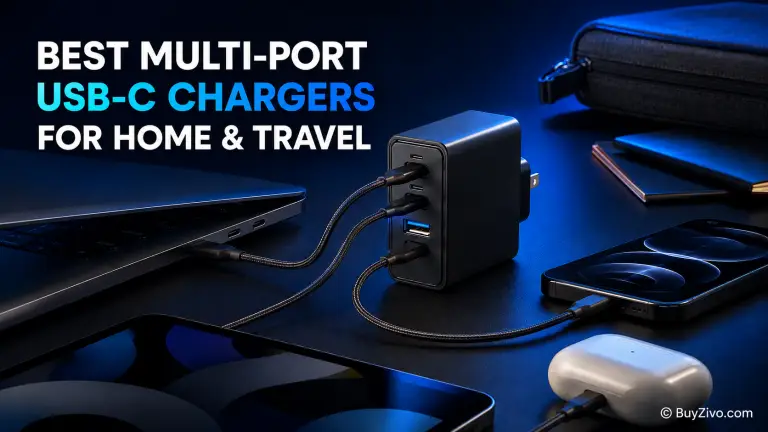
The Anker Prime Charger 100W (A2688) is the best multi-port USB-C charger for most people who want one compact adapter for a laptop, phone, and smaller accessory. It provides two USB-C ports, one USB-A port, foldable prongs, and up to 100W from either USB-C port when used alone.
For a permanent desk setup, the Belkin BoostCharge Pro 108W 4-Port GaN Charger offers easier port access and better support for older USB-A accessories. International travelers with several USB-C devices should consider the Satechi 145W USB-C 4-Port GaN Travel Charger, which includes interchangeable plug adapters.
Best multi-port USB-C chargers at a glance
Charger Ports Maximum total output Best for Main limitation Anker Prime 100W A2688 2 USB-C, 1 USB-A 100W Best overall 89W total with all ports used UGREEN Nexode 100W 3 USB-C, 1 USB-A 100W Best four-port value Output is shared Satechi 145W Travel Charger 4 USB-C 145W International travel No USB-A port Belkin BoostCharge Pro WCH010 2 USB-C, 2 USB-A 108W Home and office desks USB-A ports share 12W UGREEN Nexode Pro 160W 4 USB-C 160W High-power USB-C setups More than most users need Specifications and manufacturer availability were checked in August 2026. Prices, stock, plug versions, and included accessories may vary by region.
What should buyers know about a multi-port USB-C charger?
The wattage printed on a multi-port charger represents its maximum available output, not the amount every port delivers simultaneously.
For example, a 100W charger may provide:
- 100W when one USB-C port is used
- 65W and 35W when two USB-C devices are connected
- A lower shared total when three or four devices are connected
That is why the port-allocation chart matters more than the large number printed on the product page.
A good multi-device charger should provide:
- USB Power Delivery for compatible laptops, phones, and tablets
- PPS support if Samsung Galaxy fast charging matters
- Enough high-power USB-C ports for your devices
- A sensible power split when multiple ports are occupied
- Appropriate regional input voltage and plug support
- A suitable USB-C cable for the required wattage
For most laptop-and-phone combinations, 100W is a practical starting point. Consider 140W to 160W when you need to charge a high-power laptop quickly while other devices remain connected.
How we selected these chargers
BuyZivo did not physically test these products. Recommendations are based on official product pages, manufacturer support documentation, published port-power allocations, protocol support, plug design, warranty information, and suitability for specific use cases.
We did not rank products by popularity alone. Each recommendation must solve a clear buyer need and have specifications that can be verified from an official source.
Prices are not included because they change frequently. Before ordering, confirm the exact model number, regional plug, included cable or adapters, current price, availability, and return policy.
1. Anker Prime Charger 100W A2688 — Best overall
The Anker Prime Charger 100W A2688 offers the most practical balance for a typical home or travel setup. It has two USB-C ports, one USB-A port, foldable prongs, and a maximum output of 100W.
Either USB-C port can deliver up to 100W when it is the only port being used. Anker’s published power allocation also includes a useful 65W and 35W split when two USB-C devices are connected.
That combination is suitable for charging a mainstream USB-C laptop and a phone or tablet at the same time.
The USB-A port is helpful if you still have an older charging cable for a smartwatch, headphones, camera, or another small accessory.
However, the headline 100W figure does not apply when every port is occupied. According to Anker, the maximum total output drops to 89W with all three ports in use. Your laptop may therefore receive less than its maximum charging rate while two other devices are charging.
Anker lists 100–240V input, so the charger can accept common international mains voltages. You may still need a physical plug adapter depending on your destination.
Best for: A MacBook Air or similar USB-C laptop, phone, and watch or headphone accessory.
Pros
- Up to 100W from either USB-C port when used alone
- Useful 65W and 35W two-port power split
- USB-A port for an older cable
- Compact design with foldable prongs
- Anker lists a 24-month warranty
Cons
- Total output drops to 89W with all ports used
- Only two USB-C ports
- The standard package may not include the cable you need

2. UGREEN Nexode 100W 4-Port Charger — Best four-port value
The UGREEN Nexode 100W 4-Port Charger is a better fit when the number of available ports matters more than maximum simultaneous laptop power.
It provides:
- Three USB-C ports
- One USB-A port
- Up to 100W total output
- USB Power Delivery and PPS support on USB-C
- 100–240V input
The first two USB-C ports can each reach up to 100W in the appropriate single-port configuration. The third USB-C port and USB-A port are intended for lower-power devices.
This layout works well for a moderate-power laptop, two phones, and a small accessory. It can also reduce the number of adapters needed beside a bed or on a shared desk.
However, this is a shared 100W charging budget. It does not provide 100W from every port at the same time. Two demanding laptops will not both receive their maximum charging rates.
UGREEN lists protection against overvoltage, overcurrent, overheating, and short circuits. These are manufacturer claims and should not be confused with independent certification. Check the exact regional safety marks and purchase from a trustworthy seller.
Best for: Families or desks that need three USB-C connections plus one USB-A connection.
Pros
- Four charging ports
- Three USB-C ports
- USB PD and PPS support
- 100–240V input
- UGREEN lists a two-year limited warranty
Cons
- Power is shared between connected devices
- Lower ports are designed for lower-power equipment
- Power allocation requires careful checking
- Not ideal for fast-charging two demanding laptops
3. Satechi 145W USB-C 4-Port GaN Travel Charger — Best for international travel
The Satechi 145W USB-C 4-Port GaN Travel Charger is the strongest travel-focused option in this guide.
It includes four USB-C ports, up to 145W total output, USB Power Delivery 3.1, interchangeable travel adapters, and a carrying mesh bag.
This combination is useful when one charging kit needs to cover a laptop, phone, tablet, and watch charger across several countries. The included adapters reduce the need to carry a separate plug adapter for the charger.
The travel adapters only change the physical plug connection. They do not convert voltage for unrelated appliances. Fortunately, USB-C travel chargers generally support a wide input-voltage range, but you should always check the label on the exact regional model before traveling.
All four ports are USB-C. That is ideal for a modern cable collection but inconvenient if you still depend on USB-A charging cables. In that case, you will need a small USB-C adapter, a replacement cable, or a different charger.
The 145W figure is also a shared maximum. Each connected device will not receive 145W. Check Satechi’s current power-allocation chart against the devices you intend to connect.
Best for: International travelers carrying a USB-C laptop, tablet, phone, and smaller accessory.
Pros
- Four USB-C ports
- Up to 145W total output
- USB Power Delivery 3.1
- Interchangeable travel adapters included
- Carrying bag included
Cons
- No USB-A port
- More expensive than a basic 100W charger
- Larger than a compact three-port wall charger
- Plug adapters do not convert voltage for other equipment
4. Belkin BoostCharge Pro 108W WCH010 — Best desktop charger
The Belkin BoostCharge Pro 108W WCH010 is designed to remain on a home or office desk.
Instead of placing a relatively heavy adapter directly on the outlet, it uses a two-meter power cable. This keeps its two USB-C and two USB-A ports within reach, even if the wall outlet is behind a desk or bed.
Belkin publishes a clear power allocation:
- USB-C1 provides up to 96W when used alone
- With both USB-C ports used, the split is up to 65W and 30W
- The two USB-A ports provide 12W total
- When both USB-A ports are occupied, they share that 12W
The 65W and 30W USB-C combination works well for a laptop and phone or tablet. The USB-A ports are suitable for lower-power accessories such as headphones, a smartwatch, or an older phone.
This is not the best option for four fast-charging devices. The USB-A ports have a relatively small shared budget. Belkin’s comparison documentation also indicates that this particular model does not provide PPS.
Samsung owners who want the highest compatible Super Fast Charging tier should choose a charger that explicitly lists a suitable PPS profile and use the required cable.
Best for: A permanent desk or bedside charging station with USB-C and USB-A devices.
Pros
- Accessible desktop design
- Two-meter power cable
- Up to 96W from USB-C1
- Useful 65W and 30W dual-USB-C split
- Two USB-A ports for older accessories
- Belkin lists a two-year warranty
Cons
- USB-A ports share only 12W
- PPS is not listed for this model
- Less compact than a direct wall charger
- Not suitable for four high-power devices
5. UGREEN Nexode Pro 160W — Best for high-power USB-C setups
The UGREEN Nexode Pro 160W is intended for buyers who genuinely need more than a 100W shared charging budget.
It offers four USB-C ports, up to 160W total output, and up to 140W from the primary USB-C port. UGREEN also lists USB Power Delivery 3.1 and PPS support within the Nexode Pro range.
The 140W port is relevant for laptops designed to use USB PD Extended Power Range charging. The larger overall power budget also leaves more capacity for phones, tablets, and accessories while the laptop is connected.
Reaching more than 100W requires the complete charging system to support it. You need:
- A compatible USB PD 3.1 EPR laptop or device
- A charger port that supplies the required EPR profile
- A 240W-rated USB-C cable
A standard 60W or 100W cable will not provide the full 140W charging capability.
This charger is unnecessary for someone charging a phone, tablet, and MacBook Air. Its higher output is worth paying for only when your laptop can use it or when the larger shared budget solves an actual charging problem.
Best for: A high-power USB-C laptop plus several modern USB-C accessories.
Pros
- Four USB-C ports
- Up to 160W total output
- Up to 140W from the main USB-C port
- USB PD 3.1 support
- PPS support within the product range
- UGREEN lists a two-year warranty
Cons
- No USB-A port
- Requires the correct device and EPR cable for more than 100W
- More expensive than a typical 100W charger
- Excessive for ordinary phone and lightweight-laptop setups
How much total charging power do you need?
Estimate the amount of power your devices are likely to request at the same time, then allow some headroom.
Up to 65W
A 65W multi-device charger can work for:
- A phone and tablet
- A lightweight laptop and small accessory
- Several lower-power mobile devices
It may struggle when a laptop needs most of the available 65W while another device is fast-charging.
Around 100W
A 100W charger is the practical choice for:
- One mainstream USB-C laptop
- One phone
- A tablet, watch, or headphone accessory
This is the most useful power class for general home and travel use.
Between 140W and 160W
Consider this range for:
- A high-power laptop plus a phone or tablet
- Two moderate-power laptops
- A USB PD 3.1 EPR laptop
- Several devices that need meaningful simultaneous output
More than 200W
A charger above 200W is usually intended for a permanent multi-laptop workstation. It is a different product category from a compact travel charger.
Do not simply add the maximum number printed on every device. Phones do not maintain peak charging wattage throughout the entire charging cycle, and many laptops use less power during light work.
What matters most is whether the charger preserves sufficient output on its primary port after the other ports are occupied.
For more focused comparisons, read:
Power sharing is the specification most buyers miss
A multi-port charger contains one shared power supply. When another device is connected, the charger divides that available power between the active ports.
Some chargers briefly interrupt charging while renegotiating the new power allocation. This behavior is common, but it can be inconvenient if you are powering a device that reacts badly to a momentary interruption.
Before choosing a charger:
- Identify the recommended charging wattage of your main laptop.
- Find which USB-C port provides the highest output.
- Check that port’s output when two, three, or four devices are connected.
- Confirm whether the remaining USB-C ports support PD and PPS.
- Check whether the USB-A ports share a small combined output.
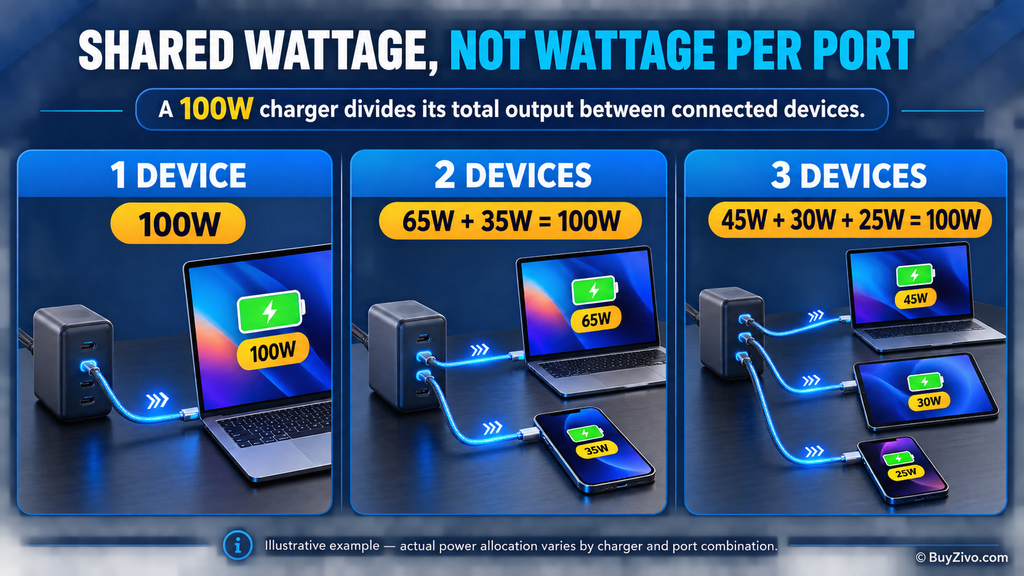
This prevents a common disappointment: buying a “100W charger” and discovering that the laptop receives only 45W or 65W when everything is connected.
USB PD, PPS, and cable compatibility explained
USB Power Delivery
USB Power Delivery allows a compatible charger and device to negotiate charging voltage and current.
Apple states that USB-C Mac computers can charge from compatible third-party USB PD adapters. For the best charging experience, the adapter should provide at least the wattage recommended for the Mac.
A higher-rated compatible charger does not force its full output into a lower-power device. The connected equipment negotiates the supported level.
PPS charging
PPS stands for Programmable Power Supply. It can adjust voltage and current in smaller steps according to the device’s charging requirements.
PPS is especially important for compatible Samsung Galaxy fast-charging modes. Samsung’s official 45W adapter documentation identifies USB PD 3.0 with PPS and recommends a 5A cable for optimal results.
Do not assume every USB-C port on a multi-port charger supports the same PPS output. Check the specification table for the exact port you intend to use.
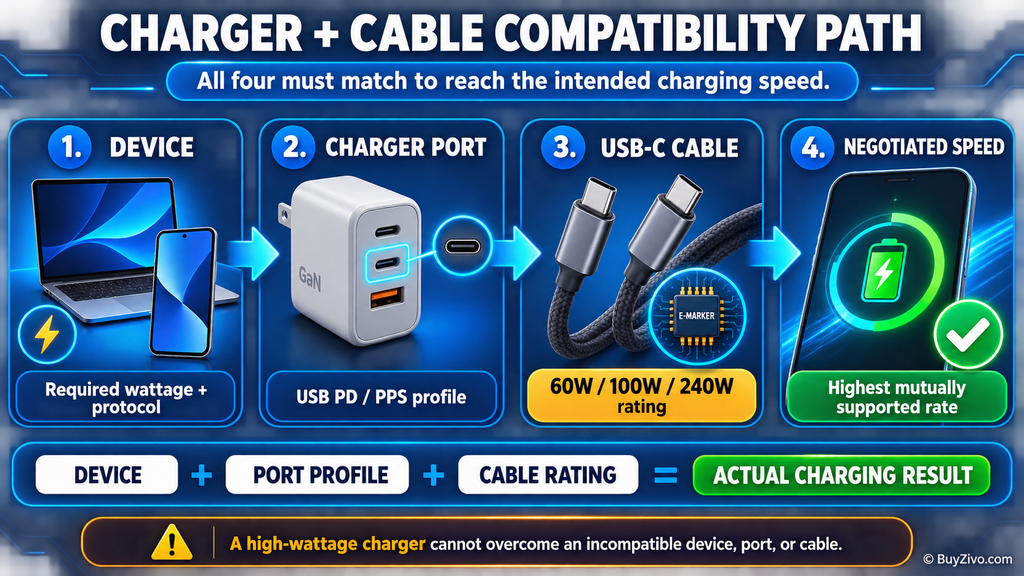
USB-C cable capacity
The charger is only one part of the charging system.
- A standard 3A USB-C cable is generally limited to 60W
- A properly identified 5A cable is required for many 100W charging situations
- Charging above 100W requires a compatible 240W EPR cable
The device, charger port, charging protocol, and cable must all support the intended charging level.
Charging wattage also says nothing about data speed or video support. A 100W charging cable may still transfer data at USB 2.0 speed and may not support an external monitor.
See USB-C Cable Specifications Guide before choosing one cable for charging, high-speed data, and video.
Should you buy a wall charger or desktop charging station?
Choose a wall charger when:
- You travel frequently
- Bag space matters
- You need foldable prongs
- You normally connect two or three devices
- The outlet is easy to reach
A compact wall charger is easier to pack, but a heavy model may sit poorly in a loose or worn outlet.
Choose a desktop charging station when:
- The outlet is behind furniture
- Several cables remain permanently connected
- You want the ports within easy reach
- A heavy wall charger may sag
- You regularly charge older USB-A equipment
A corded desktop station is usually the better choice beside a monitor, bed, or shared family charging area.
For a wider charger-selection checklist, see [Internal Link: Complete Mobile Charger Buying Guide].
Charging safety and purchasing checks
GaN refers to gallium nitride semiconductor technology. It can help manufacturers build smaller, efficient high-power chargers, but GaN is not a safety certification.
Before buying or using a charger:
- Purchase from the manufacturer or an authorized seller
- Match the model number with official documentation
- Look for legitimate regional safety marks
- Verify unfamiliar certification claims where possible
- Use a cable rated for the requested current and wattage
- Keep the charger reasonably ventilated
- Stop using damaged, loose, discolored, or cracked equipment
- Check the warranty terms for your country
- Avoid listings with unclear model numbers or copied specifications
UL Solutions has previously warned about USB chargers carrying counterfeit certification marks. A printed logo alone is therefore not enough to prove that a product was independently evaluated.
Some warmth during fast charging is normal. Persistent extreme heat, unusual odor, sparking, buzzing, casing deformation, or repeated charging interruptions should be investigated.
Frequently asked questions
Can a 100W charger damage a 20W phone?
A correctly functioning USB Power Delivery charger does not force 100W into a 20W phone. The charger and phone negotiate a mutually supported charging level.
Use a reputable charger and an undamaged compatible cable.
Can one 100W charger fast-charge two laptops?
It depends on the power allocation.
A 65W and 35W split may be enough for one mainstream laptop and one lightly used secondary computer. It will not provide 65W or 100W to both laptops simultaneously.
For two demanding laptops, consider a 140W, 160W, or higher-output desktop charger.
Do all multi-port USB-C chargers support Samsung 45W charging?
No. The relevant USB-C port must support a compatible PPS profile. Supported Samsung devices may also require a 5A USB-C cable to reach their highest charging tier.
Check the detailed PPS specification rather than relying on “PD” or “100W” in the product title.
Is a GaN charger automatically safer?
No. GaN can improve power density and efficiency, but it is not a safety approval.
Circuit design, thermal management, component quality, manufacturing consistency, and legitimate compliance testing still matter.
Will a 100–240V charger work in every country?
A 100–240V input range supports common international mains voltages. However, you may still need a physical plug adapter, and the product may not carry every regional certification.
Always check the label on the exact charger.
Should I buy more ports than I currently need?
One spare USB-C port can be useful. Buying six ports or 200W solely for future-proofing may add unnecessary size and cost.
Prioritize a charger whose current power allocation matches devices you actually own.
Final verdict
The Anker Prime Charger 100W A2688 is the best multi-port USB-C charger for most buyers. Its 100W single-port capability, useful 65W and 35W dual-port split, USB-A fallback, and compact design cover the most common laptop-and-mobile setup.
Choose the UGREEN Nexode 100W 4-Port Charger if you need four connections at a more accessible power level.
Choose the Belkin BoostCharge Pro 108W WCH010 for a permanent home-office or bedside station with older USB-A accessories.
The Satechi 145W USB-C 4-Port GaN Travel Charger is the better international travel package because it combines four USB-C ports with interchangeable plug adapters.
Move up to the UGREEN Nexode Pro 160W only when a 140W laptop port or larger shared power budget solves a real requirement.
Before placing your order, verify three details:
- The exact regional model and plug
- The power-allocation chart for your intended port combination
- The cable required to reach your target charging wattage