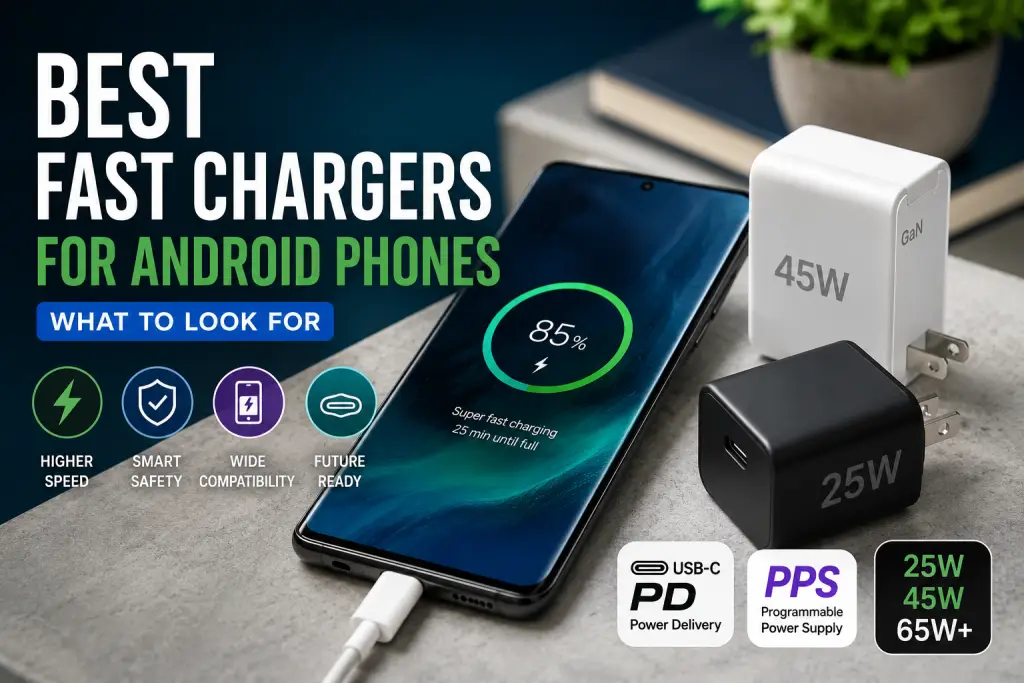
Finding the best fast chargers for Android is more complicated than choosing the model with the largest wattage number.
A 100W charger will not automatically charge every Android phone faster than a 30W charger. Your phone must support the charger’s protocol, voltage range, current level, and cable configuration. Some phones use the broadly supported USB Power Delivery standard, while others reach their highest speeds only with a manufacturer-specific charger and cable.
That is why compatibility matters more than headline power.
This guide explains how to choose an Android fast charger based on verified specifications and official documentation. It also covers USB Power Delivery, PPS, Qualcomm Quick Charge, proprietary charging systems, cables, port sharing, and common buying mistakes.
Quick Answer: Best Fast Chargers for Android
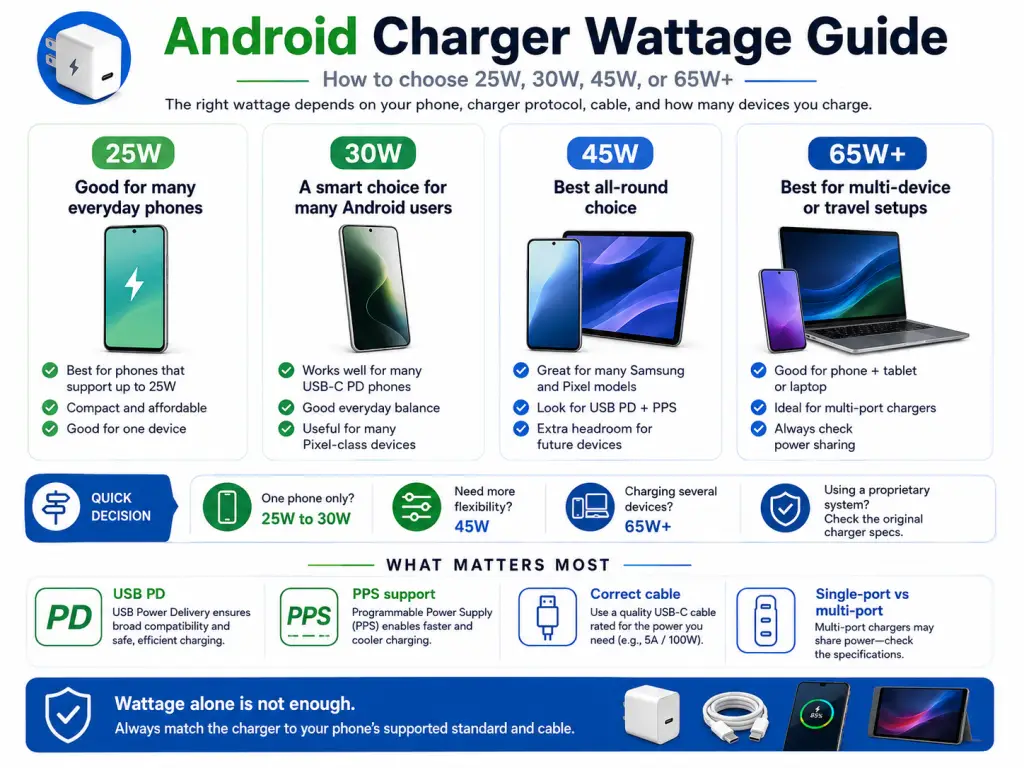
For most Android users, a 30W to 45W USB-C charger with USB Power Delivery and PPS support is the most practical choice.
Choose:
- 25W to 30W for many standard Samsung Galaxy and Google Pixel phones
- 45W for compatible flagship phones, especially models that require higher power or 5A PPS charging
- 65W or more when one charger must also power a tablet or USB-C laptop
- The phone manufacturer’s charger and cable when the device relies on a proprietary system such as SUPERVOOC
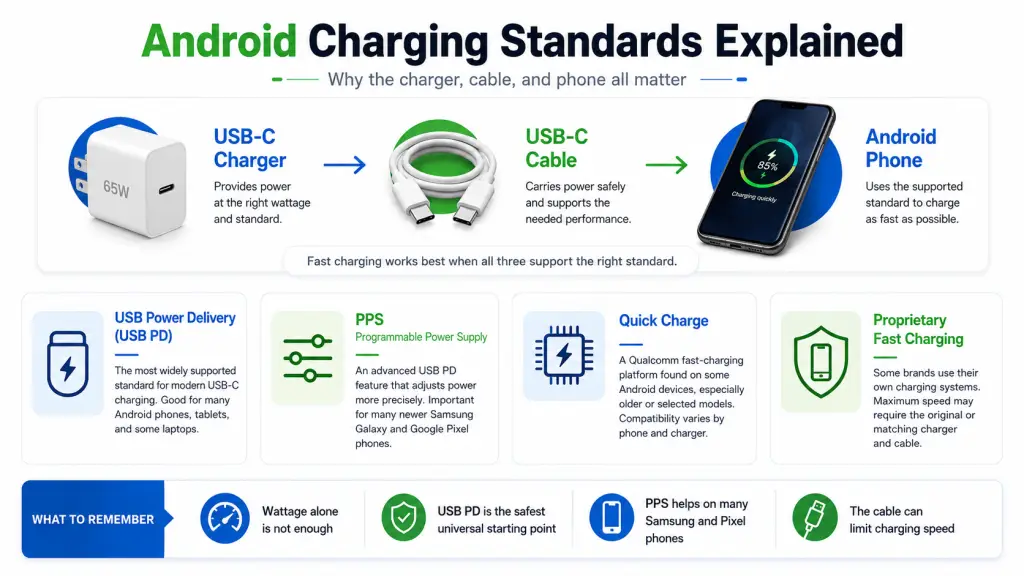
The charger must support the protocol your phone expects. Wattage alone is not enough.
What Makes an Android Charger “Fast”?
A fast charger supplies more power than a basic USB charger while communicating with the connected phone to determine an appropriate charging level.
The actual speed depends on several parts working together:
- The phone’s maximum supported charging rate
- The charging protocol supported by the phone
- The charger’s available voltage and current profiles
- The cable’s power capability
- Battery temperature and current charge level
- Whether other devices are using the charger
USB Power Delivery, commonly called USB PD, is a charging standard designed for compatible USB connections. The USB Implementers Forum describes USB PD as a system that enables flexible power delivery over the USB ecosystem.
The phone and charger negotiate before higher power is supplied. As a result, a well-designed 65W USB-C PD charger does not continuously force 65W into a phone. The phone requests a supported power level.
However, that does not mean every USB-C charger will provide every phone’s maximum charging speed. The protocol and power profiles still need to match.
Understanding Android Fast-Charging Standards
USB Power Delivery
USB Power Delivery is the most useful standard to look for when you want one charger that works across several brands.
It is used by many Android phones, tablets, laptops, and other USB-C devices. A USB-C PD charger may therefore replace several separate power adapters, provided it has enough output for the largest device.
Google officially recommends USB-C PPS adapters rated at 30W or more for suitable Pixel phones, while other USB PD adapters rated at 15W or more can also be used, although charging performance may differ.
USB PD should be considered the baseline for a modern universal Android charger.
Programmable Power Supply
Programmable Power Supply, or PPS, is an optional capability within the USB Power Delivery system.
Instead of relying only on fixed voltage levels, PPS allows a compatible charger and phone to adjust voltage and current more gradually during charging. USB-IF states that certified USB fast chargers supporting PPS require compatible PPS hosts, devices, and chargers to take full advantage of the feature.
PPS is especially important for many recent Samsung Galaxy phones. Samsung describes PPS as adjusting voltage and current according to the device’s charging status. Its 25W adapter supports USB PD 3.0 PPS, while its 45W adapter uses PD and PPS for compatible devices.
A charger marked “USB PD” but not “PPS” may charge a PPS-compatible phone, but it might not activate the phone’s highest supported charging mode.
Qualcomm Quick Charge
Qualcomm Quick Charge is another fast-charging platform used in various phones and accessories.
Qualcomm states that its current Quick Charge technology maintains backward compatibility with previous Quick Charge generations. It also notes that certified Quick Charge adapters can charge non-Quick Charge devices, but those devices will not receive Quick Charge-specific fast-charging benefits.
Quick Charge support can be valuable for older Android devices and selected current models. For a new general-purpose charger, however, USB-C PD and PPS usually provide broader compatibility across phones, tablets, and laptops.
Proprietary Charging Systems
Some Android manufacturers use proprietary charging technologies that may require a matching adapter and cable to reach the advertised maximum speed.
OPPO’s VOOC and SUPERVOOC systems, for example, are designed around coordination among the phone, charger, and cable. OPPO’s own documentation describes the charging hardware as an integrated system involving its adapters, handsets, and wires.
Similar compatibility concerns can apply to phones from associated or competing brands that advertise unusually high wired charging rates.
A universal USB PD charger may still charge such a phone, but it may fall back to a lower rate. Check the phone manufacturer’s official specifications before replacing a proprietary charger.
How Much Charger Wattage Do You Need?
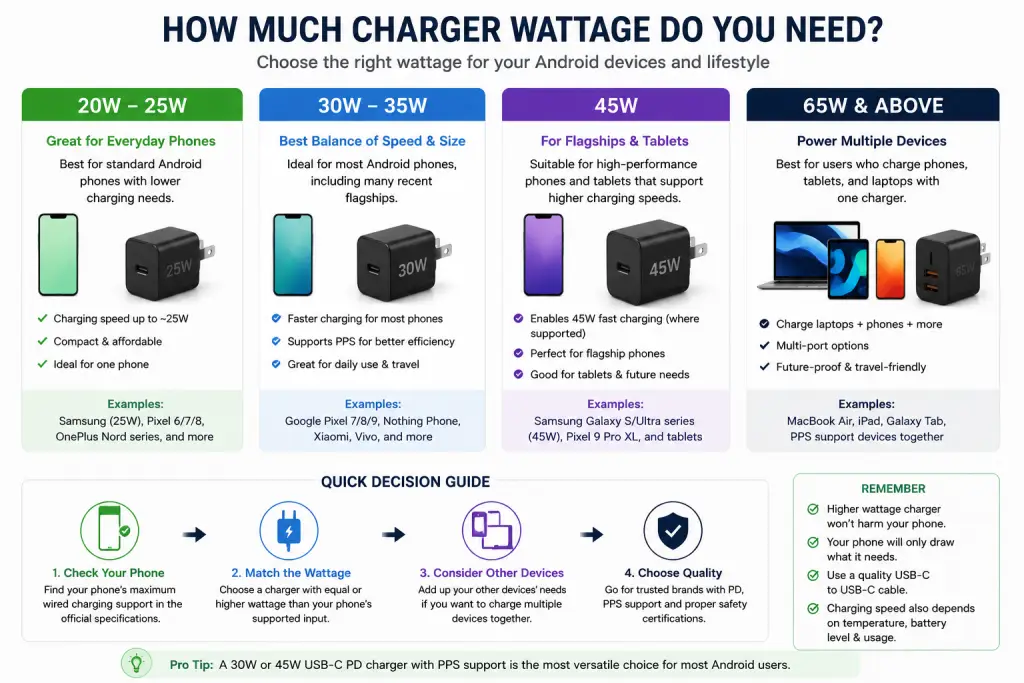
20W to 25W
A charger in this range is suitable when:
- Your phone supports no more than approximately 18W to 25W
- You charge only one phone
- Small size and low cost matter more than future flexibility
- Your Samsung phone supports 25W Super Fast Charging
Samsung’s official 25W adapter supports USB PD 3.0 PPS and provides up to 25W to capable devices.
A 25W charger may be all you need. Buying a 65W unit will not make a phone with a 25W input limit charge at 65W.
30W to 35W
This is a useful range for many Pixel phones and other USB PD-compatible Android devices.
Google says compatible Pixel phones can use a PPS power adapter rated at 30W or more. It also notes that USB-A to USB-C charging is slower than using a USB-C adapter with a USB-C cable.
A compact 30W PPS charger is a sensible everyday choice when you do not need to charge a laptop.
45W
A 45W USB-C PPS charger is one of the most versatile choices for Android users.
It can suit:
- Compatible Samsung flagship phones
- Higher-powered Google Pixel models
- USB-C tablets
- Some lightweight laptops
- Users who want extra headroom for future devices
For context, Google lists a maximum wired charging rate of up to 37W for the Pixel 9 Pro XL when used under its specified conditions with the Google 45W USB-C charger. The standard Pixel 9 and Pixel 9 Pro are listed at up to 27W. Charging speed may decrease with heat, battery age, phone use, and other conditions.
This illustrates why charger wattage and phone input are not the same thing. A 45W adapter may be recommended even when the phone’s maximum input is below 45W because the charger provides the required charging profile and sufficient capacity.
65W and Above
Consider a 65W or higher charger when:
- You also charge a USB-C laptop
- You want two or three ports
- You charge a phone and tablet together
- You want one travel charger for several devices
Do not assume every port supplies the full advertised output simultaneously. A charger advertised as “65W” may provide 65W through one USB-C port when used alone, then divide that power when a second device is connected.
Always read the port-distribution table.
Best Fast Charger Types for Different Android Users
These are charger categories rather than BuyZivo hands-on rankings. Product examples are included only where their specifications can be confirmed through manufacturer documentation.
Best General Choice: 30W to 45W USB-C PD Charger with PPS
Choose this type if: You own a Samsung Galaxy, Google Pixel, or another USB PD-compatible Android phone and want a compact single-device charger.
Look for:
- USB-C output
- USB PD support
- PPS support
- At least 30W output
- Clear voltage and current specifications
- A cable included or purchased separately
A 45W model provides more flexibility than a basic 25W charger without becoming unnecessarily large.
For example, Anker lists its Nano 45W charger with up to 45W output and multiple PPS ranges. Its specifications also show universal 100–240V input, which is useful for international travel when paired with the correct plug adapter.
Limitation: Confirm that the advertised PPS range matches your phone’s requirements. The presence of “45W” on the package is not enough by itself.
Best for Compatible Samsung Flagships: 45W PPS Charger with a 5A Cable
Choose this type if: Your Samsung phone officially supports 45W Super Fast Charging 2.0.
Samsung’s 45W adapter documentation states that PPS adjusts voltage and current in real time. Samsung also recommends using the supplied 5A cable for optimal results.
A suitable third-party model should clearly state:
- USB PD support
- PPS output
- 45W single-port output
- A PPS range capable of delivering the required current
- Compatibility with a 5A USB-C cable
The Anker Nano 45W is one example with manufacturer-listed PPS output up to 5A within one of its PPS ranges.
Limitation: Some 45W chargers support only 3A PPS. They may charge the phone, but they might not enable its highest 45W Samsung mode.
Best for Pixel Phones: 30W or 45W USB-C PPS Charger
Choose this type if: You use a recent Google Pixel and want broad accessory compatibility.
Google recommends its USB-C fast chargers or a compatible PPS adapter rated at 30W or more.
A 30W model is usually enough for Pixel phones with lower maximum input. A 45W model makes more sense for a higher-powered Pixel, tablet use, or future device upgrades.
Limitation: A charger rated above the phone’s maximum will not necessarily reduce charging time. Temperature, battery state, and active phone use can also slow charging.
Best Multi-Device Choice: 45W to 65W Dual-Port GaN Charger
Choose this type if: You regularly charge a phone plus earbuds, a smartwatch, a tablet, or a second phone.
The Belkin Dual USB-C GaN Charger with PPS provides up to 45W when one port is used. When both ports are occupied, its manufacturer-listed distribution changes to 25W from one port and 20W from the other.
That split is suitable for two phones or a phone plus a small accessory. It may not maintain a Samsung phone’s 45W mode while a second device is connected.
For a phone and laptop combination, a 65W or higher model with a suitable port split is usually more appropriate.
Limitation: Multi-port chargers frequently renegotiate power when a device is connected or disconnected. A phone may briefly pause and resume charging during that process.
Best for Proprietary Fast Charging: The Manufacturer’s Matching Charger
Choose this type if: Your phone advertises a high charging rate through VOOC, SUPERVOOC, or another manufacturer-controlled system.
The original or officially compatible charger and cable are generally the clearest route to the advertised proprietary speed.
A third-party USB PD charger can still be useful for travel or general charging, but do not assume that a charger with equal or greater wattage will reproduce the proprietary mode.
Limitation: Original proprietary systems are less universal. The charger may provide ordinary or reduced-speed charging to devices from other brands.
Best One-Charger Travel Setup: 65W Multi-Port USB-C Charger
Choose this type if: You travel with a phone, tablet, earbuds, and USB-C laptop.
Prioritize:
- 100–240V input
- At least two USB-C ports
- USB PD and PPS
- A published port-allocation chart
- Replaceable cables
- The correct plug or a suitable travel adapter
- Enough output for the laptop when used alone
Remember that a travel adapter changes the plug shape. It does not convert voltage unless it is specifically designed as a voltage converter.
Seven Things to Check Before Buying an Android Fast Charger
1. Confirm the Phone’s Charging Protocol
Start with the phone manufacturer’s official specification or support page.
Look for terms such as:
- USB PD
- PPS
- Super Fast Charging
- Quick Charge
- VOOC or SUPERVOOC
- Maximum wired charging wattage
Retailer compatibility lists are useful, but official device documentation should take priority.
2. Match the Required Wattage
Buy enough wattage to meet the phone’s supported input, with extra capacity only when it serves a purpose.
Extra power is useful for:
- Tablets
- Laptops
- Multiple ports
- Future device upgrades
It does not override the phone’s charging limit.
3. Examine the PPS Range
Two chargers can both advertise 45W PPS while offering different voltage and current combinations.
For Samsung 45W charging, the charger and cable may need to support up to 5A under the relevant PPS profile. Check the detailed output label rather than relying only on the product title.
4. Check Per-Port Output
For a multi-port model, find out:
- Maximum output from each port
- Output when two ports are used
- Output when all ports are used
- Which port supports PPS
- Whether USB-A reduces the USB-C output
The total wattage printed on the front may be shared across all ports.
5. Inspect the Included Cable
A charger cannot deliver its intended performance through an unsuitable or damaged cable.
Check:
- USB-C to USB-C connection
- 3A or 5A capability
- Length
- Connector quality
- Whether a cable is included
- Whether the cable is intended only for charging or also supports data and video
A 5A cable is particularly relevant for charging modes that require current above 3A.
6. Consider Plug Type and Input Voltage
For international use, look for an input such as 100–240V, 50/60Hz.
You will still need a compatible physical plug or travel adapter for the destination. Do not buy a charger solely because the product photos show a familiar plug, as regional versions can differ.
7. Check Traceable Safety Information
Prefer established manufacturers that provide:
- A model number
- Input and output specifications
- Regional compliance information
- Warranty terms
- Contact or support details
- Documentation for charging protocols
Be cautious with products displaying certification logos that cannot be verified. UL has published warnings about USB chargers carrying counterfeit certification marks, illustrating why a logo alone should not be treated as proof of evaluation.
Choosing the Correct USB-C Cable
The cable is one of the most frequently overlooked parts of fast charging.
Use USB-C to USB-C for Modern USB PD Charging
Google notes that USB-A to USB-C can be used with a USB-A adapter, but it charges more slowly than a USB-C power adapter with a USB-C cable.
For a new Android fast-charging setup, USB-C to USB-C should normally be the first choice.
Know the Difference Between 3A and 5A Cables
A standard 3A USB-C cable may be enough for many 18W, 25W, 27W, and 30W phone-charging scenarios.
Some higher-current modes require a 5A cable. Samsung specifically recommends its provided 5A cable for optimal use with its 45W adapter.
A charger can be fully compatible while the cable prevents the phone from reaching the expected mode.
Replace Damaged Cables
Stop using a cable when you notice:
- Exposed conductors
- A loose connector
- Severe bending near the plug
- Discoloration or melting
- Unusual heat
- Intermittent charging
Fast charging should not depend on repeatedly adjusting the cable position.
Single-Port or Multi-Port Charger?
A single-port charger is usually the simplest option for maximum phone charging speed.
Advantages include:
- Predictable output
- Smaller size
- Less power sharing
- Fewer compatibility questions
- Often lower cost
A multi-port charger is better when convenience matters more than maintaining maximum power to one device at all times.
Before buying, read the allocation chart carefully. For example, Belkin’s 45W dual-port model supplies up to 45W from one port when used alone, but divides its output into 25W and 20W when both ports are active.
For a 45W Samsung phone, that means connecting a second device may reduce the phone’s available charging power.
Are GaN Chargers Better?
GaN stands for gallium nitride, a semiconductor material used in many modern compact chargers.
For buyers, the practical attraction is usually size and multi-port power density. GaN chargers can offer relatively high output in a smaller enclosure than many older designs.
However, “GaN” is not a charging protocol and does not guarantee phone compatibility.
A GaN charger can still lack:
- PPS
- The correct voltage profile
- Enough current
- A suitable cable
- A useful port distribution
- Clear compliance documentation
Treat GaN as a design feature, not as proof that the charger is automatically faster or safer for your phone.
Common Android Fast-Charger Buying Mistakes
Buying by Wattage Alone
A 100W USB-C charger may charge a phone no faster than a compatible 30W model.
Protocol and output profiles matter.
Assuming Every USB-C Port Supports the Same Features
On a multi-port charger, one USB-C port may support the full output while another is limited. PPS may also be available on only one port.
Using the Wrong Cable
A 3A cable can become the limiting factor when a charging mode requires 5A.
Expecting Maximum Speed from Zero to 100%
Phones normally vary charging power throughout the session. Charging often slows as the battery fills, and it may also slow because of heat, background activity, battery condition, or safety controls.
Google explicitly notes that charging speed can vary with usage, battery age, and ambient temperature.
Ignoring Power Sharing
A multi-port charger may advertise 65W total but provide considerably less to the phone when two or three devices are connected.
Assuming a Universal Charger Replaces a Proprietary System
A USB PD charger may work with a proprietary-charging phone without reproducing the manufacturer’s highest advertised speed.
Buying an Untraceable Charger
Avoid products with no clear brand support, model number, technical label, warranty, or verifiable documentation.
Practical Decision Framework
Use these five steps before purchasing:
Step 1: Identify Your Phone
Write down the exact model, not just the brand or series.
“Galaxy S” is not specific enough because charging support varies by generation and model.
Step 2: Find the Official Charging Requirement
Check the manufacturer’s product specification or support page for:
- Maximum wired charging rate
- Required protocol
- Recommended adapter
- Cable requirement
Step 3: Decide How Many Devices You Will Charge
Choose:
- One port for the simplest phone-only setup
- Two ports for a phone and accessory
- 65W or more for a phone and laptop
- A proprietary charger when maximum manufacturer-specific speed is essential
Step 4: Verify the Detailed Output Profiles
Do not stop at “45W USB-C.”
Look for the actual output table and PPS information.
Step 5: Buy the Correct Cable
Use a reputable USB-C to USB-C cable with sufficient current capability. For charging modes requiring more than 3A, choose a suitable 5A cable.
Final Recommendation
For most readers, the best balance is a 30W to 45W single-port USB-C charger with USB PD and PPS.
Choose a 30W model when your phone’s official requirement is 30W or less and you value compact size.
Choose a 45W PPS model when you have a compatible Samsung flagship, a higher-powered Pixel, a tablet, or want more flexibility.
Choose a 65W multi-port model when the charger must also power a laptop or several devices. Check the port-sharing chart before purchasing.
For phones that rely on a proprietary fast-charging system, use the manufacturer’s matching adapter and cable when maximum speed is the priority.
The right charger is not necessarily the one with the highest number. It is the one that correctly matches your phone, cable, and charging routine.
Frequently Asked Questions
Can I use a 65W charger with a 25W Android phone?
Generally, a properly designed compatible USB charger can be used because the phone and charger negotiate an appropriate power level. The phone will not automatically charge at 65W.u003cbru003eCompatibility with the phone’s protocol still matters. A 65W charger without the required PPS support may not activate a Samsung phone’s preferred fast-charging mode.
Is a 45W charger always faster than a 25W charger?
No. It is faster only when the phone supports a charging mode above 25W and the charger and cable provide the required protocol and power profile.u003cbru003e
Do I need PPS for Android fast charging?
Not for every Android phone. It is particularly useful for many recent Samsung Galaxy and Google Pixel devices. Check the phone manufacturer’s official requirements.
Does USB PD mean the charger supports PPS?
Not necessarily. PPS is an additional capability within USB Power Delivery. Confirm that “PPS” appears in the specifications.
Why does my phone say fast charging but charge slowly?
* Possible reasons include:u003cbru003e* The battery is already at a high percentageu003cbru003e* The phone or room is warmu003cbru003e* You are using the phone heavilyu003cbru003e* The cable is unsuitable or damagedu003cbru003e* The charger is sharing power with another deviceu003cbru003e* The phone is using a lower compatible protocolu003cbru003e* Battery-protection settings are active
Do I need a 5A cable for a 45W charger?
Not in every 45W scenario. Some 45W profiles operate at lower current and higher voltage. However, certain Samsung 45W charging modes require a compatible 5A cable, so check the phone and charger requirements.
Are GaN chargers safer than normal chargers?
GaN describes the semiconductor technology, not the complete safety quality of the product. Safety also depends on engineering, component quality, thermal design, protection systems, manufacturing, and compliance testing.
Can one charger fast-charge both Samsung and Pixel phones?
A USB-C charger with USB PD and appropriate PPS support can be a practical choice for both. Maximum speeds will still depend on the specific models and the charger’s PPS profiles.
Conclusion: Best Fast Chargers for Android
Choosing the Best Fast Chargers for Android starts with your phone’s charging standard, not the largest wattage number on a product page.
For broad compatibility, prioritize USB-C, USB Power Delivery, and PPS. Match the wattage to your phone, check the charger’s detailed output profiles, and use a cable capable of carrying the required current.
A good charger should also fit the way you use it. A compact 30W model may be ideal for one phone, while a 45W PPS charger offers more flexibility. A 65W multi-port model makes sense when you also carry a tablet or laptop.
Check current availability, regional plug type, package contents, and the latest manufacturer specifications before purchasing.