This article may contain affiliate links. If you purchase through them, BuyZivo may earn a commission at no extra cost to you. Our recommendations are based on research, official documentation, and practical buying considerations rather than sponsored placements.
⚡ Quick Summary
Best for: A compact 45W GaN USB-C charger with USB-PD and PPS for most iPhone and Android users.
Main recommendation: Choose based on your device’s required wattage, USB-PD/PPS support, port configuration, and cable compatibility—not maximum wattage alone.
Important: A 45W or 65W label does not guarantee the fastest charging mode for every Samsung Galaxy or Google Pixel device. The required PPS profile also matters.
Research basis: USB-IF documentation, Apple, Samsung and Google support pages, and official charger manufacturer specifications.
Table of Contents
Introduction
A good GaN charger solves a simple problem: getting enough charging power without carrying an oversized power brick. But buying one based only on the wattage printed on the box can lead to the wrong choice.
The best GaN charger for your phone needs to match the charging protocol your device uses, provide enough power from the correct USB-C port, and work with the right cable. This matters particularly for Samsung and Google phones that use USB Power Delivery with PPS for their fastest charging modes.
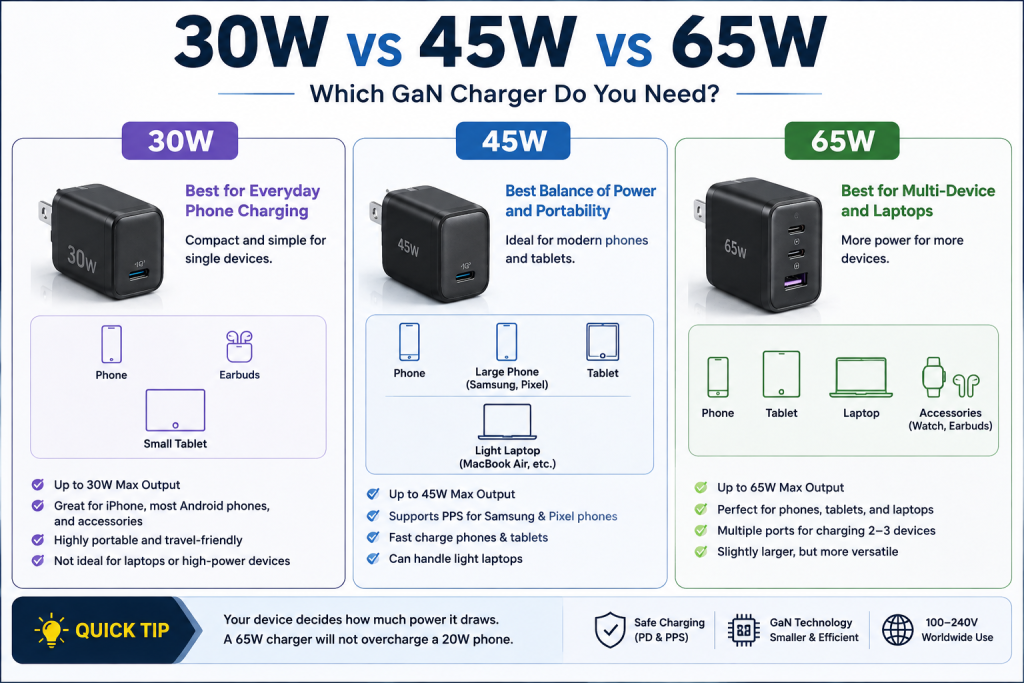
For most people, 30W to 45W is the sweet spot for a compact phone charger, while 65W is the better all-purpose choice if you also charge tablets, a MacBook Air, or another USB-C laptop. A 100W-class multi-port charger makes more sense when you regularly charge several higher-power devices.
Quick Picks
Best for
Our pick
Why
Best compact charger
Anker Nano 45W
Tiny single-port design with USB-PD/PPS
Best budget compact option
Anker Nano 3 30W
Small, simple and enough for many phones
Best for Pixel
Google 45W USB-C Power Charger
USB PD 3.1 PPS and direct Pixel compatibility
Best multi-device value
UGREEN Nexode 65W 3-Port
2× USB-C + USB-A and up to 65W
Best travel setup
UGREEN Nexode 65W Travel Charger
Interchangeable US/UK/EU plugs
Best for phone + laptop
65W-class multi-port GaN charger
More headroom than a phone-only adapter
Quick answer: If you’re buying one charger mainly for a modern iPhone, Galaxy, or Pixel, start with a 45W USB-C GaN charger with USB-PD and PPS. Move to 65W if you also want to charge a USB-C laptop or several devices.
What Is a GaN Charger?
GaN stands for gallium nitride, a semiconductor material increasingly used in compact power adapters.
The practical benefit isn’t that GaN somehow forces your phone to charge faster. A phone still controls how much power it accepts.
Instead, GaN technology can help manufacturers build power supplies that deliver relatively high output from a smaller enclosure than many older charger designs.
That distinction matters.
A 65W GaN charger isn’t automatically faster for your phone than a well-designed 45W charger. If the phone only negotiates 30W, supplying a charger capable of 65W doesn’t force 65W into the battery.
Think of GaN primarily as an enabler of compact high-power charger designs, not as a charging protocol.
USB Power Delivery, PPS, the device, and the cable determine what charging modes are actually available.
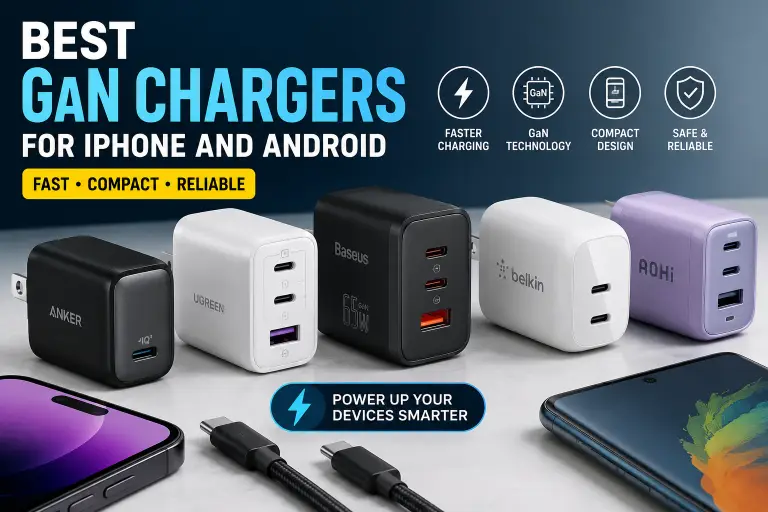
The Best GaN Chargers for iPhone and Android
1. Anker Nano 45W — Best GaN Charger for Most Phone Users
Best for: iPhone, Galaxy, Pixel and anyone wanting maximum portability
Anker’s current Nano 45W is one of the most sensible starting points for a phone-focused charger.
It has one USB-C port with a maximum output of 45W and supports PPS. Its published PPS profiles include up to 5A within part of its programmable voltage range, giving it much broader phone compatibility than simply seeing “45W” on the packaging would suggest.
The charger measures approximately 1.3 × 1.26 × 1.45 inches, making it particularly attractive if you’re replacing a larger adapter.
Why we like it
45W maximum output
USB-C
PPS support
Compact GaN design
Suitable for Apple and many Android devices
Enough power for phones, tablets and some lightweight USB-C computing
Trade-offs
Only one charging port
45W isn’t enough to maximize every higher-power laptop
Multi-device users will probably prefer 65W or more
Best for
Buy this if your priority is a small charger that lives in a backpack, laptop sleeve or travel pouch and you’re normally charging one device at a time.
2. Anker Nano 3 30W — Best Compact Budget GaN Charger
Best for: iPhone users and lower-power everyday charging
Not everyone needs 45W, 65W or 100W.
The Anker Nano 3 provides 30W maximum output in a compact GaN charger with a foldable plug.
For many iPhone owners, that’s a practical amount of power. Apple says iPhone 12 and later require at least a 20W adapter for fast charging, although newer models can benefit from more power in certain charging scenarios.
The Nano 3 also makes sense for AirPods, iPads and many other USB-C devices.
Why we like it
Very compact
30W output
Foldable plug
Good match for phone-first charging
Less unnecessary capacity if you don’t charge laptops
Trade-offs
Less future-proof than a 45W or 65W charger
One port
Not the right choice when a device’s fastest charging mode requires more than 30W
Best for
Choose it if portability matters more than maximum wattage and you primarily charge an iPhone or other moderate-power USB-C devices.
3. Google 45W USB-C Power Charger — Best for Pixel Phones
Best for: Pixel 10 Pro XL and buyers who want Google’s specified charging profile
Google’s own 45W USB-C adapter is particularly easy to recommend to Pixel owners because its electrical specifications are clearly documented.
It supports USB PD 3.1 PPS, with fixed PD profiles up to 20V/2.25A and PPS profiles reaching a maximum of 45W.
That matters for current Pixel hardware.
Google specifies a 45W USB-C PPS charger or higher for the Pixel 10 Pro XL’s advertised fast-charging performance of up to 70% in about 30 minutes. The smaller Pixel 10 Pro requires a 30W USB-C PPS charger or higher for its advertised up-to-55% result.
Why we like it
45W maximum power
USB PD 3.1 PPS
Straightforward Pixel compatibility
100–240V input
Clear official specifications
Trade-offs
One USB-C port
Not the most versatile choice for several devices
Buyers aren’t getting multi-port functionality from the extra size/capacity
Best for
This is the straightforward choice if you own a recent Pixel and would rather prioritize known protocol compatibility over maximum versatility.
4. UGREEN Nexode 65W 3-Port — Best Multi-Device GaN Charger
Best for: Phone + tablet + laptop setups
Once you regularly charge more than one device, a single-port 30W or 45W charger becomes inconvenient.
The UGREEN Nexode 65W provides:
Two USB-C ports
One USB-A port
Up to 65W from USB-C in single-device use
PPS support
Multi-device power distribution
That makes it much more flexible than a phone-only adapter.
You could use one charger for an iPhone or Android phone during the day and a USB-C laptop when necessary, rather than carrying separate adapters.
Why we like it
Three charging ports
Up to 65W
USB-PD and PPS support
USB-A remains useful for older accessories
Better laptop compatibility than 30W/45W phone chargers
Trade-offs
The biggest issue with multi-port chargers is power sharing.
A charger advertised as 65W doesn’t necessarily provide 65W to your phone while two other devices are connected. Available power is redistributed according to the charger’s port configuration.
This isn’t a flaw unique to UGREEN. It’s an important characteristic of multi-port chargers generally.
Best for
Choose this if you want one charger for a phone, tablet and occasional USB-C laptop.
iPhone Charging: How Much Power Do You Actually Need?
For years, 20W was the simple recommendation for iPhone fast charging. That advice now needs more context.
Apple says iPhone 12 and later require at least a 20W power adapter for fast charging.
But newer models can make use of more.
For the iPhone 17, iPhone 17 Pro and iPhone 17 Pro Max, Apple specifies a 40W adapter or higher for charging up to 50% in around 20 minutes under its test conditions.
So for a new charger in 2026:
30W: good for many iPhones 45W: better general-purpose recommendation for newer models 65W: worthwhile if the charger will also power an iPad or MacBook
Buying 100W exclusively for an iPhone generally doesn’t provide a meaningful advantage unless you’re purchasing the extra capacity for other devices.
Samsung Galaxy: Why PPS Matters
Samsung is where looking only at wattage can cause trouble.
Samsung‘s Super Fast Charging ecosystem relies on USB Power Delivery and PPS — Programmable Power Supply.
PPS allows a compatible device to request changes in voltage and current rather than relying only on fixed USB-PD power profiles.
That means two chargers can both say 45W while behaving differently with a Galaxy phone.
A particularly important example is 45W Samsung charging. Some implementations require a charger and cable combination capable of the necessary PPS current.
This is why buyers should verify the PPS output specification, not merely the total wattage.
Samsung’s charging requirements are also moving upward. The Galaxy S26 Ultra supports Super Fast Charging 3.0 up to 60W, according to Samsung.
If you’re buying specifically for that device, check the charger’s current Samsung compatibility rather than assuming every 65W USB-C charger can activate the phone’s fastest charging mode.
You charge a phone and laptop from the same outlet
You want to replace several adapters
You understand that available wattage may be divided between ports
Multi-port GaN chargers are convenient, but always check their power distribution table.
For example, a 65W charger may provide the full 65W when only USB-C1 is connected but redistribute that power when USB-C2 or USB-A is also active.
Does a 65W Charger Damage a 20W or 30W Phone?
A properly implemented USB-C Power Delivery charger does not simply force its maximum advertised wattage into the connected phone.
USB-PD involves communication between the power source and the device.
So using a reputable 65W USB-C PD charger with a phone that requires much less power is normal.
The same principle is why Apple explicitly permits higher-wattage USB-C adapters for iPhone charging.
The important qualifier is reputable and standards-compliant hardware.
Don’t treat “100W” printed on an unknown adapter as proof that the charger implements USB-C power negotiation correctly or has undergone meaningful safety evaluation.
Safety: Don’t Buy a Charger Based on “GaN” Alone
GaN is a semiconductor technology, not a safety certification.
A charger can contain GaN components and still vary significantly in electrical design, protection systems, manufacturing quality and regulatory compliance.
When evaluating an unfamiliar charger:
Check the manufacturer and exact model
Look for complete input/output specifications
Check applicable safety marks and regulatory information
Verify certification claims where possible
Avoid suspicious chargers with vague specifications
Be cautious of counterfeit certification marks
A logo printed on a product should not automatically be treated as independent proof of certification.
Buy from the manufacturer or a reputable authorized seller when practical.
How We Selected These Chargers
BuyZivo did not physically test the products in this guide.
Recommendations were based on manufacturer documentation and current technical requirements, including:
USB-C output
USB Power Delivery support
PPS support
Wattage
Port configuration
Device compatibility
Portability
Published electrical specifications
Use-case value
We also cross-checked current charging guidance from Apple, Samsung, Google and USB-IF where relevant.
Prices and retailer availability change frequently, so we do not rank products based on temporary discounts.
What to Look for Before Buying a GaN Charger
1. Start with your device
Find the charging protocol and practical wattage your device supports.
2. Check USB-PD
USB Power Delivery should be a priority for modern USB-C devices.
3. Check PPS for Android
For current Galaxy and Pixel phones, PPS compatibility can matter more than simply buying more wattage.
4. Look at individual port output
“100W total” and “100W from one USB-C port” aren’t necessarily the same thing.
5. Check multi-port power sharing
Adding a second device can reduce output from the first port.
6. Match the cable
A high-power charger doesn’t fix an inadequate cable.
7. Buy enough wattage — not the biggest number
For phone-focused use, 30W–45W is often enough.
For mixed phone/laptop charging, 65W is usually much more flexible.
Which GaN Charger Should You Buy?
For most phone users, 45W is the most balanced starting point.
The Anker Nano 45W combines a very compact design with USB-PD/PPS support and enough output for a wide range of iPhones and Android phones.
Choose the Anker Nano 3 30W if your priorities are simplicity, portability and phone-first charging.
Pixel owners who want straightforward compatibility should consider the Google 45W USB-C Power Charger.
If you want one adapter for a phone, tablet and USB-C laptop, step up to a 65W multi-port GaN charger such as the UGREEN Nexode.
And if you’re buying for a newer high-power Android device such as the Galaxy S26 Ultra, check the exact PPS and device compatibility specifications before assuming that the charger’s headline wattage tells the whole story.
Bottom line: Don’t buy the highest-wattage GaN charger you can find. Buy the smallest reputable charger that supports the protocols, output and number of ports your devices actually require.
Frequently Asked Questions
What should buyers know about the best GaN charger?
The best GaN charger should provide enough USB-C Power Delivery wattage for your device, PPS when your phone requires it, appropriate cable support and enough ports for your setup. GaN itself primarily enables compact power-adapter designs; it does not guarantee maximum charging speed or safety certification.
Is GaN better than a normal charger?
GaN technology can allow manufacturers to build smaller high-power adapters with efficient power conversion. However, the quality of the complete charger design matters more than the semiconductor material alone.
Is a 30W GaN charger enough for an iPhone?
For many iPhones, yes. Apple specifies at least 20W for fast charging on iPhone 12 and later, although newer models such as iPhone 17, 17 Pro and 17 Pro Max can benefit from a 40W-or-higher adapter for Apple’s fastest advertised wired charging result.
Is 45W enough for Samsung Galaxy phones?
It depends on the model and the charger’s PPS capabilities. Some Galaxy models support 45W charging, but the required PPS/current profile matters. The Galaxy S26 Ultra has moved beyond 45W and supports up to 60W Super Fast Charging 3.0.
Does Pixel need a PPS charger?
For the fastest advertised wired charging on current Pixel models such as the Pixel 10 Pro and Pixel 10 Pro XL, Google specifies USB-C PPS chargers of 30W or 45W and above, respectively.
Can I use a 65W GaN charger with an iPhone?
Yes, provided it is a compatible USB-C Power Delivery charger. The iPhone negotiates the power it needs rather than receiving the charger’s entire 65W capacity.
Does GaN make a phone charge faster?
Not by itself. Charging speed depends on the phone, charging protocol, charger output, and cable. GaN primarily helps charger designers achieve high output in smaller power adapters.
Is a 100W charger worth buying for a phone?
Usually not for the phone alone. A 100W charger becomes useful when you also charge laptops or several devices and need the additional total power capacity.u003cbru003e
Final Verdict
For most iPhone and Android users, a 45W GaN charger is the best overall choice, offering a strong balance of compact size, charging power, and compatibility.
The Anker Nano 45W is our top pick for phone-first charging, while a 65W multi-port GaN charger makes more sense if you also charge a tablet or USB-C laptop.
Most importantly, don’t choose by wattage alone. Check USB-PD, PPS support, port output, and cable compatibility, especially for Samsung Galaxy and Google Pixel devices.
Bottom line: Choose 45W for most phones, 65W for phone + laptop setups, and 100W+ only when your devices genuinely need the extra power.
Views:432
About the Author
Hi, I'm Arif Hossen, founder of BuyZivo. I research and write about mobile accessories, including chargers, power banks, earbuds, cables, and other everyday tech essentials. My goal is to help readers make informed buying decisions with honest reviews, comparisons, and practical guides.