Introduction
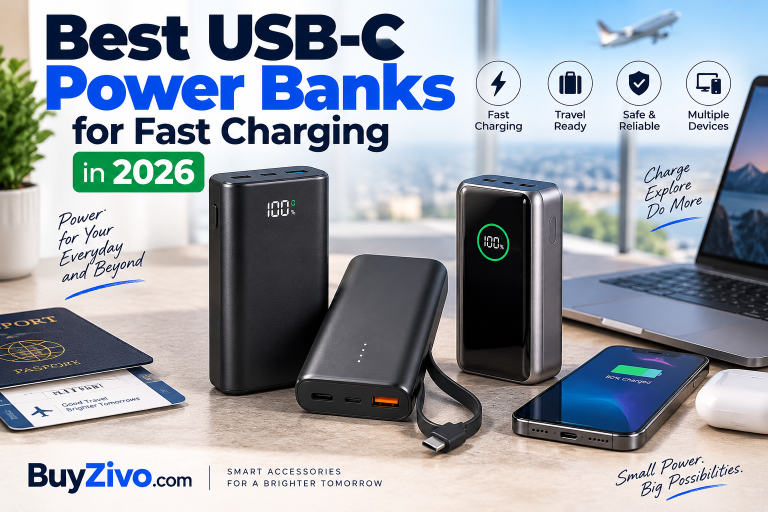
A good USB-C power bank should do more than have a USB-C socket. It needs the right USB Power Delivery profiles, enough single-port wattage, appropriate capacity, and compatible cables to fast-charge the devices you actually carry.
For most buyers, the UGREEN Nexode Power Bank 20,000mAh 100W is the strongest all-around option in this guide. Its main USB-C port provides up to 100W, it supports USB PD and PPS, carries 72Wh of energy, has three output ports, and can recharge itself at up to 65W.
The Anker Power Bank 20K (87W, Built-In USB-C Cable) is the more convenient choice if you want an integrated cable, while the Anker Prime 20,000mAh 200W makes more sense for users who regularly charge two high-power devices. Samsung users who specifically want 45W Super Fast Charging 2.0 should also consider Samsung’s own 20,000mAh 45W Battery Pack.
Quick answer: Look beyond the advertised total wattage when choosing the best USB-C power bank. Check the maximum output of an individual USB-C port, USB PD/PPS compatibility, battery capacity in Wh, port sharing behavior, and the cable required by your device. A 65W–100W USB-C model is enough for many phones, tablets, handhelds, and USB-C laptops; higher total output becomes more useful when charging multiple demanding devices.
Best USB-C Power Banks at a Glance
| Power bank | Capacity | Max USB-C output | Ports | Best for |
|---|---|---|---|---|
| UGREEN Nexode 20,000mAh 100W | 20,000mAh / 72Wh | 100W | 2× USB-C, 1× USB-A | Best overall |
| Anker Power Bank 20K 87W | 20,000mAh | 65W single USB-C | Built-in USB-C, USB-C, USB-A | Best with built-in cable |
| Anker Prime 20,000mAh 200W | 20,000mAh | 100W | 2× USB-C, 1× USB-A | Best for multiple high-power devices |
| Samsung 20,000mAh 45W Battery Pack | 20,000mAh / 74Wh | 45W | USB-C | Best for compatible Samsung Galaxy devices |
| Belkin BoostCharge Pro 20K | 19,200mAh internal | 65W | 2× USB-C, 1× USB-A | Alternative laptop option* |
*Belkin’s U.S. product page showed the BPB020 out of stock during our September 2026 verification, so check current availability before buying.
1. UGREEN Nexode Power Bank 20,000mAh 100W — Best Overall
Best for: Buyers who want one power bank for a USB-C laptop, phone, tablet, and smaller accessories.
UGREEN’s Nexode 20,000mAh hits a useful middle ground between phone-focused portable chargers and much heavier high-output laptop power banks.
Its main USB-C port delivers up to 100W, while USB-C2 supports up to 30W and USB-A up to 22.5W. The battery is rated at 20,000mAh/72Wh, and the main USB-C input supports up to 65W recharging. UGREEN lists USB PD 3.0 and PPS among the protocols supported by the primary USB-C output.
That 100W single-port rating is the important number. It means the Nexode can serve considerably more demanding USB-C laptops than a typical 20W or 30W phone power bank, provided the laptop accepts USB-C PD at an appropriate profile.
The three-port layout is also practical. You can carry one battery for a laptop, phone, and accessory rather than several smaller packs.
Pros
- Up to 100W from the primary USB-C port
- USB PD 3.0 and PPS support
- 20,000mAh / 72Wh capacity
- Two USB-C ports plus USB-A
- Up to 65W input
- LED display
- 420g listed weight
Cons
- 420g is substantial for everyday pocket carry
- Secondary USB-C is limited to 30W
- Maximum output changes when multiple ports are used
BuyZivo verdict: This is the most balanced choice here if your charging kit includes both a laptop and smaller USB-C devices.

2. Anker Power Bank 20K (87W, Built-In USB-C Cable) — Best for Convenience
Best for: Travelers and commuters who do not want to carry a separate USB-C cable for everyday charging.
The headline “87W” needs some explanation.
Anker specifies 87W total output, divided as up to 65W plus 22W. The built-in USB-C cable and USB-C port can provide up to 65W rather than 87W from a single connection. The power bank has a 20,000mAh battery, a built-in USB-C cable, an additional USB-C port, and USB-A.
That makes it a useful example of why buyers should not judge a power bank solely by the largest wattage printed in its name.
Sixty-five watts is still plenty for many USB-C devices and can power compatible laptops, tablets, phones, handheld gaming devices, and accessories. The built-in cable is arguably the bigger selling point.
Anker lists the unit at about 431g and 15.75 × 7.35 × 2.6cm.
Pros
- Built-in USB-C cable
- 20,000mAh capacity
- Up to 65W USB-C output
- 87W combined maximum output
- Additional USB-C and USB-A connectivity
- Less chance of forgetting your primary charging cable
Cons
- 87W is total output, not single-port USB-C output
- Less powerful for demanding laptops than 100W options
- Built-in cables are convenient but are also permanently attached components
BuyZivo verdict: Pick this over the UGREEN if cable convenience matters more than getting 100W from one USB-C port.
3. Anker Prime 20,000mAh Power Bank (200W) — Best for Multi-Device Power
Best for: Users carrying a laptop plus another high-power USB-C device.
The Anker Prime 20,000mAh is the performance-oriented option in this group, but again, its 200W rating is a total-output figure.
Anker documents two USB-C ports and one USB-A port. Each USB-C port can provide up to 100W individually, while the power bank can reach 200W total output. USB-C input can also reach 100W.
Anker’s documentation lists USB PD support and PPS at 3.3–11V/3A on the USB-C outputs. The unit weighs about 545g, which is significantly heavier than many phone-oriented portable chargers.
That weight is the main trade-off. If you only need to recharge an iPhone or Galaxy phone, buying a 200W power bank adds bulk without providing a proportional benefit because the phone controls how much compatible power it accepts.
Where the Prime becomes useful is when you have two demanding devices.
Pros
- 200W maximum total output
- Up to 100W from either USB-C port
- Two USB-C ports
- 100W maximum USB-C input
- Useful for laptop-heavy setups
- Detailed charging information display
Cons
- Heavy at about 545g
- Overkill for phone-only charging
- 200W does not mean 200W through one USB-C port
BuyZivo verdict: Buy it for multi-device power, not simply because “200W” is bigger than “100W.”
4. Samsung 20,000mAh 45W Battery Pack — Best for Samsung Galaxy
Best for: Compatible Galaxy users who prioritize Samsung’s 45W charging implementation over laptop-class output.
Samsung’s EB-P4520 is a more targeted recommendation.
It has a 20,000mAh / 74Wh battery and supports 45W Super Fast Charging 2.0. Samsung also documents PD 3.0 PDO/PPS support and includes a USB-C-to-USB-C cable.
Samsung says Super Fast Charging 2.0 is available when a single compatible device is connected, and the package includes a 5A USB-C cable.
This is why protocol compatibility can matter as much as raw wattage. Buying a generic high-wattage power bank does not automatically guarantee a particular manufacturer’s fastest charging mode.
Pros
- 45W Super Fast Charging 2.0 for compatible Galaxy devices
- USB PD 3.0 PDO/PPS
- 20,000mAh / 74Wh
- 5A USB-C cable included
- Straightforward choice for Samsung users
Cons
- 45W ceiling is modest for higher-power laptops
- Less reason to choose it if Samsung charging compatibility is not important
- Samsung’s U.S. page showed delivery unavailable during our check, so retailer availability should be verified
BuyZivo verdict: A strong specialist choice for compatible Galaxy hardware rather than the best universal laptop power bank.
5. Belkin BoostCharge Pro 3-Port Laptop Power Bank 20K — Worth Watching
Best for: Buyers wanting a 65W PD laptop power bank from Belkin—once stock is available.
Belkin’s BPB020 offers up to 65W Power Delivery from a single USB-C port, two USB-C ports, USB-A, a digital display, and a two-year warranty. Belkin describes it as a 20K product but specifies a 19,200mAh internal battery.
The specifications make sense for everyday USB-C laptop and phone charging.
There is one problem: availability.
At the time of our September 2026 research, Belkin’s U.S. page listed it as out of stock, with availability expected to return.
For that reason, it is an alternative rather than one of our primary purchase recommendations right now.
Pros
- 65W single-port USB-C PD
- Two USB-C ports plus USB-A
- Digital battery display
- Two-year warranty
- Laptop-friendly output
Cons
- Lower output than 100W alternatives
- Official U.S. availability was limited during verification
- 19,200mAh actual internal battery specification despite “20K” branding
BuyZivo verdict: Worth considering when available, but don’t wait for it if the UGREEN or Anker options already meet your needs.
What Makes a USB-C Power Bank Fast?
A USB-C connector tells you the physical interface, not the charging performance.
USB Power Delivery is the charging system that enables compatible USB-C devices and power sources to negotiate appropriate power levels. USB-IF says USB PD Revision 3.1 expanded USB Power Delivery to as much as 240W using USB Type-C, with higher fixed-voltage levels including 28V, 36V, and 48V.
That does not mean every USB-C power bank supports 240W—or that your phone will accept anything close to it.
The charging chain looks like this:
Power bank → USB-C port/profile → cable → device
The effective charging capability is limited by the compatible capabilities across that chain.
>> USB-C Cable Specifications Guide
Total Wattage vs. Single-Port Wattage
This is one of the easiest power-bank specifications to misunderstand.
Consider the Anker models above.
The Anker 20K 87W can reach 87W total, but its USB-C output tops out at 65W for a single device. The Anker Prime can reach 200W total, while an individual USB-C port tops out at 100W.
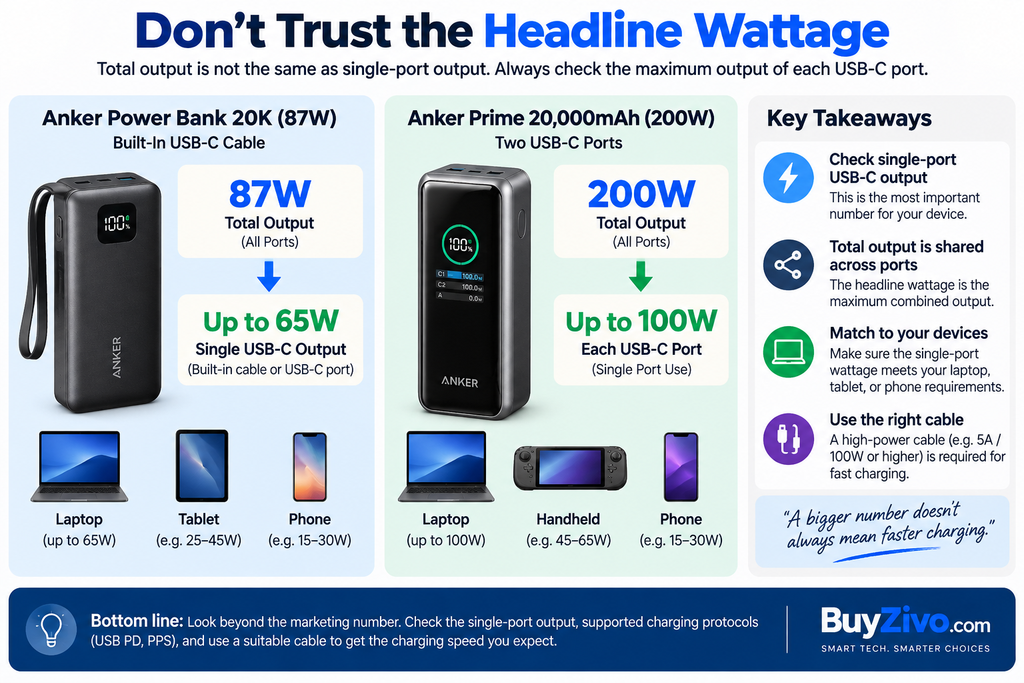
So when buying a power bank for a laptop, find:
Maximum USB-C single-port output
before looking at:
Maximum combined output
Combined output matters mainly when charging multiple devices simultaneously.
USB PD vs. PPS: What’s the Difference?
USB Power Delivery provides standardized power negotiation over USB-C.
PPS (Programmable Power Supply) adds finer voltage/current adjustment within supported ranges. It matters particularly for devices whose fast-charging implementations use PPS.
For example, Google recommends compatible PPS power adapters for Pixel phones, alongside supported USB PD options.
Samsung‘s 45W battery pack explicitly lists PD 3.0 PDO/PPS and Super Fast Charging 2.0 support.
So if maximum charging speed for a specific phone matters, don’t stop at:
“Does it have USB-C?”
Check:
“Does it support the PD/PPS profiles my device needs?”
How Much Wattage Do You Actually Need?
There is no universal “best” wattage.
Mainly charging phones
A huge 100W or 200W battery is usually unnecessary unless you also charge other devices.
Your phone negotiates supported charging power; attaching it to a higher-capacity USB PD source does not force the entire advertised wattage into the phone.
Phone + tablet
A midrange USB-C PD power bank gives you more flexibility, especially when both devices may be connected simultaneously.
USB-C laptop
Check your laptop’s charging requirement first.
A 65W power bank can be suitable for many efficient USB-C laptops, while machines designed around higher-power adapters may benefit from 100W or more. Under heavy load, an underpowered source may charge slowly or struggle to increase the battery level.
Laptop + phone simultaneously
This is where total output and power allocation become important.
A 100W power bank may provide 100W to one device but redistribute its output when another port is connected.
Always check the manufacturer’s multi-port power-distribution specifications.
10,000mAh vs. 20,000mAh: Which Is Better?
Capacity and charging speed describe different things.
mAh tells you about battery capacity. Wattage tells you how quickly compatible power can be delivered.
For lightweight daily phone use, approximately 10,000mAh can be easier to carry. For travel, tablets, laptops, or multiple devices, 20,000mAh offers a more useful energy reserve.
Don’t assume a 20,000mAh power bank will deliver exactly 20,000mAh at the USB output. Battery-cell capacity and usable output are measured under different voltage conditions, and conversion losses occur.
For a broader capacity-focused explanation, see our Power Bank Buying Guide
Do You Need a Special USB-C Cable?
Sometimes.
High-power USB-C charging requires the cable to support the intended current and power level.
USB-IF notes that before USB PD 3.1, USB PD supported up to 100W using 20V and USB Type-C cables rated at 5A. PD 3.1 introduced higher power levels and updated cable requirements for operation up to 240W.
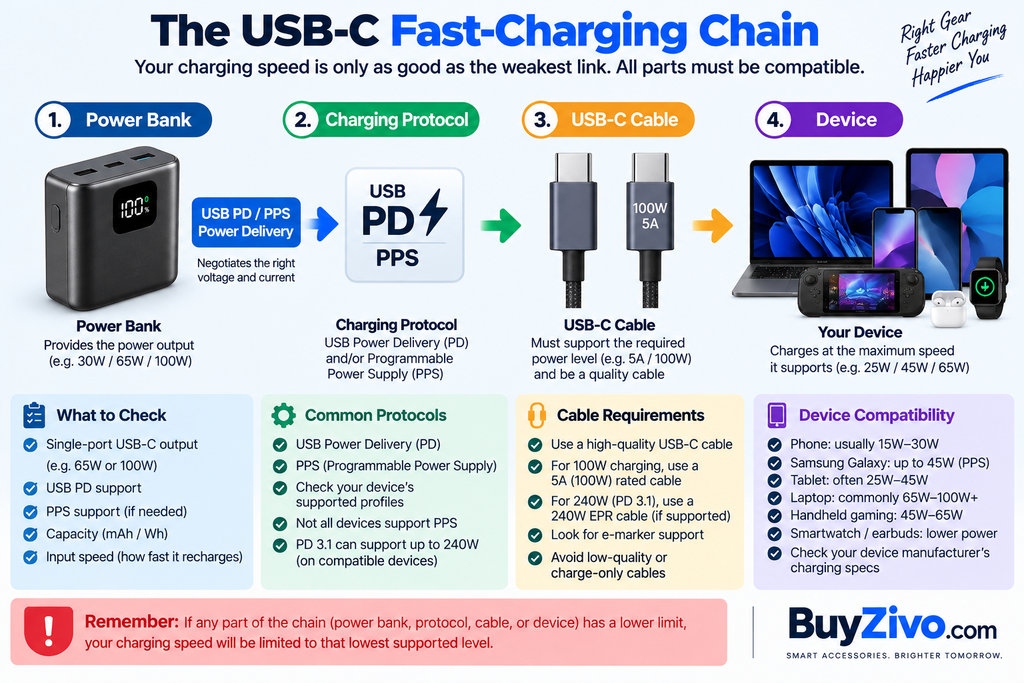
That means buying a high-output power bank while continuing to use an unsuitable cable can prevent you from reaching the expected charging performance.
For 100W-class and higher charging, verify the cable’s supported USB-C power rating and applicable electronic marking rather than assuming every USB-C cable is equivalent.
>> USB-C Cable Specifications Guide
Can You Take a USB-C Power Bank on a Plane?
Usually, yes—but power banks belong in your carry-on baggage, not checked baggage.
FAA guidance says spare lithium-ion batteries, including power banks and portable chargers, must be carried in the cabin. Lithium-ion batteries up to 100Wh are generally permitted; batteries from 101Wh to 160Wh require airline approval, while batteries above 160Wh are prohibited on passenger aircraft under these rules. Airlines and international regulations can be more restrictive.
That is one reason Wh is useful when buying a travel power bank.
For example:
- UGREEN Nexode 20K: 72Wh
- Samsung 20K: 74Wh
Both manufacturers publish those energy ratings.
You should still check your airline’s current rules before departure.
Also avoid traveling with a damaged, swollen, defective, or recalled battery. FAA guidance specifically addresses damaged or recalled lithium batteries as a safety concern.
What to Check Before Buying a USB-C Power Bank
Use this checklist rather than buying on capacity or wattage alone:
- Single-port USB-C output: Can one port supply what your primary device needs?
- USB PD support: Essential for broad modern USB-C fast-charging compatibility.
- PPS support: Important for certain phone fast-charging implementations.
- Capacity: 10,000mAh favors portability; 20,000mAh is more useful for longer trips and larger devices.
- Wh rating: Particularly important for air travel.
- Power distribution: Check what happens to wattage when two or three devices are connected.
- Input wattage: A large power bank with slow input can take frustratingly long to recharge.
- Cable capability: The cable must support the required charging mode.
- Size and weight: High capacity and high output usually come with a portability penalty.
- Safety documentation: Prefer established manufacturers that provide clear specifications and relevant testing/compliance information.
UL Solutions tests and certifies battery products, including lithium-ion battery packs and power banks, against applicable standards, but a manufacturer’s reference to a material rating or another UL-related claim should not automatically be interpreted as certification of the complete power bank.
FAQ
What is the best USB-C power bank for fast charging?
For most buyers in this comparison, the UGREEN Nexode 20,000mAh 100W offers the strongest balance of 100W single-port USB-C output, PD/PPS support, 20,000mAh capacity, three ports, and 65W recharging. Users prioritizing a built-in cable should consider the Anker 20K 87W instead.
Is a 100W power bank safe for a phone?
With standards-compliant USB Power Delivery equipment, the connected devices negotiate supported power rather than a 100W source simply forcing 100W into a phone. USB PD is specifically designed around flexible power negotiation.
Is 65W enough for a laptop?
It depends on the laptop. Many USB-C laptops can operate or charge from a 65W PD source, but higher-performance models may require more power for normal or full-speed charging. Check the laptop manufacturer’s charging specification.
Is PPS necessary in a power bank?
Not for every device. It becomes important when your device’s fastest supported charging mode relies on PPS. Samsung and Google devices are notable examples where PPS compatibility can matter.
Can I put a 20,000mAh power bank in checked luggage?
No. Under FAA guidance, power banks are treated as spare lithium batteries and must be carried in carry-on baggage. Capacity should be evaluated in watt-hours rather than mAh alone for aviation limits.
Is more wattage always better?
No. Once the power bank meets your devices’ requirements, extra output may provide little benefit unless you charge multiple high-power devices. Port allocation, capacity, weight, PPS support, and recharge speed can matter more.
Final Verdict
The UGREEN Nexode 20,000mAh 100W is our best overall USB-C power bank for fast charging because it combines a genuinely useful 100W primary USB-C output with PD/PPS support, 20,000mAh/72Wh capacity, three-device connectivity, and 65W input.
Choose the Anker 20K 87W instead if an integrated USB-C cable is more valuable than 100W single-port output. Choose the Anker Prime 20K 200W when you regularly power multiple demanding devices. For compatible Galaxy hardware, Samsung’s 45W 20,000mAh Battery Pack is the specialist option worth considering.
The key is not buying the largest wattage number. Match USB-C output + PD/PPS profile + cable + capacity to your actual devices.