Quick Answer
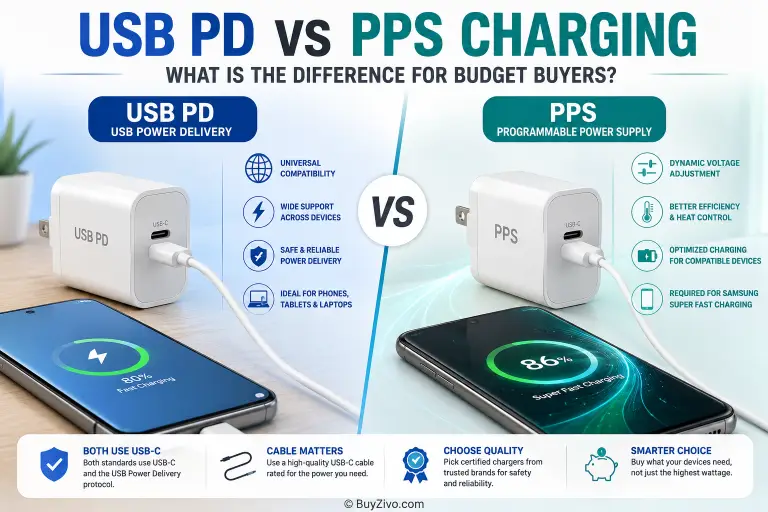
Buy a USB PD charger with PPS when your phone’s specified charging mode requires it. Keep a compatible fixed-profile USB PD charger if it already delivers the speed you need. PPS is an optional feature within USB Power Delivery, so these are not two competing standards. The practical choice is between a PD adapter with only fixed output profiles and a PD adapter that also offers PPS.
Before paying extra, check three things: your exact device model, the adapter’s per-port output specifications, and the cable requirements. A large wattage number or a PPS badge alone is not enough.
What This Comparison Covers
This is a documentation-based buying guide, not a hands-on charger review. We checked USB-IF guidance and Apple, Samsung and Google support instructions. We have not measured charging time, adapter temperature or battery lifespan, and we do not claim that a particular charger runs cooler or lasts longer.
For a broader explanation of power negotiation, see USB Power Delivery explained. This guide focuses on deciding whether PPS is worth buying for your devices. For the feature’s operation and fixed-profile fallback, read PPS charging explained.
USB PD and PPS: The Important Difference
USB Power Delivery lets a compatible charger and device agree on an available power output. With fixed profiles, the adapter advertises specific voltage and current combinations and the device selects an appropriate one. The device can negotiate again when needed; fixed-profile charging does not mean the phone’s battery receives a permanently fixed charging rate.
USB-IF’s Certified USB Fast Charger guidance identifies PPS as a feature of USB PD 3.0 and explains that both the charger and device must support it to take advantage of it. PPS lets the device request finer adjustments to the adapter’s voltage and current within its advertised range.
USB PD also includes other capabilities. For example, Adjustable Voltage Supply (AVS) is distinct from PPS. Do not assume that a charger with “PD” or “PPS” on the box supports every feature in later USB PD specifications. Match the output information to the device maker’s instructions.
Fixed-Profile PD vs PD with PPS: At a Glance
| Buying question | Fixed-profile-only USB PD | USB PD with PPS |
|---|---|---|
| How does the output work? | The device selects an advertised fixed voltage/current profile. | The device can request small adjustments within the advertised PPS range. |
| Does it automatically charge faster? | No. Speed depends on the device, output profile and cable. | No. The device must support and use PPS. |
| Supported Samsung Super Fast Charging modes? | May not provide the required mode without PPS. | Check the exact Galaxy model, PPS range, power and cable. |
| Non-PPS devices? | Check that the required fixed output is available. | Check its fixed outputs too; PPS adds no speed benefit by itself. |
| Apple devices? | Check Apple’s model-specific adapter and cable requirements. | A PPS label does not replace those requirements or prove AVS support. |
| Is an upgrade worthwhile? | Keep it if it meets your current needs and remains in good condition. | Consider it when it enables a charging mode you actually need. |
Does PPS Improve Speed or Reduce Heat?
A supported device may need PPS to reach its specified charging mode. That is a compatibility requirement, not a guarantee that every PPS charger beats every fixed-profile charger. Charging speed also changes with battery level, temperature, use during charging and the device’s power limits.
Texas Instruments’ PPS engineering article describes how adjustable output can help reduce conversion losses in a compatible charging design. This explains the engineering purpose of PPS; it does not establish a measured temperature reduction for the chargers discussed here.
To compare two actual products, use tests with the same phone, cable, starting battery level and ambient conditions. Without those measurements, treat “cooler charging,” “longer battery life” and precise charging-time promises as unverified for that product.
Samsung Galaxy: Check More Than the PPS Badge
Samsung’s Galaxy charging guidance specifies USB PD with PPS for supported Super Fast Charging modes. A high-power adapter without the required PPS support may charge the phone but fail to enable the desired mode.
The exact Galaxy model matters. Check the required adapter power, supported PPS output and cable current rating in Samsung’s instructions. Cable requirements can differ between models, so do not apply one universal cable rule to every Galaxy phone. Also check that fast charging is enabled where the model provides that setting.
For a budget purchase, select the least expensive well-documented adapter that matches your model’s requirements. Paying for extra laptop-level wattage does not help a phone that cannot use it.
Apple: Use the Exact Model’s Requirements
Apple’s fast-charge requirements lists different adapter and cable requirements for different iPhone models and charging configurations. USB PD support matters, but “any PD charger is sufficient” is too broad. Some listed configurations also specify AVS; AVS is not PPS.
A PPS-capable adapter can still charge an Apple device through compatible fixed PD outputs. However, do not pay extra solely because it advertises PPS. First confirm the adapter output and cable required for the Apple device and charging speed you want.
Google Pixel: Read Google’s Charger Guidance
Google’s Pixel charging guidance describes compatible USB PD charging and PPS adapter options. Required power and the fastest supported charging rate vary by Pixel model.
Choose an adapter according to the instructions for your exact Pixel. If a current adapter already provides an acceptable charging speed, the PPS feature alone is not a reason to replace it.
How to Read an Adapter’s Output Label
Compare the output for the port you will actually use, rather than just the total wattage printed on the front of the box. The following is an illustrative example, not the specification of a tested product.
| Illustrative output listing | What it tells you | What you still need to check |
|---|---|---|
| Fixed PD: 5 V / 3 A; 9 V / 3 A; 15 V / 3 A; 20 V / 3.25 A | The adapter lists separate fixed profiles, with a maximum of 65 W at 20 V. | Which profile your device needs, and whether the cable supports the required current. |
| PPS: 3.3–11 V / 3 A | The port offers an adjustable range and a maximum current within that range. | Whether that range and current match your phone’s specified charging mode. |
| Multi-port: “65 W total” | This may be the combined output rather than the power of every port. | The power-sharing table when two or more devices are connected. |
For the example above, 9 V × 3 A equals 27 W. The PPS line does not mean the charger supplies 65 W through PPS. A phone that needs an output outside the listed range cannot obtain it merely because the adapter has a higher total rating.
If the listing omits fixed profiles, the PPS range or the multi-port allocation, ask the seller for the manufacturer’s specification before buying. Reviews that say “fast” are not a substitute for the output details.
Buy, Keep or Skip: Budget Decisions
| Your situation | Decision | Reason |
|---|---|---|
| Your existing adapter already reaches the charging mode you need. | Keep it, provided it is undamaged and reliable. | PPS alone may add no useful benefit. |
| Your supported Galaxy or Pixel needs PPS for your desired mode. | Buy a matching PD + PPS adapter and suitable cable. | The required feature, range and current matter more than the largest wattage number. |
| You charge a laptop and phone from one adapter. | Compare per-port profiles and power sharing, then check PPS for the phone. | A laptop’s power requirement and a phone’s PPS requirement are separate checks. |
| A cheap listing advertises huge wattage but omits output details. | Skip until the specifications can be verified. | The headline rating cannot establish compatibility or quality. |
Compare the actual price difference between suitable products. We have not collected current prices for this guide, so we do not assume PPS always carries a particular premium. Consider the cost of a required cable as well as the adapter.
Safety and Cable Checks
A properly designed USB PD charger negotiates power with the device. Its maximum rating is not automatically forced into a phone. Basic USB-C power can be present before a higher-voltage PD contract is established; see TI’s USB PD negotiation overview for the source-capabilities, request and power-transition sequence.
Protocol support does not by itself prove electrical safety. Look for a traceable manufacturer, documented protections, an appropriate local plug and applicable electrical safety compliance. If USB-IF certification is claimed, check the product or model rather than trusting a decorative logo; see USB-IF’s compliance information.
Use the cable specified for the device and required power/current. A USB-C connector alone does not tell you the cable’s rating. Replace a damaged cable or adapter, and check the device maker’s instructions if charging causes unusual heat or repeated disconnections.
For the separate safety checklist, see Fast Charger Safety: Certifications and Features to Check.
Before You Buy
- Find the exact device model and desired charging mode in the manufacturer’s instructions.
- Match the adapter’s fixed PD outputs and, where required, its PPS or AVS capabilities.
- Check the USB-C port’s output with the number of devices you plan to connect.
- Match the cable’s connectors, power and current rating.
- Compare the full price, including any cable you need, and check the return policy.
- Keep a working compatible adapter unless the replacement solves a real limitation.
Frequently Asked Questions
Is PPS faster than USB PD?
PPS is an optional USB PD feature, so the useful comparison is a fixed-profile-only PD charger versus a PD charger with PPS. PPS can enable a supported phone’s specified charging mode; it does not make every device faster.
Does an iPhone need a PPS charger?
Check Apple’s fast-charge guide for your exact iPhone model, required adapter output and cable. Do not treat a PPS label as proof of compatibility. Apple also specifies AVS for certain charging configurations; AVS and PPS are different features within USB PD.
Why does Samsung recommend PPS?
Samsung specifies USB PD with PPS for supported Super Fast Charging modes. The charger’s output range, power and cable must also match the requirements of the particular Galaxy model.
Can a PPS charger charge non-PPS devices?
Usually, yes, through compatible fixed USB PD profiles. Verify the adapter’s listed outputs and the device’s requirements. The PPS feature itself provides no extra speed to a device that does not support it.
Does a higher wattage charger damage my phone?
A properly designed, compatible USB PD charger negotiates power with the device; its maximum wattage is not automatically delivered to the phone. A wattage label alone does not prove electrical safety or product quality.
Should I replace my existing USB PD charger with a PPS charger?
Replace it if it cannot provide the charging mode you need or if it is damaged or unreliable. If it already meets your device’s requirements, buying PPS solely for the feature may provide little value.
Can the USB-C cable affect charging speed?
Yes. The cable must support the required current and power, and the connector must suit the device. Check the device maker’s instructions rather than assuming every USB-C cable provides the same charging performance.
Are all USB-C chargers USB PD chargers?
No. USB-C describes the connector, while USB PD describes power negotiation. Read the adapter’s specifications for PD support, fixed outputs and any PPS output range.
Final Verdict
Choose by device requirements, not by a universal “PD vs PPS” winner. A fixed-profile USB PD adapter can be the right budget choice when it meets your needs. Buy PD with PPS when your device’s desired mode requires it, and verify the output range and cable. For Apple devices or other equipment that specifies additional PD features, check those requirements separately.
Sources and Research Basis
- USB-IF’s Certified USB Fast Charger guidance — PPS within USB PD and compatible charger/device requirements.
- Samsung’s Galaxy charging guidance — Galaxy charging modes and model-dependent adapter/cable checks.
- Apple’s fast-charge requirements — iPhone fast-charge adapter and cable requirements.
- Google’s Pixel charging guidance — Pixel USB PD and PPS charging guidance.
- Texas Instruments’ PPS engineering article — the engineering rationale for programmable output.
Research checked on 8 October 2026. Manufacturer requirements can change with new models. This guide reports documentation and buying criteria; it does not rank tested chargers or promise measured charging speeds.